Backend interviews rarely hinge on trivia. They test whether you understand how a request actually flows through a system: what happens between a client sending an HTTP request and a server writing to a database, why a cache can go stale, what happens when two transactions touch the same row at the same time. Get those mental models right, and you can reason through a question you have never seen phrased quite that way before, even under interview pressure.
This article collects 111 of the most commonly asked backend interview questions, aimed at developers with zero to three years of experience. It deliberately stays framework-agnostic: you will not find a single question about a specific web framework here, those get their own dedicated articles, like the Top 111 Laravel Interview Questions. What you will find is the stuff that shows up in almost every backend interview regardless of which language or framework the job actually uses: HTTP fundamentals, API design, relational and NoSQL databases, authentication and security, caching, concurrency, distributed systems, messaging, and testing and deployment. Each answer starts with a clear, simple definition, explains the reasoning behind it, and includes a short example, code snippet, or diagram only where it genuinely helps the idea stick.
HTTP and Web Fundamentals
1. What are the main HTTP methods and when do you use each (GET, POST, PUT, PATCH, DELETE)?
HTTP methods (also called verbs) tell the server what kind of action the client wants to perform on a resource. Picking the right one is part of what makes an API predictable to use.
| Method | Purpose | Has body? | Typical use |
|---|---|---|---|
GET | Retrieve a resource | No | Fetch a user, list products |
POST | Create a new resource | Yes | Create an order, submit a form |
PUT | Replace a resource entirely | Yes | Overwrite a user's full profile |
PATCH | Partially update a resource | Yes | Update just a user's email |
DELETE | Remove a resource | Usually no | Delete a comment |
GET requests should never change data on the server; that's what makes them safe. POST is the odd one out because calling it twice usually creates two resources, while PUT, PATCH, and DELETE are generally designed so that repeating the same request doesn't cause extra side effects. In practice, interviewers care less about you reciting definitions and more about whether you'd pick POST for creating a resource versus PUT for replacing one, since mixing these up is a very common mistake in real APIs.
2. What is the difference between PUT and PATCH?
PUT replaces the entire resource with the payload you send; anything you omit is treated as removed or reset to a default. PATCH only updates the fields you include, leaving the rest untouched.
For example, if a user resource has name, email, and age, sending a PUT with only name and email could wipe out age. Sending the same data as a PATCH would leave age exactly as it was. In short: PUT is a full replace, PATCH is a partial edit. Many APIs implement both, but PATCH is the safer default when you only want to change one or two fields.
3. What does it mean for an HTTP method to be idempotent, and which methods are idempotent?
Idempotent means calling the same request multiple times produces the same result as calling it once; the server ends up in the same state no matter how many times the client retries.
GET, PUT, DELETE, HEAD, and OPTIONS are idempotent. PUT /users/1 with the same body always leaves user 1 in the same final state, and DELETE /users/1 called twice just means the user is deleted (the second call may 404, but the state doesn't change further). POST is generally not idempotent, since calling POST /orders twice typically creates two separate orders. This matters most for retry logic: it's safe to blindly retry an idempotent request after a network timeout, but retrying a POST without care can duplicate data.
4. What is the difference between a 4xx and a 5xx status code? Give examples of each.
4xx status codes mean the client made a mistake (bad input, missing auth, requesting something that doesn't exist). 5xx status codes mean the server failed to handle a valid request, even though the client did nothing wrong.
| Range | Meaning | Common examples |
|---|---|---|
4xx | Client error | 400 Bad Request, 401 Unauthorized, 404 Not Found, 422 Unprocessable Entity |
5xx | Server error | 500 Internal Server Error, 502 Bad Gateway, 503 Service Unavailable |
This distinction is useful in debugging too: a spike in 4xx errors usually points to a client-side bug or bad documentation, while a spike in 5xx errors points to something broken on your infrastructure or code, like an unhandled exception or a downstream service timing out.
5. What is the difference between 401 Unauthorized and 403 Forbidden?
401 Unauthorized means the request has no valid credentials at all, or the ones provided are invalid or expired; the server doesn't know who you are. 403 Forbidden means the server does know who you are, but you don't have permission to access that resource.
A simple way to remember it: 401 is "please log in," 403 is "you're logged in, but you're not allowed here." For example, hitting an admin-only endpoint without a token returns 401, but hitting it while logged in as a regular (non-admin) user returns 403.
6. What is the difference between a 301 and a 302 redirect?
301 Moved Permanently tells the client (and search engines) that a resource has permanently moved to a new URL; browsers and crawlers will update their references and cache the new location. 302 Found (temporary redirect) says the resource is currently at a different URL, but the original URL should still be used for future requests.
Using the wrong one has real consequences: a 301 on a URL that later changes back can leave search engines and caches pointing at the wrong place for a long time, while using 302 for something that's actually permanent means you lose SEO value that should have transferred to the new URL.
7. What are HTTP headers, and what's the difference between request headers and response headers?
Headers are key-value pairs sent alongside an HTTP request or response that carry metadata, separate from the actual body content. They describe things like content type, authentication, caching rules, and client information.
Request headers are sent by the client to give the server context about the request, such as Authorization (credentials), Content-Type (format of the body being sent), and Accept (what response formats the client can handle). Response headers are sent back by the server to describe the response, such as Content-Type of the returned data, Set-Cookie, and caching headers like Cache-Control. Some headers, like Content-Type, appear on both sides but describe different things depending on direction.
8. What is CORS, and why does the browser enforce it?
CORS (Cross-Origin Resource Sharing) is a browser security mechanism that controls whether a web page running on one origin (domain, protocol, and port) is allowed to make requests to a server on a different origin. By default, browsers block cross-origin requests due to the same-origin policy, and CORS is the standard way for a server to explicitly relax that restriction.
The browser enforces this to protect users: without it, a malicious website could silently make authenticated requests to another site (like your bank) using cookies stored in your browser, and read the response. When a browser makes a cross-origin request, the server must respond with headers like Access-Control-Allow-Origin telling the browser which origins are permitted.
Access-Control-Allow-Origin: https://example.com
Access-Control-Allow-Methods: GET, POST, PUT, DELETE
Access-Control-Allow-Headers: Content-Type, Authorization
It's worth knowing that CORS is enforced by the browser, not the server; server-to-server requests and tools like curl ignore CORS entirely.
9. What does it mean for HTTP to be a stateless protocol?
Stateless means each HTTP request is handled independently; the server doesn't automatically remember anything about previous requests from the same client. Every request must carry all the information the server needs to process it, such as authentication tokens.
This is why things like login sessions require extra mechanisms, cookies, tokens, or server-side session stores, to simulate "memory" across requests. Statelessness is actually a deliberate design choice: it makes servers easier to scale horizontally, since any server in a pool can handle any request without needing to know what happened before.
10. What is the difference between HTTP/1.1, HTTP/2, and HTTP/3 at a high level?
Each version improves how requests and responses move over the network, without changing the core semantics (methods, status codes, headers stay conceptually the same).
HTTP/1.1 sends requests as plain text over a single connection per request at a time (with keep-alive to reuse the connection), which leads to head-of-line blocking: one slow request can delay the ones behind it, so browsers open multiple parallel connections as a workaround.
HTTP/2 introduced multiplexing, allowing many requests and responses to be interleaved over a single TCP connection, along with header compression and server push. This removed the need for multiple connections and made pages load faster, especially with many small assets.
HTTP/3 replaces the underlying transport, moving from TCP to QUIC (built on UDP). This fixes a subtler problem: in HTTP/2, if a single TCP packet is lost, all multiplexed streams stall waiting for retransmission. QUIC handles streams independently, so packet loss on one stream doesn't block the others, which matters a lot on flaky mobile networks.
| Version | Transport | Key improvement |
|---|---|---|
| HTTP/1.1 | TCP | Simple, but one request at a time per connection |
| HTTP/2 | TCP | Multiplexed streams, header compression |
| HTTP/3 | QUIC (UDP) | Avoids TCP-level head-of-line blocking |
11. What is content negotiation, and how does the Accept header relate to it?
Content negotiation is the process where a client and server agree on the best format to represent a resource, such as JSON versus XML, or English versus French. Instead of a server having one fixed format for every client, it can serve different representations based on what the client asks for.
The client signals its preference using the Accept header (for format) and headers like Accept-Language (for language). The server reads these and responds accordingly, often falling back to a default if it can't satisfy the request, or returning 406 Not Acceptable if it truly can't.
GET /users/42 HTTP/1.1
Accept: application/json
Accept-Language: en-US
12. What are cookies used for on the backend, and what do attributes like HttpOnly, Secure, and SameSite do?
Cookies are small pieces of data the server asks the browser to store and automatically send back on future requests to the same site. On the backend, they're commonly used for session identifiers, authentication tokens, and tracking user preferences, since HTTP itself is stateless.
A few attributes control how safely cookies behave:
HttpOnlyprevents JavaScript from reading the cookie, which protects against theft via cross-site scripting (XSS).Secureensures the cookie is only sent over HTTPS, not plain HTTP.SameSite(Strict,Lax, orNone) controls whether the cookie is sent on cross-site requests, which helps prevent cross-site request forgery (CSRF).
A typical session cookie for a production app would set all three: HttpOnly, Secure, and SameSite=Lax or Strict, to minimize the attack surface. For a deeper comparison of cookies against browser storage options, see Local Storage vs Session Storage vs Cookies.
13. What is the same-origin policy?
The same-origin policy is a browser security rule that restricts how a script loaded from one origin can interact with resources from a different origin. Two URLs share an origin only if they have the same protocol, domain, and port; changing any one of those makes it a different origin.
Without this policy, a script running on a malicious page could freely read data from other sites you're logged into, like your email or bank, using your existing browser session. It's the underlying reason CORS exists: CORS is essentially a controlled way for a server to opt out of the same-origin restriction for specific origins.
14. What is a WebSocket, and how is it different from a regular HTTP request?
A WebSocket is a persistent, full-duplex (two-way) connection between client and server, established by an initial HTTP handshake that then "upgrades" to the WebSocket protocol. Once open, either side can send messages at any time without starting a new request each time.
A regular HTTP request follows a strict request-response cycle: the client asks, the server answers, and the connection is typically closed or reused for the next separate request-response pair. This makes plain HTTP a poor fit for things that need real-time, ongoing communication, like chat apps, live notifications, or collaborative editing, since the client would otherwise have to keep polling the server for updates. WebSockets solve this by keeping one connection open so the server can push data to the client the moment it's available.
API Design
15. What makes an API "RESTful"? What are the core REST constraints?
REST (Representational State Transfer) is an architectural style for designing networked APIs, built around a set of constraints rather than a strict protocol. An API is considered RESTful when it follows these principles, even though in practice most "REST APIs" only loosely follow all of them.
The core constraints are:
- Client-server separation: the client and server evolve independently, communicating only through requests.
- Statelessness: each request contains everything needed to process it; the server holds no client session state between requests.
- Cacheability: responses should indicate whether they can be cached, to improve performance.
- Uniform interface: resources are identified by URLs, manipulated through a consistent set of methods (
GET,POST, etc.), and represented in a standard format like JSON. - Layered system: the client shouldn't need to know whether it's talking directly to the server or through intermediaries like load balancers or caches.
- Code on demand (optional): servers can optionally send executable code to the client.
In interviews, the practical expectation is usually simpler: can you design endpoints around resources (nouns), use HTTP methods correctly, and keep requests stateless, rather than reciting the formal constraint list.
16. What is the difference between resource-based URL design and action-based URL design? Give examples of good vs bad REST endpoint naming.
Resource-based design treats URLs as nouns representing things (resources), and uses HTTP methods to express the action. Action-based design bakes the verb directly into the URL, which goes against REST conventions.
| Bad (action-based) | Good (resource-based) |
|---|---|
POST /createUser | POST /users |
GET /getUserOrders?id=5 | GET /users/5/orders |
POST /deleteOrder/12 | DELETE /orders/12 |
POST /updateUserEmail | PATCH /users/5 |
The resource-based style is preferred because the URL stays stable and the HTTP method conveys the intent, which keeps the API predictable and consistent as it grows. It also means you don't end up with an ever-growing list of one-off endpoint names for every possible action.
17. How do you version an API, and what are the tradeoffs of different versioning strategies (URL path, header, query param)?
API versioning lets you change or break a contract without disrupting clients still relying on the old behavior. Since consumers of a public API can't all upgrade at the same time, some way of running multiple versions side by side is usually necessary.
| Strategy | Example | Tradeoff |
|---|---|---|
| URL path | /v1/users | Very visible and easy to route/cache, but "pollutes" the URL and implies the resource itself changed |
| Custom header | Api-Version: 2 | Keeps URLs clean, but less discoverable and harder to test manually (e.g. in a browser) |
| Query param | /users?version=2 | Simple to add, but easy to forget and doesn't play well with caching |
Media type (Accept header) | Accept: application/vnd.api.v2+json | Follows content negotiation properly, but the least intuitive for most developers |
URL path versioning is the most common in practice because it's explicit and simple to reason about, even though it's considered less "pure REST" than negotiating the version via headers. Whatever strategy you pick, the more important discipline is minimizing how often you need a new version by preferring backward-compatible changes.
18. What is pagination, and what's the difference between offset-based and cursor-based pagination?
Pagination splits a large result set into smaller chunks (pages) so a single request doesn't return, say, a million rows at once.
Offset-based pagination uses a page number or offset plus a limit, like GET /orders?offset=40&limit=20. It's simple to implement and lets users jump to any page directly, but it has a real weakness: if rows are inserted or deleted while paging through results, items can be skipped or duplicated, and performance degrades on large offsets since the database still has to scan past all the skipped rows.
Cursor-based pagination instead returns a pointer (cursor), often an encoded value based on the last item's ID or timestamp, and the next request asks for items after that cursor, like GET /orders?after=cursor_abc123&limit=20. This stays consistent even as data changes and scales much better on large tables, but you lose the ability to jump directly to an arbitrary page. Cursor-based pagination is generally preferred for large, frequently-changing datasets and infinite-scroll style feeds.
19. What is rate limiting, and why do APIs implement it?
Rate limiting restricts how many requests a client can make to an API within a given time window, for example 100 requests per minute per API key. When the limit is exceeded, the server typically responds with 429 Too Many Requests.
APIs implement it to protect their infrastructure from being overwhelmed (whether by legitimate traffic spikes, bugs like retry loops, or abuse), to keep the service fair across all consumers, and sometimes as part of a paid tiering model. Common strategies include fixed windows, sliding windows, and token bucket algorithms. Response headers like X-RateLimit-Remaining and Retry-After are often included so well-behaved clients know when to back off.
20. What is an idempotency key, and why is it important for APIs like payment processing?
An idempotency key is a unique value (usually a client-generated UUID) that the client attaches to a request so the server can recognize and safely ignore duplicate submissions of the same operation.
This matters most for non-idempotent methods like POST. Imagine a client sends a payment request, the network times out before the response arrives, and the client retries. Without an idempotency key, that retry could charge the customer twice. With one, the server checks if it has already processed that exact key; if so, it returns the original result instead of processing the payment again.
POST /payments HTTP/1.1
Idempotency-Key: 7c9e6679-7425-40de-944b-e07fc1f90ae7
Content-Type: application/json

{ "amount": 4999, "currency": "usd" }
21. What is the difference between REST and GraphQL at a conceptual level?
REST exposes multiple fixed endpoints, each returning a predetermined shape of data for a resource. GraphQL exposes a single endpoint where the client sends a query describing exactly the fields it wants, and the server returns data matching that shape, nothing more, nothing less.
This difference solves two common REST pain points: over-fetching (getting fields you don't need, wasting bandwidth) and under-fetching (needing to call multiple endpoints to assemble the data a screen actually needs, like fetching a user, then their orders, then each order's items separately). GraphQL lets a client ask for a user along with specific nested fields from orders and items in one request.
query {
  user(id: 5) {
    name
    orders {
      id
      total
    }
  }
}
The tradeoff is that GraphQL pushes more complexity onto the server (query cost analysis, avoiding N+1 queries under the hood, custom caching) and loses some of REST's simplicity, like relying on standard HTTP caching by URL. Neither is strictly "better"; REST tends to be simpler for straightforward CRUD APIs, while GraphQL shines when clients have very different, evolving data needs (like a mobile app versus a web dashboard). Both are also younger than SOAP, the XML-based protocol REST largely replaced for public APIs but which still runs a lot of enterprise and banking infrastructure; the SOAP API article covers why it hasn't gone away.
22. What is HATEOAS?
HATEOAS (Hypermedia as the Engine of Application State) is a REST constraint where API responses include links describing what actions or related resources are available next, similar to how clicking through a website works without knowing URLs in advance.
For example, a response for an order might include links to cancel or pay actions directly in the payload, rather than the client having to hardcode those URLs based on documentation. In theory this lets clients navigate an API dynamically as it evolves; in practice, very few real-world APIs implement it fully, since it adds complexity that most teams don't find worth the payoff. It's still a common interview topic because it's part of the "official" REST definition.
23. How should an API communicate errors to consumers? What makes a good error response?
A good error response uses the right HTTP status code as the first signal, then includes a structured body with enough detail for the client to understand and, ideally, act on the problem, without leaking internal implementation details like stack traces.
A useful error response usually includes: a machine-readable error code (for programmatic handling), a human-readable message (for logs or display), and, for validation errors, which specific fields failed and why.
{
  "error": {
    "code": "VALIDATION_FAILED",
    "message": "One or more fields are invalid",
    "details": [
      { "field": "email", "issue": "must be a valid email address" }
    ]
  }
}
Consistency matters a lot here: if every endpoint formats errors differently, client code ends up littered with special cases. Keeping one consistent error shape across the whole API makes it much easier for consumers to write generic error-handling logic.
24. What is an API contract (e.g. via OpenAPI/Swagger), and why do teams maintain one?
An API contract is a formal, machine-readable description of an API's endpoints, request/response shapes, status codes, and authentication requirements, often written using a spec like OpenAPI (formerly Swagger).
Teams maintain one because it acts as a single source of truth that both the backend team and any API consumers (frontend, mobile, third-party partners) can rely on. Practical benefits include auto-generated documentation, auto-generated client SDKs, mock servers for frontend developers to build against before the backend is finished, and automated contract tests that catch accidental breaking changes before they ship.
25. What is the difference between a webhook and polling?
Polling means the client repeatedly asks the server "has anything changed?" at fixed intervals, whether or not anything actually happened. Webhooks flip this around: the client registers a URL with the server ahead of time, and the server calls that URL to push data the moment an event occurs.
Polling is simple to implement but wastes resources on both sides, especially if changes are rare, and introduces delay equal to the polling interval. Webhooks are far more efficient and near-instant, but they add complexity: the receiving server needs a publicly reachable endpoint, must handle retries if delivery fails, and should verify the request actually came from the expected sender (commonly via a signature header). A common real-world example is a payment provider sending a webhook the moment a payment succeeds, instead of your server repeatedly asking "is this payment done yet?"
26. What's the difference between a backward-compatible API change and a breaking change? Give examples of each.
A backward-compatible change is one that existing clients can safely ignore; their code keeps working without any modification. A breaking change alters the contract in a way that existing client code can no longer rely on, causing errors or incorrect behavior.
Backward-compatible examples: adding a new optional field to a response, adding a new endpoint, adding a new optional query parameter, making a previously required field optional.
Breaking examples: removing or renaming a field, changing a field's data type (e.g. string to number), changing a status code for an existing scenario, making a previously optional parameter required, or changing the meaning of an existing field without renaming it.
The general rule of thumb: additive changes are usually safe, while removing, renaming, or changing the meaning or type of anything is usually breaking. This is exactly why API versioning exists, to introduce breaking changes without forcing every consumer to upgrade at once.
Relational Databases
If any of the fundamentals below feel shaky, the SQL Made Dead Simple guide covers RDBMS basics, keys, joins, and schema design in more depth than an interview-prep answer can.
27. What is normalization, and what problem does it solve?
Normalization is the process of organizing a database's tables and columns to reduce redundant data and avoid certain types of inconsistency. It works by breaking data into smaller, related tables connected through foreign keys, instead of repeating the same information across many rows.
Without normalization, if a customer's address were duplicated in every one of their orders and it changed, you'd need to update it in every row, and missing even one would leave the data inconsistent. Normalization solves this by storing the address once in a customers table and referencing it by ID from orders. The tradeoff is that reading normalized data often requires joining multiple tables, which is where denormalization sometimes comes back into play for performance.
28. Can you explain the first three normal forms (1NF, 2NF, 3NF) in simple terms?
Each normal form builds on the one before it, progressively removing specific kinds of redundancy.
1NF (First Normal Form): every column holds a single, atomic value, not a list or a set of values crammed into one field. A phone_numbers column containing "555-1234, 555-5678" violates 1NF; it should be split into a separate table where each row is one phone number linked to the customer.
2NF (Second Normal Form): builds on 1NF, and requires that every non-key column depends on the entire primary key, not just part of it. This only really applies to tables with a composite (multi-column) primary key. For example, in an order_items table keyed on (order_id, product_id), a column like product_name depends only on product_id, not the full key, so it violates 2NF and should live in a separate products table instead.
3NF (Third Normal Form): builds on 2NF, and requires that non-key columns depend only on the primary key, not on other non-key columns. If a students table has student_id, department_id, and department_name, then department_name depends on department_id rather than directly on student_id, which violates 3NF; department_name should move into its own departments table.
In short: 1NF is about atomic values, 2NF is about full key dependency, and 3NF is about removing dependencies between non-key columns.
29. What is denormalization, and when would you intentionally use it?
Denormalization is the deliberate act of introducing redundancy back into a database, usually by duplicating data or merging tables, in order to reduce the number of joins needed for common read queries.
It's a tradeoff: you gain faster reads at the cost of extra storage and more complex writes, since now you have to keep the duplicated data in sync in multiple places. It's commonly used for reporting/analytics tables, caching computed aggregates (like storing a total_reviews count directly on a products row instead of counting them every time), or high-read, low-write systems where query speed matters more than storage efficiency.
30. What is the difference between a primary key, a foreign key, and a unique key?
A primary key uniquely identifies each row in a table; a table can have only one, it cannot contain NULL, and it's typically used to link to other tables.
A foreign key is a column (or set of columns) in one table that references the primary key of another table, enforcing that the referenced value actually exists there. This is how relational databases maintain referential integrity, for example ensuring an order can't reference a customer_id that doesn't exist.
A unique key enforces that all values in a column are distinct, just like a primary key, but a table can have several unique keys, and (unlike a primary key) unique columns can typically allow one NULL value. A good example is an email column: it's a natural fit for a unique key, but id remains the primary key.
31. What is a database index, and how does it speed up queries?
An index is a separate data structure (commonly a B-tree) that the database maintains alongside a table, allowing it to look up rows matching a condition without scanning every row.
Without an index, a query like SELECT * FROM users WHERE email = 'a@b.com' has to check every row in the table (a full table scan), which gets slower as the table grows. With an index on email, the database can jump almost directly to the matching row, similar to using the index at the back of a book instead of reading every page. Indexes dramatically speed up WHERE filters, JOIN conditions, and ORDER BY clauses on the indexed columns, but they aren't free (see the next question).
32. What is the tradeoff of adding too many indexes to a table?
Indexes speed up reads, but every index has to be updated on every INSERT, UPDATE, or DELETE, so more indexes mean slower writes. They also consume additional disk space, sometimes significantly, since each index is essentially its own copy of the indexed columns in a different structure.
The practical guideline is to index columns that are frequently used in WHERE, JOIN, or ORDER BY clauses, and avoid indexing columns that are rarely queried or that change very often, since those indexes add write overhead without much read benefit in return.
33. What is the difference between a clustered index and a non-clustered index?
A clustered index determines the physical order in which rows are actually stored on disk; because of this, a table can have only one clustered index (often the primary key by default). Looking up a row via the clustered index means the data is found directly at that location.
A non-clustered index is a separate structure that stores the indexed column's values along with a pointer (or reference) back to the actual row's location. A table can have many non-clustered indexes. Looking up via a non-clustered index typically means finding the pointer first, then following it to fetch the actual row, an extra step compared to a clustered index, though still far faster than a full scan. A simple analogy: a clustered index is like a phone book sorted by last name (the data itself is in that order), while a non-clustered index is like an index at the back of a textbook pointing you to a page number.
34. What are the different types of SQL joins (INNER, LEFT, RIGHT, FULL)?
A join combines rows from two or more tables based on a related column. Which rows survive the combination depends on the join type.
| Join | Returns |
|---|---|
INNER JOIN | Only rows with matches in both tables |
LEFT JOIN | All rows from the left table, matched rows from the right (or NULL if no match) |
RIGHT JOIN | All rows from the right table, matched rows from the left (or NULL if no match) |
FULL JOIN | All rows from both tables, NULL where there's no match on either side |
SELECT orders.id, customers.name
FROM orders
LEFT JOIN customers ON orders.customer_id = customers.id;
This LEFT JOIN example returns every order, even ones where the linked customer record is somehow missing, with customers.name showing as NULL in that case. INNER JOIN is the most commonly used in practice, while RIGHT JOIN is rarely used since it's equivalent to swapping the table order and using LEFT JOIN.
35. What is a database transaction, and what does ACID stand for?
A transaction groups multiple database operations into a single unit that either all succeed together or all fail together; there's no in-between state where only some of them took effect. For example, transferring money between two bank accounts involves debiting one account and crediting another, and a transaction ensures both happen, or neither does.
ACID describes the guarantees a transaction should provide:
- Atomicity: all operations in the transaction succeed, or none of them do; a partial failure rolls everything back.
- Consistency: a transaction takes the database from one valid state to another, never violating defined rules like constraints or foreign keys.
- Isolation: concurrent transactions don't interfere with each other in ways that produce incorrect results, as if transactions ran one at a time (the exact degree of this is controlled by isolation levels).
- Durability: once a transaction commits, its changes survive even a crash immediately afterward, typically because they've been written to persistent storage.
BEGIN;
UPDATE accounts SET balance = balance - 100 WHERE id = 1;
UPDATE accounts SET balance = balance + 100 WHERE id = 2;
COMMIT;
If the second UPDATE fails for any reason, atomicity guarantees the first one is rolled back too, so money doesn't vanish from account 1 without appearing in account 2.
36. What are database transaction isolation levels, and what problem does each one solve?
Isolation levels control how much one transaction is allowed to "see" the in-progress, uncommitted work of another concurrent transaction. Stricter isolation prevents more anomalies but generally costs more performance, since the database has to do more locking or version-checking.
| Isolation level | Prevents | Still allows |
|---|---|---|
| Read Uncommitted | Nothing | Dirty reads, non-repeatable reads, phantom reads |
| Read Committed | Dirty reads | Non-repeatable reads, phantom reads |
| Repeatable Read | Dirty reads, non-repeatable reads | Phantom reads (mostly, depends on engine) |
| Serializable | All of the above | Nothing (transactions behave as if run one at a time) |
The anomalies being prevented are worth knowing in plain terms:
- A dirty read happens when a transaction reads data that another transaction has written but not yet committed; if that other transaction rolls back, you've read data that never actually existed.
- A non-repeatable read happens when a transaction reads the same row twice and gets different values, because another transaction updated and committed a change in between.
- A phantom read happens when a transaction re-runs the same query and gets a different set of rows, because another transaction inserted or deleted rows matching that query in between.
Read Committed is the default in many databases (like PostgreSQL) because it offers a reasonable balance; Serializable gives the strongest guarantees but can hurt throughput under heavy concurrent load, so it's typically reserved for operations where correctness (like financial calculations) matters more than raw speed.
37. What is a deadlock in a database, and how can it be avoided?
A deadlock occurs when two (or more) transactions are each waiting for a lock the other one holds, so neither can proceed; transaction A holds a lock that B needs, while B holds a lock that A needs. Most databases detect this situation and forcibly abort one of the transactions (the "victim") so the other can continue.
Deadlocks can be reduced by always acquiring locks in a consistent order across your codebase (e.g. always lock the lower-ID row first), keeping transactions short so locks aren't held longer than necessary, and avoiding unnecessary locking of rows the transaction doesn't actually need to modify. When a deadlock does occur, the application should catch the resulting error and retry the transaction.
38. What is the N+1 query problem, and how do you fix it?
The N+1 query problem happens when code runs one query to fetch a list of records, then runs an additional query for each individual record to fetch related data, resulting in 1 + N total queries instead of just one or two efficient ones.
orders = SELECT * FROM orders          -- 1 query, returns N orders
for order in orders:
    SELECT * FROM customers WHERE id = order.customer_id  -- N queries
If there are 100 orders, that's 101 round trips to the database instead of 1 or 2, which adds significant, often invisible, latency as the dataset grows. The fix is usually to fetch the related data upfront using a JOIN, or to batch the lookups with a single query using WHERE id IN (...) across all the needed IDs, instead of querying per row in a loop. Many ORMs offer "eager loading" features specifically to avoid this pattern; for a concrete example of how this looks in Laravel's Eloquent, see the Top 111 Laravel Interview Questions.
39. What is connection pooling, and why does it matter?
Opening a new database connection is relatively expensive; it involves a network handshake, authentication, and setting up session resources on the database server. Connection pooling solves this by keeping a set of already-open connections ready to be reused, instead of opening and closing a new one for every single query.
When the application needs to run a query, it borrows a connection from the pool, uses it, and returns it when done, rather than paying the setup cost each time. This matters a lot under load: without pooling, a busy application could overwhelm the database with connection setup overhead alone, or hit the database's maximum connection limit and start failing requests.
40. What is database replication, and what's the difference between synchronous and asynchronous replication?
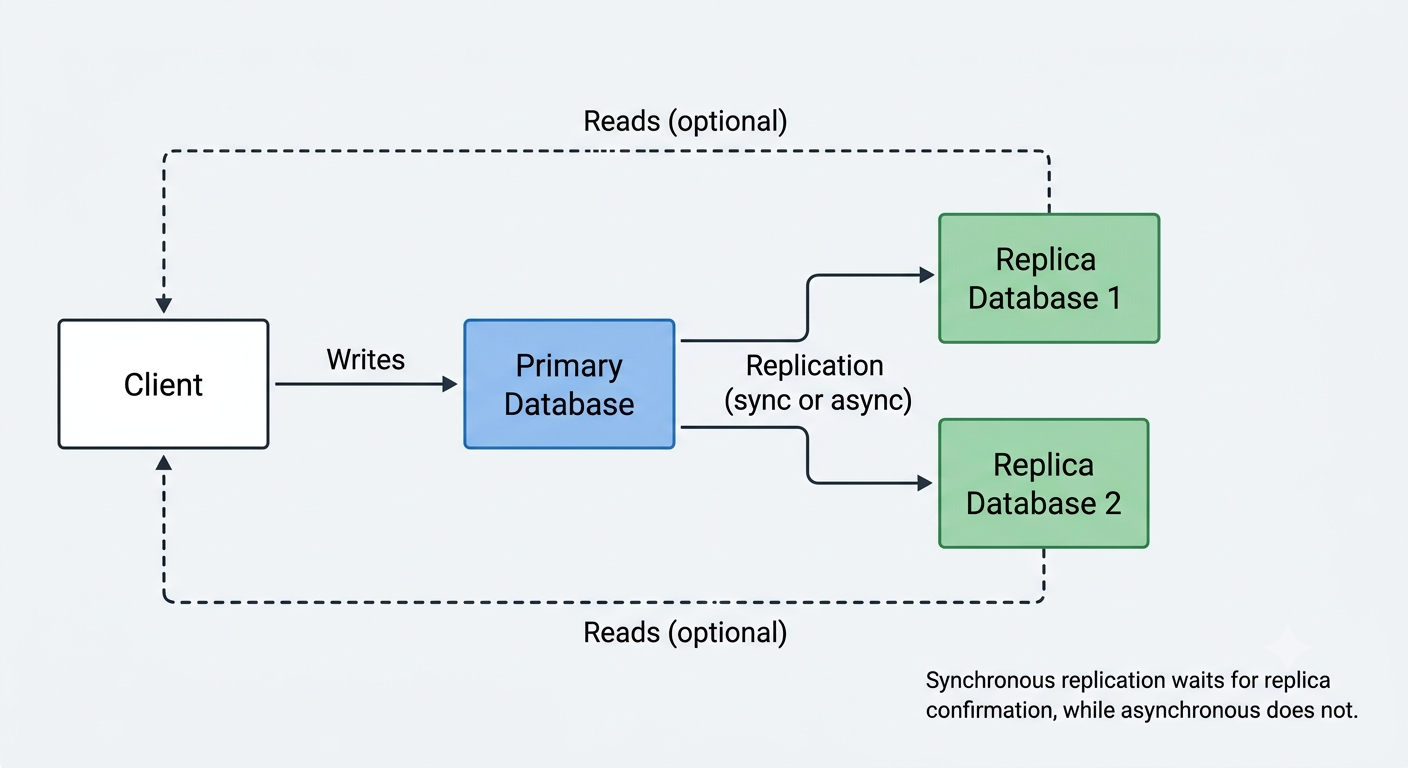
Replication is the process of copying data from one database (the primary, or leader) to one or more other databases (replicas, or followers), so the same data exists in multiple places. It's used for high availability (a replica can take over if the primary fails), read scaling (reads can be spread across replicas), and disaster recovery.
In synchronous replication, the primary waits for at least one replica to confirm it has received and applied the write before telling the client the write succeeded. This guarantees the replica is always up to date, but it adds latency to every write and means the primary can be blocked if a replica is slow or unreachable.
In asynchronous replication, the primary confirms the write to the client immediately and sends the change to replicas in the background. This keeps writes fast, but there's a small window where a replica lags behind the primary, and if the primary fails before replicating a change, that write could be lost. Most systems default to asynchronous replication for performance, and accept eventual consistency on reads from replicas as the tradeoff.
41. What is database sharding, and how is it different from replication?
Sharding (also called horizontal partitioning) splits a single logical database into multiple smaller, independent databases (shards), where each shard holds a different subset of the data, typically split by some key like user_id or region. A query for a specific user only needs to hit the one shard that owns that user's data.
This is fundamentally different from replication, which keeps full, identical copies of the same data on multiple servers. Sharding solves a different problem: when a single database's data or write volume grows too large for one machine to handle efficiently, sharding spreads both the storage and the write load across multiple machines, whereas replication mainly helps with read scaling and availability, not write capacity.
The tradeoffs are significant: queries that need to combine data across shards (like "find all orders across every user") become much harder and slower, joins across shards generally aren't practical, and choosing a good shard key upfront is critical, since an uneven distribution of data across shards (a "hot shard") undermines the whole point. Sharding is usually a last resort, reached only after simpler scaling options like better indexing, caching, or read replicas have been exhausted.
NoSQL and Data Modeling
42. What is the difference between SQL and NoSQL databases, and when would you choose one over the other?
SQL databases (like PostgreSQL or MySQL) are relational: data lives in tables with a fixed schema, and relationships between tables are enforced through foreign keys. NoSQL databases are a broad category of non-relational stores (document, key-value, column-family, graph) that generally favor flexible schemas and horizontal scalability over strict consistency guarantees.
| Aspect | SQL | NoSQL |
|---|---|---|
| Schema | Fixed, defined upfront | Flexible, can vary per record |
| Relationships | Joins across tables | Usually denormalized, embedded |
| Scaling | Typically vertical (bigger server) | Typically horizontal (more servers) |
| Consistency | Strong (ACID) by default | Often eventual, tunable |
Choose SQL when your data is naturally relational and you need strong consistency and complex queries (think financial transactions, order systems). Choose NoSQL when you need to scale out horizontally, your data is naturally hierarchical or unstructured, or your access patterns are simple and known in advance (think user sessions, activity feeds, product catalogs). Many real systems use both, picking the right tool per use case rather than treating it as an all-or-nothing decision.
43. What are the main types of NoSQL databases (document, key-value, column-family, graph)? Give an example use case for each.
NoSQL isn't one thing; it's an umbrella term for several different data models that each solve a different problem.
| Type | How data is stored | Example | Good for |
|---|---|---|---|
| Document | JSON-like documents | MongoDB | Content management, product catalogs |
| Key-value | Simple key maps to a value | Redis, DynamoDB | Sessions, caching, feature flags |
| Column-family | Rows with dynamic columns, grouped by column family | Cassandra, HBase | Time-series data, write-heavy logging |
| Graph | Nodes and edges with properties | Neo4j | Social networks, recommendation engines |
The common thread is that each model trades the flexibility of SQL's joins for a structure that maps closely to how the application actually reads and writes data, which usually makes those specific access patterns faster at scale.
44. How is data modeling different in a document database compared to a relational database?
In a relational database, you model data by normalizing it: splitting information into separate tables to avoid duplication, then joining them back together at query time. In a document database, you typically model around the application's access patterns instead, often denormalizing (embedding) related data directly into a single document so a common read can be satisfied with one lookup instead of several joins.
For example, a blog post and its comments might be two tables in SQL, joined by a post_id foreign key. In a document store, you might embed the comments array directly inside the post document if you almost always read them together:
{
    "title": "Intro to Backend Systems",
    "comments": [
        { "user": "alex", "text": "Great post!" },
        { "user": "sam", "text": "Very helpful, thanks." }
    ]
}
The rule of thumb is "model for your queries" in document databases versus "model for your data's structure" in relational ones. The cost is that updating an embedded value in many documents can be more work than updating one row in a normalized table.
45. What is eventual consistency, and where does it typically show up in NoSQL systems?
Eventual consistency means that after a write, the system doesn't guarantee every subsequent read sees that write immediately, but it guarantees that if no new writes happen, all replicas will eventually converge to the same value. It's common in distributed NoSQL systems that replicate data across multiple nodes for availability and speed.
A typical example: you update your profile picture, and a friend loading your profile from a different data center might see the old picture for a few seconds before the change propagates. This is a deliberate tradeoff, not a bug, made to keep the system fast and available even when some nodes are slow or temporarily unreachable. Systems that need every read to reflect the latest write immediately instead choose strong consistency, usually at the cost of availability or latency.
46. What is the CAP theorem, and why can't a distributed system guarantee all three of Consistency, Availability, and Partition tolerance at once?
The CAP theorem states that a distributed data system can only guarantee two out of three properties at the same time:
- Consistency: every read receives the most recent write (or an error).
- Availability: every request receives a (non-error) response, even if it's not the latest data.
- Partition tolerance: the system keeps working even if network communication between nodes breaks down.
The key insight is that network partitions will happen in any real distributed system (cables get cut, servers lose connectivity, data centers get isolated), so partition tolerance isn't really optional; you have to design for it. That leaves a genuine choice only between consistency and availability during a partition. If two nodes can't talk to each other and both receive a write for the same record, the system must either reject one write to stay consistent (sacrificing availability) or accept both and risk serving stale or conflicting data (sacrificing consistency).
In practice, most databases are described as CP (like traditional relational databases or ZooKeeper, which favor consistency) or AP (like Cassandra or DynamoDB, which favor availability). It's worth noting CAP only applies during an actual partition; outside of that, most systems try to offer both as best they can.
47. What is a composite/compound key, and why does key design matter so much in NoSQL databases?
A composite key (also called a compound key) is a key made up of more than one attribute, often a partition key plus a sort key, rather than a single simple value. For example, in a table storing orders, the partition key might be customer_id and the sort key might be order_date, letting you efficiently fetch "all orders for this customer, sorted by date."
Key design matters enormously in NoSQL because, unlike SQL where you can add indexes and write ad-hoc joins later, most NoSQL databases route and distribute data based on the key you choose, and many don't support flexible ad-hoc queries at all. A poorly chosen key can lead to "hot partitions," where one key gets a disproportionate share of traffic while others sit idle, hurting performance and scalability. Because changing the key design later often means rewriting the whole dataset, it's something you generally need to get right up front by thinking hard about access patterns before writing any code.
48. When would you reach for Redis as a primary data store instead of just using it as a cache?
Most people meet Redis as a cache sitting in front of a "real" database, but it's a full in-memory data store with persistence options (RDB snapshots, AOF logs), so it can also serve as a primary store for the right workload. It makes sense as a primary store when your data is naturally short-lived or small enough to fit in memory, and when you need very low latency access to structures like counters, leaderboards (sorted sets), rate-limit counters, or real-time session state.
For example, a live leaderboard for a game benefits from Redis's sorted-set operations far more than it would from running ORDER BY score queries against a relational table on every request. The tradeoff is that Redis's durability guarantees are weaker than a disk-based database's by default, and its cost per gigabyte of storage is much higher since everything lives in RAM, so it's usually reserved for data where speed matters more than being the permanent system of record.
49. What does "schema-less" really mean for a database like MongoDB? Does it actually mean there's no schema at all?
"Schema-less" is a bit of a misnomer. It means the database doesn't enforce a rigid, predefined structure on every document the way a relational table enforces columns and types. You can insert a document with fields another document in the same collection doesn't have, without running a migration first.
It does not mean there's no schema at all; your application still has an implicit schema, since your code expects certain fields to exist with certain types. The difference is where that schema is enforced: in SQL it's enforced by the database engine at write time, while in a schema-less database it's enforced (or not) by application code, or optionally by tools like MongoDB's schema validation rules. This flexibility is great for rapid iteration and handling varied data, but it shifts responsibility onto developers to keep documents consistent, and inconsistent documents can cause subtle bugs if the application isn't defensive about missing or differently-typed fields.
Authentication and Security
50. What is the difference between authentication and authorization?
Authentication answers "who are you?", it's the process of verifying an identity, typically through a username/password, a token, or biometrics. Authorization answers "what are you allowed to do?", it happens after authentication and determines which resources or actions the now-verified identity can access.
A simple way to remember it: logging into an app is authentication; being blocked from an admin page because your account isn't an admin is authorization. The two are almost always implemented as separate layers, and a common mistake is conflating them, for example checking only "is this user logged in" without also checking "is this user allowed to do this specific action."
51. What is the difference between session-based authentication and token-based authentication?
In session-based authentication, the server creates a session after login and stores its state (like the user ID) server-side, usually in memory or a database, keyed by a session ID. That session ID is sent to the client as a cookie, and on every request the server looks up the session ID to find out who the user is. In token-based authentication, the server issues a self-contained token (commonly a JWT) that holds the user's identity and claims directly inside it, cryptographically signed. The server doesn't need to store anything; it just verifies the token's signature on each request.
| Aspect | Session-based | Token-based |
|---|---|---|
| State | Stored server-side | Stored in the token itself |
| Scaling | Needs shared session store across servers | Stateless, easier to scale horizontally |
| Revocation | Easy (delete the session) | Harder (token valid until it expires) |
| Typical transport | Cookie | Cookie or Authorization header |
Sessions are simpler to revoke instantly (just delete the session record) but require shared storage in a multi-server setup. Tokens scale more easily since any server can verify them without a shared store, but revoking a single token before it expires is genuinely harder, which is why short expiry times and refresh tokens are common companions to this approach.
52. How does a JWT work, and what are its three parts?
A JWT (JSON Web Token) is a compact, signed string that carries claims (pieces of data) about a user, used to prove identity without the server needing to look anything up in a database. It has three parts separated by dots: header.payload.signature.
eyJhbGciOiJIUzI1NiJ9.eyJzdWIiOiIxMjM0In0.SflKxwRJSMeKKF2QT4fwpMeJf36POk6yJV_adQssw5c
- Header: metadata, like which signing algorithm is used (e.g.
HS256). - Payload: the actual claims, like user ID, roles, and expiry time (
exp). This part is only base64-encoded, not encrypted, so it's readable by anyone who has the token. - Signature: created by hashing the header and payload together with a secret key (or private key). This is what lets the server verify the token hasn't been tampered with.
When a client sends a request with a JWT, the server recomputes the signature using its secret and compares it to the one in the token. If they match, the server trusts the claims inside without needing a database lookup, which is what makes JWTs fast and stateless. Because the payload is readable, sensitive data should never be stored in it unencrypted. For a full walkthrough of signing algorithms, expiry, and revocation, see Everything You Actually Need to Know About JWT.
53. What are the security tradeoffs of storing a JWT in localStorage versus an httpOnly cookie?
Storing a JWT in localStorage means your JavaScript code can read and attach it manually, which is convenient, but it also means any JavaScript running on the page can read it, including malicious scripts injected via an XSS attack. If an attacker manages to run JS on your page, they can simply read the token out of localStorage and exfiltrate it.
Storing the JWT in an httpOnly cookie means client-side JavaScript can't read it at all (the browser withholds it from document.cookie), so it's immune to token theft via XSS. The tradeoff is that cookies are automatically attached to every request to the domain, which opens the door to CSRF attacks unless you add protections like SameSite cookie attributes or CSRF tokens.
| Storage | Vulnerable to | Protected from |
|---|---|---|
localStorage | XSS (token theft) | CSRF (not sent automatically) |
httpOnly cookie | CSRF (unless mitigated) | XSS (JS can't read it) |
In short, neither option is a silver bullet on its own; httpOnly cookies plus SameSite=Strict (or Lax) plus CSRF tokens is generally considered the safer combination for browser-based apps.
54. What is OAuth 2.0, and what problem does it solve?
OAuth 2.0 is an authorization framework that lets a user grant a third-party application limited access to their data on another service, without ever sharing their password with that third-party app. The problem it solves: before OAuth, "log in with your Google account" style features required handing your Google password directly to the third-party app, which is both insecure and gives that app far more access than necessary.
The most common flow, the authorization code flow, works like this:
- The user clicks "Log in with X" in the client app, which redirects them to the authorization server (X's login page).
- The user logs in and grants consent for specific permissions (scopes).
- The authorization server redirects back to the client app with a short-lived authorization code.
- The client app exchanges that code (along with a client secret) for an access token by calling the authorization server directly.
- The client app uses the access token to call the resource server (X's API) on the user's behalf.
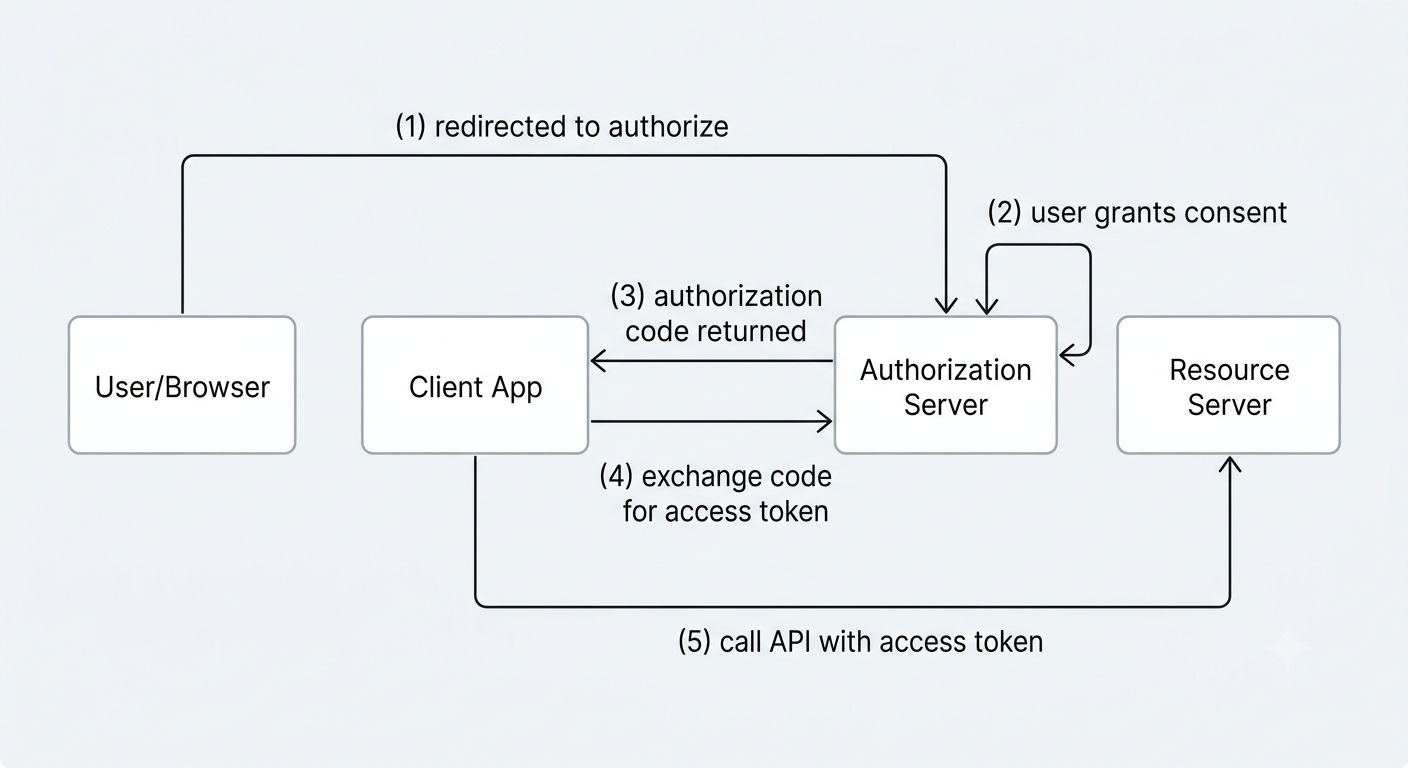
The access token the client app receives is scoped (e.g. "read your email address" but not "read your files"), which is the core security benefit: the app only gets exactly the access the user approved, and the password itself never leaves the authorization server.
55. Is OAuth an authentication protocol? What's the relationship between OAuth 2.0 and OpenID Connect?
Strictly speaking, no: OAuth 2.0 is an authorization protocol, designed to grant access to resources, not to verify identity. It's a common mistake to use OAuth alone as a login system, because an access token by itself doesn't reliably tell you who the user is or guarantee the token was issued for authentication purposes.
OpenID Connect (OIDC) is a thin identity layer built directly on top of OAuth 2.0 that adds authentication. It introduces a standardized ID token (itself a JWT) containing verified identity claims like the user's ID, name, and email, alongside the regular OAuth access token. So when an app implements "Sign in with Google," it's typically using OIDC, not raw OAuth: OAuth handles the token exchange plumbing, and OIDC adds the piece that actually proves who the user is.
56. How should passwords be stored in a database, and why is plain hashing (like a single unsalted MD5 hash) not enough?
Passwords should never be stored in plain text, and they shouldn't just be run through a fast, general-purpose hash function like a single unsalted MD5 or SHA-256 either. Instead, they should be hashed with a slow, purpose-built password hashing algorithm like bcrypt, scrypt, or Argon2, which include a random salt automatically and are deliberately computationally expensive.
The problem with plain fast hashing is twofold. First, MD5/SHA-256 are designed to be fast, which is exactly the wrong property for password hashing: an attacker with a stolen database can compute billions of hashes per second on modern GPUs and brute-force short or common passwords quickly. Second, without a salt, two users with the same password produce the identical hash, and attackers can use precomputed rainbow tables to reverse common hashes instantly.
# Weak: fast, unsalted
MD5("password123") -> "482c811da5d5b4bc6d497ffa98491e38"

# Strong: slow, salted, adaptive cost
bcrypt("password123", salt=random, cost=12) -> "$2b$12$KIXQ...unique per user"
A good password hashing algorithm is deliberately slow (tunable via a "cost" or "work factor" parameter that can be increased as hardware gets faster), which makes brute-forcing at scale impractical even if the database is leaked.
57. What is salting, and why does it defeat precomputed rainbow table attacks?
A salt is a random value generated uniquely for each password and combined with it before hashing. The salt is stored alongside the hash (it doesn't need to be secret) and used again whenever the password needs to be verified.
Without a salt, two users who happen to pick the same password would produce identical hashes, and an attacker could precompute a giant lookup table (a rainbow table) mapping common passwords to their hashes once, then reuse it against any leaked database instantly. With a unique salt per user, the same password produces a different hash for every user, so a precomputed table for one salt is useless against another, forcing the attacker to redo the expensive computation individually for every single password, which makes large-scale rainbow table attacks impractical.
58. What is CSRF, and how do you protect against it?
CSRF (Cross-Site Request Forgery) is an attack where a malicious site tricks a logged-in user's browser into submitting a request to a different site the user is authenticated on, exploiting the fact that browsers automatically attach cookies to requests regardless of which site triggered them. For example, a hidden form on an attacker's page auto-submits a "transfer money" request to your bank, and since your browser still has a valid session cookie for the bank, the request looks legitimate.
Common defenses include: CSRF tokens (a random, unpredictable value embedded in forms that must be sent back and validated server-side, which an attacker's site can't know), setting the SameSite cookie attribute to Strict or Lax so cookies aren't sent on cross-site requests, and checking the Origin/Referer headers on state-changing requests. Using SameSite cookies alone handles most modern cases, but CSRF tokens remain a solid defense-in-depth layer, especially for older browsers.
59. What is XSS, and how do you prevent it from the backend's side?
XSS (Cross-Site Scripting) is an attack where an attacker injects malicious JavaScript into a page that other users then load and execute, typically by submitting attacker-controlled content (like a comment or profile bio) that the app later renders without proper escaping. Once that script runs in another user's browser, it can steal cookies, tokens, or perform actions as that user.
From the backend's side, the main defenses are: always escape or sanitize user-generated content before it's rendered as HTML (encode <, >, &, quotes, etc.), never trust client input even if a frontend framework already escapes by default, and set a strong Content-Security-Policy header to restrict which scripts are allowed to run on the page at all. Backend-issued cookies containing sensitive tokens should also be marked httpOnly so even a successful script injection can't read them directly. Treating all user input as untrusted data, never as executable code, is the underlying principle behind every one of these defenses.
60. What is SQL injection, and how do parameterized queries prevent it?
SQL injection happens when user input is concatenated directly into a SQL query string, letting an attacker craft input that changes the query's actual logic. A classic example is a login query built by string concatenation:
-- Vulnerable: user input concatenated directly
SELECT * FROM users WHERE username = '" + username + "' AND password = '" + password + "'

-- If username is:  admin' --
-- The query becomes:
SELECT * FROM users WHERE username = 'admin' --' AND password = ''
-- Everything after -- is commented out, bypassing the password check entirely
Parameterized queries (also called prepared statements) fix this by separating the query structure from the data. The query is sent to the database with placeholders, and the actual values are sent separately:
-- Safe: parameterized
SELECT * FROM users WHERE username = ? AND password = ?
-- values [username, password] are bound separately, never parsed as SQL
Because the database engine treats the bound values purely as data, never as part of the query's syntax, no amount of clever input can change what the query actually does. This is why parameterized queries (or a well-built ORM that uses them under the hood) are the standard defense, rather than trying to manually escape special characters yourself, which is error-prone and easy to get wrong.
61. How does rate limiting help protect a login endpoint against brute-force attacks?
Rate limiting restricts how many requests a client (identified by IP, account, or both) can make within a given time window. On a login endpoint, without rate limiting, an attacker can script thousands of password guesses per second against a single account or across many accounts using leaked password lists (a "credential stuffing" attack).
By capping login attempts, say 5 per minute per IP or per account, brute-forcing becomes impractically slow: guessing even a modest password space at 5 attempts a minute could take years instead of seconds. Rate limiting is often paired with other measures like exponential backoff, temporary account lockouts, or CAPTCHAs after repeated failures, and logging repeated failures helps detect attacks in progress rather than just slowing them down.
62. What is the principle of least privilege, and how does it apply to backend systems (e.g. database users, service permissions)?
The principle of least privilege means giving every user, service, or process only the minimum access it needs to do its job, nothing more. The reasoning is straightforward: if a component with broad, unnecessary permissions is ever compromised, an attacker inherits all of that access too, so limiting permissions upfront limits the damage a breach can cause.
In backend systems this shows up in a lot of concrete places: a web application's database user should have permission to read and write its own tables but not to drop tables or access other schemas; a microservice that only ever reads from a queue shouldn't have write or delete permissions on it; an API key used for a read-only reporting job shouldn't also be able to trigger production deployments. Applying least privilege consistently means access reviews aren't just a compliance checkbox; they genuinely reduce the blast radius of any single credential leak or bug.
63. What is TLS/SSL, and what does "terminating TLS" mean in a backend architecture?
TLS (Transport Layer Security, the modern successor to the older SSL protocol) encrypts data in transit between a client and a server, so anyone intercepting the traffic (on public wifi, at an ISP, etc.) sees only ciphertext, not the actual request or response content. It also verifies the server's identity via certificates, so clients can trust they're talking to the real server and not an impostor.
"Terminating TLS" refers to the point in the architecture where encrypted traffic is decrypted back into plain HTTP. In many setups, TLS is terminated at a load balancer or reverse proxy sitting in front of the application servers; the connection from the client to that proxy is encrypted, but traffic from the proxy to the internal application servers may run as plain HTTP, since it stays within a trusted private network. This centralizes certificate management in one place instead of every backend instance handling its own TLS, though it does mean that internal network segment must genuinely be trusted, since encryption isn't happening on that leg.
64. What is a refresh token, and why is it used alongside a short-lived access token?
A refresh token is a long-lived credential used to obtain a new access token without forcing the user to log in again. It works alongside a short-lived access token (often valid for just 15 minutes to an hour) that's used for actual API requests.
The reasoning behind this split is a security-versus-convenience tradeoff. A short expiry on the access token limits the damage if it's ever stolen, since it becomes useless quickly. But if every token were that short-lived with no way to renew it, users would have to log in constantly, which is a poor experience. The refresh token solves this: it's stored more securely (often in an httpOnly cookie, and used less frequently, which makes it lower-risk to keep valid for days or weeks), and it's only sent to a dedicated endpoint to mint new access tokens, never to general API endpoints. If a refresh token is suspected of being compromised, it can be revoked server-side, cutting off future access even though already-issued access tokens will still work until they naturally expire.
Caching
65. Why is caching important in backend systems, and what's the general tradeoff of introducing a cache?
Caching means storing a copy of frequently-accessed or expensive-to-compute data somewhere faster to read from, so future requests for the same data can skip the slow path (a database query, an external API call, a heavy computation). It matters because it directly reduces latency for users and cuts load on backend systems that would otherwise redo the same expensive work repeatedly.
The core tradeoff is staleness versus freshness: a cache is a copy, and copies can drift out of sync with the source of truth. Every caching decision is really a decision about how much staleness is acceptable for that specific piece of data. Caching also adds real complexity, since now there are two places data can live, and keeping them consistent (cache invalidation) is famously one of the harder problems to get right in practice.
66. What is the difference between client-side caching, CDN caching, and server-side/application caching?
These three caching layers sit at different points between the user and your backend, and each solves a different problem.
| Layer | Where it lives | What it caches | Example |
|---|---|---|---|
| Client-side | User's browser/device | Static assets, API responses | Browser cache, localStorage |
| CDN | Edge servers near the user | Static assets, sometimes full pages | Images, JS/CSS bundles |
| Server-side/application | Backend infrastructure | Database query results, computed data | Redis, in-memory cache |
Client-side caching avoids network requests entirely by keeping data on the user's device. CDN caching serves static (and sometimes dynamic) content from a server geographically close to the user, cutting network latency and offloading traffic from origin servers. Server-side caching sits inside the backend itself, saving repeated database queries or expensive computations. A well-built system typically layers all three, letting each layer catch what the layer before it missed.
67. What is the cache-aside (lazy-loading) pattern, and how does it work?
Cache-aside (also called lazy-loading) is the most common caching pattern for reads. The application code is responsible for managing the cache directly: on a read, it checks the cache first; if the data is there (a cache hit), it returns it immediately; if not (a cache miss), it queries the database, then writes the result into the cache before returning it to the caller, so the next request for the same data hits the cache instead.
GET /user/42
  1. Check cache for key "user:42"
  2. If found (hit)  -> return cached value
  3. If not found (miss) -> query database
  4.                     -> store result in cache
  5.                     -> return value
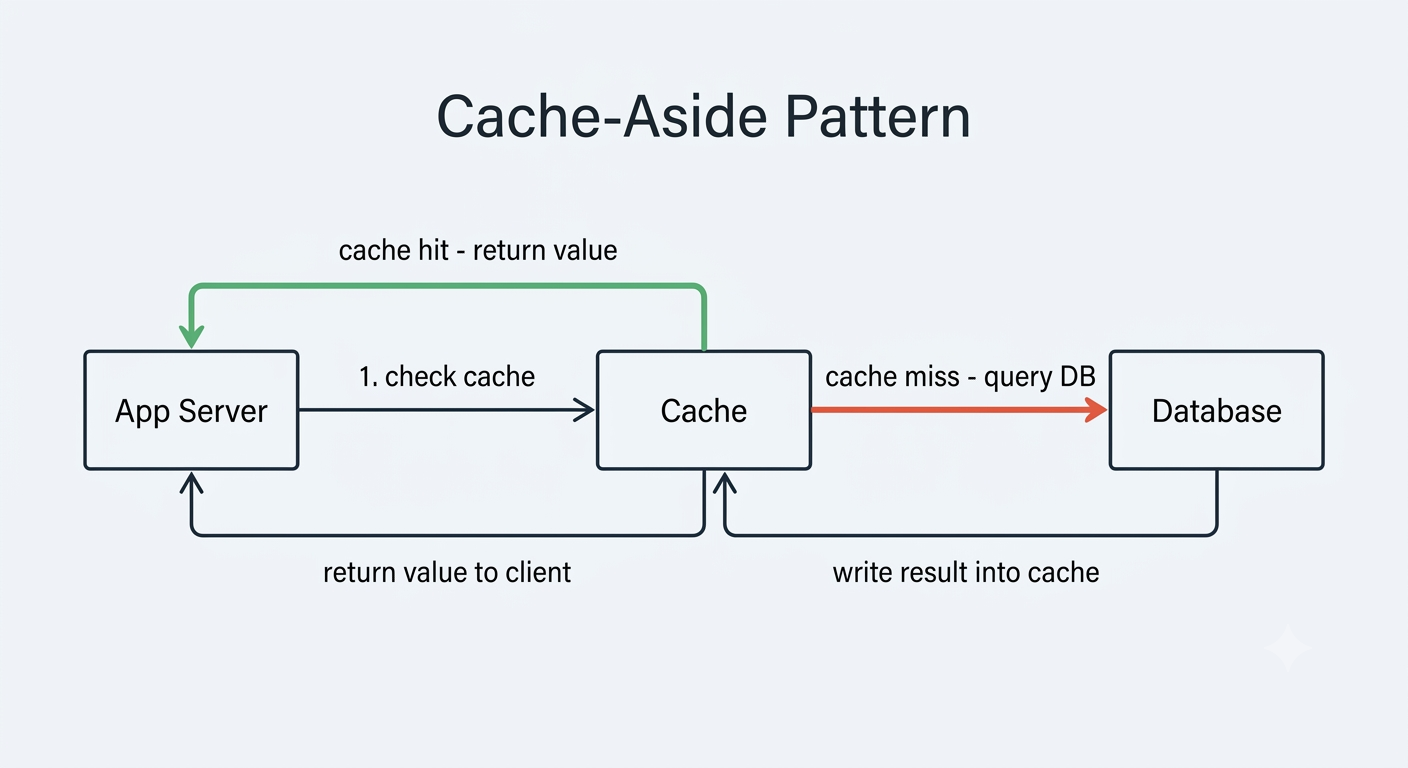
Cache-aside is popular because it's simple and resilient: if the cache goes down entirely, the app still works by falling back to the database on every request, just slower. The downside is the first request for any given key always pays the full cost of a cache miss.
68. What is the difference between cache-aside, write-through, and write-behind caching strategies?
These three strategies differ mainly in when data gets written into the cache, which affects consistency, latency, and complexity.
| Strategy | How writes work | Consistency | Write latency |
|---|---|---|---|
| Cache-aside | App writes to DB; cache is only populated on the next read (or invalidated) | Cache can be briefly stale after a write | Fast (cache untouched on write) |
| Write-through | App writes to cache, cache synchronously writes to DB | Cache and DB stay consistent | Slower (write waits on DB) |
| Write-behind | App writes to cache, cache asynchronously flushes to DB later | Cache is fresh, DB can lag | Fastest (write returns immediately) |
Cache-aside keeps writes simple (write straight to the database, and either invalidate or let the cache repopulate naturally on the next read). Write-through keeps the cache always in sync with the database by writing to both together, at the cost of slower writes since every write waits on the database. Write-behind optimizes for write speed by writing to the cache immediately and flushing to the database in the background, but this risks losing data if the cache crashes before the flush happens. There's no universally "best" option; the right choice depends on whether your workload is more read-heavy or write-heavy, and how much risk of data loss or staleness you can tolerate.
69. What is cache invalidation, and why is it considered one of the hard problems in computer science?
Cache invalidation is the process of removing or updating stale data in a cache once the underlying source of truth has changed, so the cache doesn't keep serving outdated information. It's famously referenced (alongside "naming things") as one of the genuinely hard problems in computer science, half-jokingly, but the difficulty is real: knowing exactly when data has changed, which cache entries are affected, and how to update them without introducing race conditions or serving inconsistent data mid-update gets complicated fast, especially across distributed caches or when multiple services can write to the same underlying data.
Common strategies include invalidating a specific key immediately after a write, using short TTLs so staleness self-heals within a bounded time, or versioning cache keys so old entries simply become unreachable. Each approach makes a different tradeoff between complexity and how long stale data might linger, and there's rarely a solution that's both perfectly fresh and perfectly simple at the same time. Cache Invalidation Strategies Explained walks through each of these strategies with Redis code, plus the race conditions and failed deletes that let stale data survive anyway.
70. What is a TTL (time to live) on a cache entry, and how do you decide on a good value for it?
A TTL (time to live) is the amount of time a cache entry is allowed to live before it automatically expires and gets removed (or is treated as stale on the next access). It's the simplest and most common way to bound how out-of-date cached data can get, without needing explicit invalidation logic for every write.
Choosing a good TTL is about balancing freshness against cache effectiveness: a very short TTL keeps data fresh but causes frequent cache misses (defeating much of the point of caching), while a very long TTL maximizes hit rates but risks serving stale data for longer. In practice, the value should reflect how often the underlying data actually changes and how tolerant the use case is of staleness; a product price might need a short TTL of a few minutes, while a rarely-changing configuration value might safely use a TTL of hours or days.
71. What is cache stampede (thundering herd), and how do you prevent it?
A cache stampede (also called the thundering herd problem) happens when a popular cache entry expires and a large number of concurrent requests all experience a cache miss at the same moment, causing all of them to hit the database (or recompute the expensive value) simultaneously. This sudden spike can overwhelm the database, sometimes badly enough to cause a cascading outage, right at the moment the cache was supposed to be protecting it.
Common prevention techniques include: using a lock (or "single-flight" pattern) so only one request recomputes the value while others wait for the result rather than all hitting the database independently; adding jitter (randomness) to TTLs so entries don't all expire at exactly the same time; and probabilistic early expiration, where a request occasionally refreshes a "soon to expire" value slightly early instead of waiting for the exact expiry moment. All of these approaches aim at the same goal: making sure only one request pays the cost of a cache miss instead of every concurrent request paying it at once.
72. What's the difference between Redis and Memcached at a conceptual level?
Both Redis and Memcached are popular in-memory key-value stores commonly used for caching, but they differ in scope and capability.
| Aspect | Redis | Memcached |
|---|---|---|
| Data structures | Strings, lists, sets, sorted sets, hashes | Strings only |
| Persistence | Optional (RDB/AOF) | None, purely in-memory |
| Threading | Historically single-threaded core | Multi-threaded |
| Extras | Pub/sub, Lua scripting, replication | Minimal, focused purely on caching |
Memcached is deliberately simple: a fast, multi-threaded, pure key-value cache with no extra features, which makes it very efficient for straightforward caching of simple values. Redis is a richer data structure server that can be used purely as a cache, but also supports more complex use cases like leaderboards (sorted sets), pub/sub messaging, and optional persistence so data can survive a restart. The practical rule of thumb: reach for Memcached when you want the simplest possible caching layer for basic key-value pairs, and reach for Redis when you need those richer data structures or features beyond plain caching.
Concurrency, Processes, and Performance
73. What is the difference between a process and a thread?
A process is an independent running instance of a program, with its own memory space, file handles, and system resources. A thread is a unit of execution inside a process; a process can contain multiple threads, and those threads share the same memory space and resources.
Because threads share memory, communicating between them is cheap (just read/write shared variables), but that also means one thread can corrupt data another thread is using if access isn't coordinated. Processes are heavier to create and switch between (the OS has to set up a fresh memory space), but they're isolated from each other, so a crash in one process generally doesn't take down another. This is why a browser tab crashing doesn't usually crash the whole browser: modern browsers run tabs as separate processes.
74. What is the difference between concurrency and parallelism?
Concurrency is about structuring a program so multiple tasks can make progress during overlapping time periods, even on a single CPU core, by switching between them. Parallelism is about actually running multiple tasks at the exact same instant, which requires multiple CPU cores.
A single-core machine can be concurrent (juggling many tasks by time-slicing) but never truly parallel. A multi-core machine can do both: it can run several tasks in parallel, and each core can also juggle multiple concurrent tasks. A simple way to remember it: concurrency is about dealing with lots of things at once (structure), parallelism is about doing lots of things at once (execution). Go builds this distinction into the language with goroutines and channels; the Go Syntax Recap walks through that model in practice.
75. What is a race condition, and how do you prevent one?
A race condition happens when two or more threads or processes access shared data at the same time, and the final result depends on the unpredictable order in which they run. It's called a "race" because the outcome depends on who gets there first.
// two threads run this concurrently on the same `counter` variable
read counter      // both threads read 5
add 1
write counter     // both write 6, one increment is lost
In the example above, counter should end up at 7 after two increments, but because both threads read the value before either writes it back, one increment gets silently lost. You prevent race conditions by making the shared access atomic, using a mutex/lock, or using data structures designed to be safely shared (like atomic counters or thread-safe queues) so only one thread can touch the critical section at a time.
76. What is a deadlock in general concurrent programming, and what four conditions must all hold for one to occur?
A deadlock is a situation where two or more threads or processes are each waiting on a resource the other holds, so none of them can ever proceed. Everyone is stuck waiting forever.
For a deadlock to happen, four conditions (known as the Coffman conditions) all have to be true at once:
- Mutual exclusion: at least one resource can only be held by one thread at a time.
- Hold and wait: a thread is holding one resource while waiting for another.
- No preemption: a resource can't be forcibly taken away from a thread; it has to be released voluntarily.
- Circular wait: there's a cycle of threads, each waiting on a resource held by the next one in the cycle.
Breaking any single one of these conditions prevents deadlock. In practice, the most common fix is attacking circular wait: always acquire locks in the same, agreed-upon order across the whole codebase, so a cycle can never form.
77. What is the difference between blocking and non-blocking I/O?
With blocking I/O, when code makes a call like reading a file or a network socket, the calling thread stops and waits until the operation finishes before it can do anything else. With non-blocking I/O, the call returns immediately (often with "not ready yet" or a partial result), and the program is free to go do other work and check back later, or get notified when the data is ready.
Blocking I/O is simpler to write and reason about, since code runs top to bottom in order. Non-blocking I/O is more efficient when you have many concurrent operations (like thousands of open network connections), because a single thread doesn't have to sit idle waiting on any one of them; it can juggle all of them.
78. What is an event loop, and how does it let a single-threaded server handle many concurrent requests?
An event loop is a runtime mechanism that continuously checks for pending work (like a completed network read, an expired timer, or a callback ready to run) and executes it, one piece at a time, on a single thread. It's the core mechanism behind single-threaded servers that still manage to serve thousands of concurrent connections.
The trick is that the event loop never blocks on slow operations like disk or network I/O. When code asks to read from a socket, the request is handed off to the operating system, and the event loop moves on to process other pending work. Once the OS signals that data is ready, the associated callback gets queued up, and the event loop picks it up on a future iteration.
while true:
    task = event_queue.wait_for_next_ready_task()
    run(task)          // runs to completion, no other task runs mid-way
This works well because most backend workloads spend the vast majority of their time waiting on I/O (database queries, HTTP calls to other services) rather than doing heavy CPU computation. The limitation is that a single CPU-heavy task (like a large synchronous computation) blocks the entire event loop and delays every other pending request, which is why CPU-bound work is usually offloaded to worker threads or separate processes.
79. What is the difference between synchronous and asynchronous code execution?
Synchronous code runs one statement at a time, in order, and each statement has to finish before the next one starts. Asynchronous code lets a slow operation (like a network call) run in the background while the rest of the program keeps executing, and the result is handled later via a callback, promise/future, or similar mechanism.
Synchronous code is easier to follow but wastes time waiting. Asynchronous code is more efficient for I/O-heavy work, but it's harder to reason about, since operations can complete in a different order than they were started, and errors have to be handled at the point the async result comes back rather than with a simple try/catch around sequential code.
80. What is a mutex/lock, and why is it needed in concurrent programming?
A mutex (short for "mutual exclusion") is a synchronization primitive that only lets one thread at a time enter a specific section of code, called the critical section. A thread has to acquire the lock before entering, and release it when it's done; if another thread tries to acquire it while it's held, that thread waits until it's free.
Locks are needed whenever multiple threads read and write shared data, to prevent race conditions. Without a lock around the increment in a shared counter, for example, two threads could read the same value before either writes back, and an update gets lost. The tradeoff is that locks introduce waiting and, if used carelessly (locking in inconsistent order across the code), can cause deadlocks.
81. What is thread starvation?
Thread starvation happens when a thread is repeatedly denied access to a resource it needs, usually because other threads with higher priority or better luck keep getting scheduled ahead of it, so it never gets a fair turn to run. The thread isn't stuck the way it would be in a deadlock; it's technically still able to proceed, it just never actually gets the chance.
It's commonly caused by poor lock fairness (some locks always favor certain threads) or aggressive priority scheduling where low-priority threads keep getting bumped. The usual fix is using fair locks or scheduling policies that guarantee every waiting thread eventually gets a turn.
82. What is backpressure, and why does it matter when one part of a system is slower than another?
Backpressure is a way of signaling "slow down" from a slower part of a system back to a faster part that's producing more work than the slower part can consume. Without it, the fast producer just keeps pushing data, and it piles up somewhere (in memory, in a queue) until something runs out of resources and crashes.
Think of a fast API accepting write requests faster than the database behind it can actually persist them. If there's no backpressure, requests queue up in memory indefinitely, memory usage climbs, and eventually the service falls over. With backpressure, the system might reject new requests with a "too busy" response, slow down how fast it reads from an upstream queue, or apply a rate limit, so the pressure gets pushed back to the producer instead of building up uncontrollably downstream. It's a core concept in streaming systems, message queues, and reactive programming.
Distributed Systems and Scalability
83. What is the difference between vertical scaling and horizontal scaling?
Vertical scaling ("scaling up") means adding more resources (CPU, RAM) to a single existing machine. Horizontal scaling ("scaling out") means adding more machines and spreading the load across them.
| Aspect | Vertical scaling | Horizontal scaling |
|---|---|---|
| How | Bigger machine | More machines |
| Ceiling | Limited by the biggest hardware available | Effectively unlimited |
| Complexity | Simple, no code changes needed | Needs load balancing, often needs the app to be stateless |
| Downtime | Often requires a restart/resize | Can add machines without downtime |
Vertical scaling is simpler and a good first step, but it eventually hits a hardware ceiling and creates a single point of failure. Horizontal scaling scales further and adds redundancy, but it requires the application to be designed so any instance can handle any request, usually meaning it needs to be stateless or share state externally (in a database or cache).
84. What is a load balancer, and what are some common load balancing algorithms?
A load balancer sits in front of a group of servers and distributes incoming requests across them, so no single server gets overwhelmed and the system can keep working even if one server goes down.
Some common algorithms:
| Algorithm | How it decides |
|---|---|
| Round robin | Cycles through servers in order, one request each |
| Least connections | Sends the request to the server with the fewest active connections |
| Weighted round robin | Like round robin, but bigger/faster servers get proportionally more requests |
| IP hash | Routes a given client's requests to the same server based on a hash of its IP |
Round robin is simple and works well when requests are roughly equal in cost. Least connections is better when request processing times vary a lot, since it adapts to how busy each server actually is. IP hash is used when you need the same client to consistently land on the same server, for example to keep a local, in-memory session working without needing a shared session store.
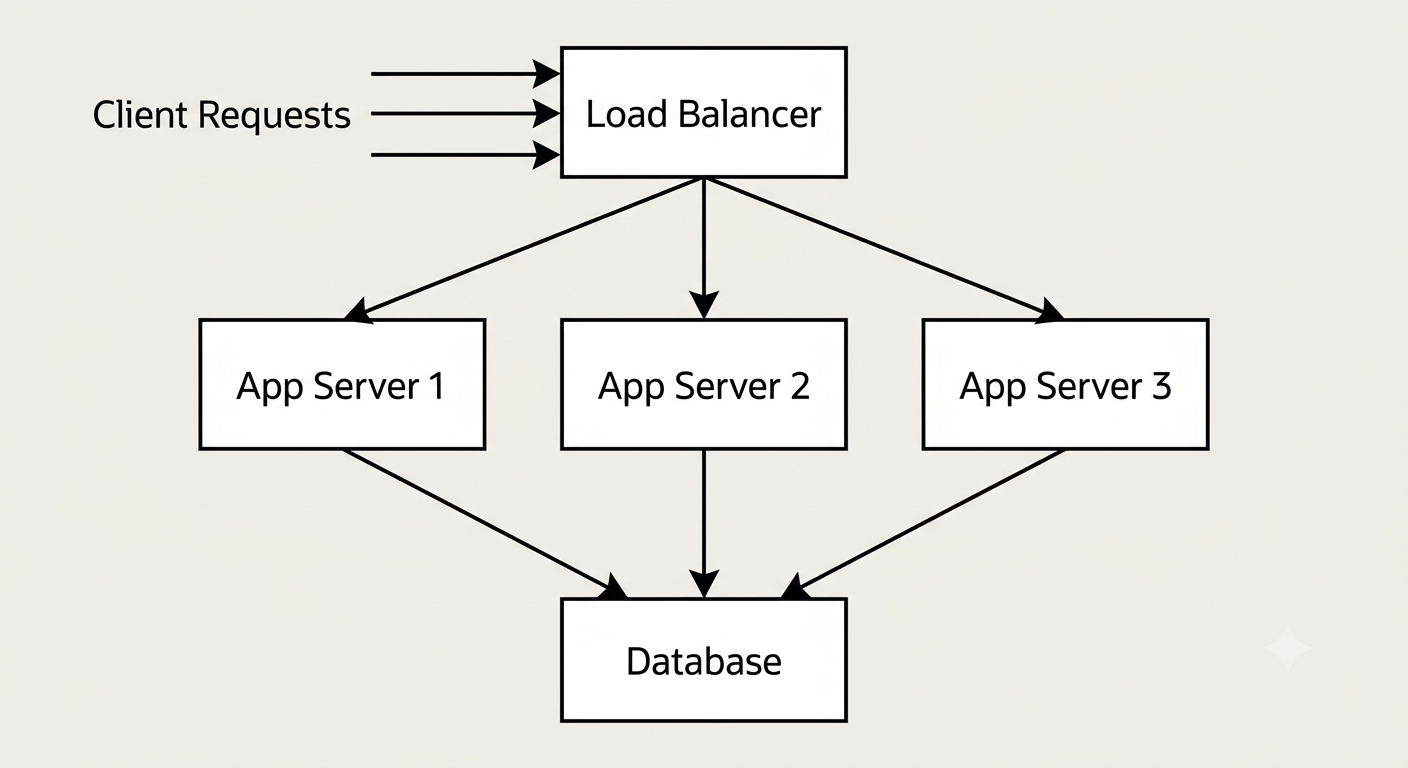
85. What is the difference between a load balancer and a reverse proxy?
A reverse proxy is a server that sits in front of one or more backend servers and forwards client requests to them, often also handling things like SSL termination, caching, or compression. A load balancer does one specific job: distributing traffic across multiple servers to balance the load.
In practice, the two overlap a lot: a load balancer is essentially a reverse proxy whose primary purpose is traffic distribution, and most reverse proxy software can also do load balancing. The distinction is more about intent than a hard technical line: if the main job is "which backend gets this request based on capacity", you're describing load balancing; if the job is broader, like hiding backend topology, caching responses, or terminating TLS, that's the reverse proxy role.
86. What is an API gateway, and what problems does it solve in a microservices setup?
An API gateway is a single entry point that sits in front of a collection of backend services and routes each incoming request to the right one. Clients talk to the gateway; they don't need to know how many services exist behind it or where each one lives.
In a microservices setup, it solves several problems at once: it centralizes cross-cutting concerns like authentication, rate limiting, request logging, and SSL termination so each individual service doesn't have to reimplement them; it can aggregate responses from multiple services into a single response for the client; and it hides internal service topology, so services can be split, merged, or moved without breaking clients. The tradeoff is that the gateway becomes a critical piece of infrastructure itself, so it needs to be highly available, since every request flows through it.
87. What is the difference between a monolithic architecture and microservices?
A monolith is an application built and deployed as a single unit, where all the features (user accounts, payments, notifications, etc.) live in one codebase and run as one process. Microservices split those same features into separate, independently deployable services that communicate over the network, usually via APIs or messaging.
| Aspect | Monolith | Microservices |
|---|---|---|
| Deployment | One unit, deployed together | Each service deployed independently |
| Scaling | Scale the whole app together | Scale each service independently |
| Development | Simple to start, easy to reason about | More moving parts, needs infra for service communication |
| Failure isolation | A bug can bring down the whole app | A failing service can be isolated (with the right design) |
| Data | Usually one shared database | Each service often owns its own data |
Neither is universally "better". Monoliths are usually faster to build and simpler to operate early on, which is why most systems start as one. Microservices pay off at scale, when different teams need to ship independently and different parts of the system have very different scaling or reliability needs, but they add real operational complexity (network calls where there used to be function calls, distributed debugging, more infrastructure).
88. What is service discovery, and why do microservices need it?
Service discovery is the mechanism that lets services find each other's network location (IP address and port) at runtime, instead of that information being hardcoded. It matters in microservices because instances are constantly being created, destroyed, moved, or scaled up and down, especially in containerized environments, so a service's address can't be assumed to stay fixed.
There are two common patterns. With a service registry, each service registers itself on startup and deregisters on shutdown, and other services query the registry to find current addresses. With DNS-based discovery, a DNS name resolves to the current healthy instances, often managed automatically by the orchestration platform (see How DNS Works for how that resolution actually happens). Without service discovery, you'd have to manually track and update IP addresses every time something scales or restarts, which doesn't work at any real scale.
89. What is a single point of failure, and how do you go about eliminating one?
A single point of failure (SPOF) is any component in a system that, if it fails, takes down the whole system (or a critical part of it) because nothing else can take over its job. A single database server with no replica, or a single load balancer with no backup, are classic examples.
You eliminate a SPOF by adding redundancy: running multiple instances of the component behind a load balancer, replicating the database so a replica can be promoted if the primary fails, and spreading instances across multiple availability zones or data centers so one physical failure doesn't take everything down. The general principle is that any critical component should have at least one backup that can take over automatically (failover) without a human needing to intervene at 3am.
90. What is the difference between horizontal partitioning and vertical partitioning of data?
Horizontal partitioning (often called sharding) splits a table's rows across multiple databases or servers, so each shard holds a subset of the rows, usually based on a key like user ID. Vertical partitioning splits a table's columns instead, putting different columns (or groups of columns) into different tables or databases, often to separate frequently-accessed data from rarely-accessed data.
For example, horizontally partitioning a users table might put users 1 to 1 million on server A and users 1 million to 2 million on server B. Vertically partitioning the same table might put login-related columns (email, password hash) in one table and profile data (bio, avatar, preferences) in another, since they're accessed at different times and rates. Horizontal partitioning is mainly about scaling write/read volume across machines; vertical partitioning is mainly about optimizing access patterns and reducing the amount of unnecessary data read per query.
91. What is the difference between eventual consistency and strong consistency, and when is eventual consistency an acceptable tradeoff?
With strong consistency, once a write completes, every subsequent read (from any node) is guaranteed to see that write immediately. There's never a window where different clients see different, conflicting versions of the data. With eventual consistency, a write is accepted and will eventually propagate to all nodes, but for some period of time right after the write, different nodes (and therefore different reads) might return stale or different values.
Strong consistency is easier to reason about but usually costs more in latency and availability, since nodes have to coordinate (agree) before confirming a write, and that coordination gets harder to do quickly the more nodes and the more geographically spread out they are. Eventual consistency trades that guarantee for better availability and lower latency, since a node can accept a write and respond immediately without waiting for every other node to agree.
It's an acceptable tradeoff whenever a brief staleness window doesn't cause real harm: a social media "like" count that's a few seconds behind, a product view counter, or a user's profile picture propagating across CDN edge nodes are all fine being eventually consistent. It's a poor tradeoff for things like account balances or inventory counts during checkout, where seeing stale data can lead to real, hard-to-reverse mistakes (overselling stock, double-spending).
92. What is the circuit breaker pattern, and why is it used between services?
The circuit breaker pattern protects a service from repeatedly calling another service that's already failing or responding too slowly. It works like an electrical circuit breaker: it monitors calls to a downstream service, and if failures cross a threshold, it "trips" and stops sending new requests to that service for a while, failing fast instead.
A circuit breaker has three states. In the closed state, everything is normal and requests pass through as usual while failures are being counted. Once failures exceed a threshold, it moves to the open state, where requests fail immediately (or return a fallback) without even attempting the call, giving the struggling downstream service room to recover. After a cooldown period, it moves to half-open, where it lets a small number of test requests through; if those succeed, it closes again and resumes normal traffic, and if they fail, it goes back to open.
This matters in distributed systems because without it, a slow or failing downstream service can cause every upstream caller to pile up requests waiting on it (threads blocked, connection pools exhausted), which can cascade into taking down services that were otherwise perfectly healthy. Failing fast with a circuit breaker contains the damage to just the one struggling dependency instead of letting it spread across the whole system.
93. What does idempotency mean at the system level, and why does it matter for retries in distributed systems?
An operation is idempotent if performing it multiple times has the same effect as performing it once. Calling it once or calling it ten times with the same input leaves the system in the same end state.
This matters enormously for retries. In a distributed system, network calls can fail in ambiguous ways: a request might time out because the response was lost, even though the server actually processed it successfully. When a client retries after a timeout, it genuinely doesn't know whether the original request succeeded or not. If the operation is idempotent, retrying is always safe. If it isn't, a retry can cause real damage, like charging a customer twice.
A common technique is an idempotency key: the client generates a unique ID for an operation (like a payment) and sends it with every retry attempt. The server checks if it has already processed that key before doing the work again.
{
  "idempotency_key": "a3f9-92c1-...",
  "amount": 4999,
  "currency": "USD"
}
If the server sees the same key twice, it returns the original result instead of charging the customer a second time. Note that not all operations are naturally idempotent: setting a value is idempotent, but incrementing a value is not, unless it's protected with an idempotency key.
94. What is the difference between latency and throughput?
Latency is how long it takes for a single request to complete, usually measured in milliseconds. Throughput is how many requests a system can process in a given period of time, usually measured as requests per second.
The two aren't the same thing, and improving one doesn't automatically improve the other. A system can have low latency (each request is fast) but low throughput (it can only handle a few requests at a time), or high throughput (it processes a huge volume overall) while each individual request has noticeably higher latency, for example because requests are being batched together before processing. When people talk about performance, they usually care about both, but which one matters more depends on the use case: a real-time chat feature cares a lot about latency, while a nightly batch report cares more about throughput.
Messaging and Asynchronous Communication
95. What is a message queue, and what problem does it solve?
A message queue is a service that lets one part of a system (the producer) send messages that get stored and later picked up and processed by another part of the system (the consumer), without the two talking to each other directly or needing to be available at the same time.
The core problem it solves is decoupling. Without a queue, if service A calls service B directly and B is slow or down, A is stuck waiting or failing too. With a queue in between, A can drop a message and move on immediately, and B processes messages whenever it's ready, at its own pace. This also naturally smooths out traffic spikes: if a sudden burst of requests comes in, they pile up in the queue instead of overwhelming the consumer, and the consumer just works through the backlog.
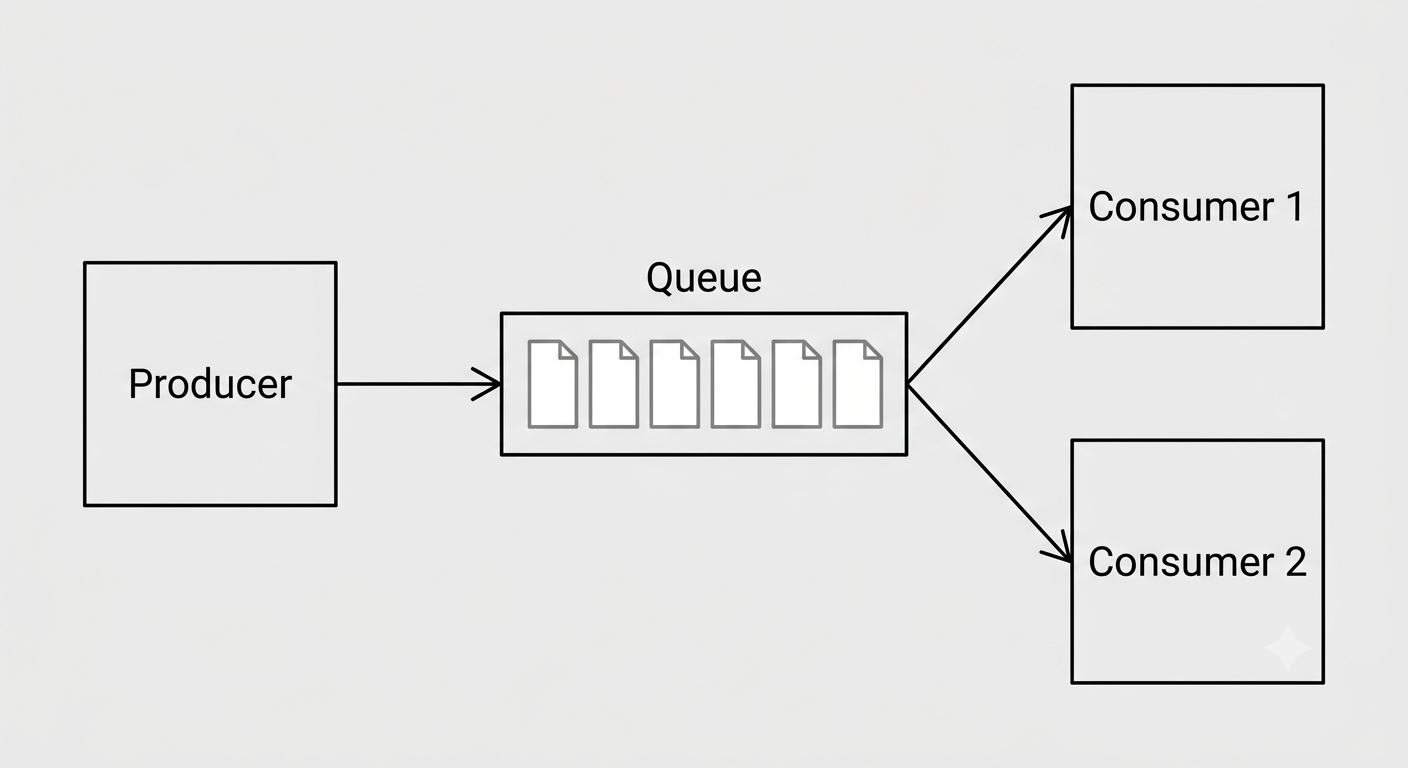
96. What is the difference between a message queue and a publish/subscribe (pub/sub) system?
In a classic message queue, each message is typically delivered to and consumed by exactly one consumer; once it's picked up and processed, it's removed from the queue. In a pub/sub system, a publisher sends a message to a topic, and every subscriber to that topic gets its own copy of the message.
The distinction is really about delivery pattern: queues are for distributing work across a pool of consumers (so the work only gets done once), while pub/sub is for broadcasting an event to multiple independent listeners who each need to react to it in their own way. For example, an "order placed" event might be published once, and separately consumed by an email service, an inventory service, and an analytics service, each doing something completely different with the same event. Many real-world message brokers actually support both patterns.
97. What is the difference between synchronous request-response communication and event-driven communication between services?
In synchronous request-response communication, service A calls service B directly and waits for a response before continuing, similar to a normal function call but over the network. In event-driven communication, service A publishes an event describing something that happened, and doesn't wait for or even know which services, if any, react to it.
Request-response is simpler to reason about and gives you an immediate answer, which is useful when you actually need the result right away (checking if a payment succeeded before showing a confirmation page). Event-driven communication decouples services in time and topology: the publisher doesn't need the subscriber to be available at that moment, and new subscribers can be added later without changing the publisher at all. The tradeoff is that event-driven flows are harder to trace and debug, since there's no single call stack to follow, and consistency has to be handled carefully since things happen asynchronously rather than in one atomic step.
98. What do "at-least-once", "at-most-once", and "exactly-once" delivery guarantees mean?
These describe how many times a message might be delivered to a consumer when things go wrong (network failures, crashes, retries).
| Guarantee | Meaning | Risk |
|---|---|---|
| At-most-once | Message is delivered zero or one times, never retried | Messages can be silently lost |
| At-least-once | Message is retried until acknowledged, so it may be delivered more than once | Consumers may see duplicates |
| Exactly-once | Message is delivered and processed exactly one time, no loss, no duplicates | Hardest and most expensive to guarantee |
At-most-once is the simplest to implement (just send and forget) but risks data loss, so it's only acceptable for things you don't mind occasionally losing, like non-critical metrics. At-least-once is the most common in practice: the system retries until it gets an acknowledgment, which guarantees nothing is lost, but means consumers must be built to safely handle duplicate messages (usually via idempotency). True exactly-once delivery is notoriously difficult across a network; what systems that claim it actually provide is usually at-least-once delivery combined with idempotent processing, which produces the same practical result.
99. What is a dead-letter queue, and why is it useful?
A dead-letter queue (DLQ) is a separate queue where messages get moved if they fail to be processed successfully after a certain number of retry attempts, instead of being retried forever or silently dropped.
It's useful because it prevents one bad message (say, one with malformed data that causes the consumer to crash every time) from blocking or endlessly looping the whole queue, while also making sure that message isn't just lost. Once it's sitting in the DLQ, engineers can inspect it, fix the underlying bug, and reprocess it, or at least get alerted that something needs attention. Without a DLQ, a single poison message can either get stuck retrying forever and stall the whole pipeline, or get silently discarded and quietly lose data.
100. What is the producer-consumer model, and why might a system have multiple consumers reading from the same queue?
The producer-consumer model describes a pattern where one or more producers generate work (messages, tasks, data) and put it somewhere (usually a queue), and one or more consumers pull that work off and process it, independently of how fast it's being produced.
A system often runs multiple consumers on the same queue purely for throughput: if one consumer can process 100 messages a second but messages are arriving at 500 a second, adding more consumers lets the work be processed in parallel, so the backlog doesn't keep growing. It also improves resilience: if one consumer instance crashes, the others keep working through the queue, so processing doesn't stop entirely. Most queue systems make sure each message only goes to one consumer at a time, so adding consumers scales throughput without causing the same message to be processed twice.
101. What is event-driven architecture, and how does it decouple services from each other?
Event-driven architecture is a design style where services communicate primarily by producing and reacting to events (facts about something that happened, like "order placed" or "user signed up") rather than calling each other directly.
It decouples services in a few concrete ways: the service that produces an event doesn't need to know which services, if any, are listening; new services can start consuming existing events without any change to the producer; and each consumer processes events at its own pace, so a slow or temporarily unavailable consumer doesn't block the producer or other consumers. This makes it easier to add new functionality over time (a new "send welcome email" service can just subscribe to the existing "user signed up" event) without touching existing code, though it does trade away the simplicity of a straight-line call stack, since a single business action can trigger a chain of reactions spread across many services.
Testing, Deployment, and Observability
102. What is the difference between unit testing, integration testing, and end-to-end testing?
These three test types differ mainly in scope, how much of the system they exercise at once.
| Test type | Scope | Speed | Example |
|---|---|---|---|
| Unit | A single function or class, in isolation | Very fast | Testing that a calculateDiscount() function returns the right value |
| Integration | Multiple components working together | Medium | Testing that a service correctly reads and writes to a real (or test) database |
| End-to-end (E2E) | The whole system, as a user would experience it | Slow | Simulating a full checkout flow through the actual API/UI |
Unit tests are fast and pinpoint exactly what broke, but they don't catch problems that only show up when pieces interact (like a database query that's syntactically fine but wrong). Integration tests catch those interaction bugs but run slower and are more brittle to set up. End-to-end tests give the most confidence that the system actually works for a real user, but they're the slowest, most expensive to maintain, and hardest to debug when they fail. Most teams aim for a pyramid: lots of unit tests, a moderate number of integration tests, and a small number of E2E tests covering critical flows.
103. What is mocking, and why do you mock dependencies in unit tests?
Mocking means replacing a real dependency (a database, an external API, a file system) with a fake, controllable stand-in when writing a test, so the test doesn't actually depend on that real thing being available or behaving a certain way.
You mock dependencies in unit tests to keep them fast, isolated, and predictable. A test that hits a real database is slow, might fail because of network issues or unrelated data changes, and makes it hard to test edge cases (like "what happens when the database times out") on demand. With a mock, you can make the fake database return exactly the response, error, or delay you want to test against, every single time, without needing the real thing running at all.
104. What is CI/CD, and what problem does it solve for a backend team?
CI/CD stands for continuous integration and continuous delivery/deployment. Continuous integration means every code change is automatically built and tested as soon as it's pushed, so integration problems are caught within minutes instead of piling up. Continuous delivery/deployment extends that automation to actually releasing the change, either to a staging environment ready for manual approval (delivery) or straight to production automatically (deployment).
The problem it solves is the pain and risk of manual releases. Without CI/CD, merging code from multiple developers and shipping it is a slow, error-prone, manual process: someone has to remember to run the tests, build the artifact, and push it out correctly, and mistakes at any step can ship broken code. CI/CD makes that pipeline automatic and repeatable, catches bugs earlier (right after they're introduced, not weeks later), and makes shipping small, frequent changes low-risk enough that teams can release many times a day instead of once a quarter.
105. What is a container, and how is it different from a virtual machine?
A container packages an application together with everything it needs to run (libraries, dependencies, configuration) into a single unit that runs consistently across different environments. A virtual machine (VM) emulates an entire computer, including its own full operating system kernel, on top of a host machine.
| Aspect | Container | Virtual machine |
|---|---|---|
| OS | Shares the host machine's kernel | Runs its own full guest OS |
| Size | Typically megabytes | Typically gigabytes |
| Startup time | Seconds or less | Minutes |
| Isolation | Process-level isolation | Full hardware-level isolation |
| Resource overhead | Low | Higher |
Because containers share the host's kernel instead of running a whole separate OS, they're much lighter weight and start almost instantly, which makes them well suited to running many small services, scaling quickly, and packing more workloads onto the same hardware. VMs offer stronger isolation, since each one is a genuinely separate operating system, which matters more when running fully untrusted or wildly different workloads on the same hardware.
106. Why does the twelve-factor app principle recommend storing config in environment variables instead of in code?
The twelve-factor app methodology recommends keeping configuration (database URLs, API keys, feature flags, anything that varies between environments) in environment variables rather than hardcoded in the codebase, and the reasoning is mostly about safety and portability.
If config is baked into the code, you either need different code (or a different branch/config file committed) for each environment, which is error-prone and easy to mix up, or you risk accidentally committing secrets like API keys straight into version control where they can leak. Environment variables keep the same build/artifact deployable to development, staging, and production unchanged; only the environment around it differs. It also means secrets never need to touch the codebase or git history at all, which is a meaningful security win.
107. What is the difference between logging, metrics, and tracing?
These are the three main pillars of observability, and each answers a different question about a running system.
Logging records discrete, timestamped events, like "user 42 failed to log in" or "payment service returned a 500 error", usually with enough detail to understand exactly what happened at that moment. Metrics are numeric measurements aggregated over time, like requests per second, average response time, or memory usage, useful for spotting trends and setting alerts. Tracing follows a single request as it moves through multiple services, recording how long it spent in each one, which is essential for understanding why a particular request was slow in a distributed system where one request might touch a dozen services.
They complement each other: metrics tell you something is wrong (error rate spiked), logs help you understand what happened in a specific case, and traces show you exactly where in a multi-service call chain the time went or the failure occurred.
108. What is a health check endpoint, and why do backend services expose one?
A health check endpoint is a simple API endpoint (commonly something like /health or /status) that returns whether a service is up and able to handle requests, without doing any real work itself.
curl -s https://api.example.com/health
# {"status":"ok","database":"connected"}
Load balancers and orchestration systems call this endpoint regularly to decide whether an instance should keep receiving traffic. If it stops responding or returns an unhealthy status, the instance can be automatically taken out of rotation, or restarted, without a human needing to notice and intervene manually. Some health checks are "shallow" (just confirm the process is running) and others are "deep" (also check that the database and other dependencies it needs are reachable), and the right choice depends on what you actually want to happen when a dependency is down.
109. What is the difference between a rolling deployment and a blue-green deployment?
A rolling deployment updates instances of a service gradually, a few at a time, replacing old versions with new ones until every instance is running the new version. A blue-green deployment runs two complete, identical environments ("blue" is the current live one, "green" is the new one); traffic is switched over all at once from blue to green after the new version is verified.
| Aspect | Rolling | Blue-green |
|---|---|---|
| Infrastructure cost | Lower, reuses existing instances | Higher, needs two full environments at once |
| Rollback speed | Slower, has to roll instances back gradually | Instant, just switch traffic back to blue |
| Traffic during deploy | Mixed old and new versions simultaneously | Never mixed, switches all at once |
| Risk window | Smaller batches limit blast radius | All-or-nothing cutover |
Rolling deployments are cheaper and reduce the blast radius of a bad change, but for a period of time both old and new versions are serving traffic, which requires the two versions to be compatible with each other. Blue-green avoids that mixed-version problem and allows an instant rollback, at the cost of needing double the infrastructure while both environments exist.
110. What is graceful shutdown, and why does a backend service need to handle it explicitly?
Graceful shutdown means a service, when told to stop (usually via a termination signal), finishes handling requests it's currently working on and cleans up properly (closing database connections, finishing in-flight writes) before actually exiting, instead of stopping abruptly mid-request.
on SIGTERM:
    stop accepting new requests
    wait for in-flight requests to finish (up to a timeout)
    close database connections, flush logs
    exit
Without this, a service that gets killed mid-request can leave things in a bad state: a client gets a broken connection instead of a response, a database write gets cut off halfway, or a message gets picked off a queue but never actually finishes processing (and might just be lost, depending on the acknowledgment model). This matters constantly in modern deployments, since instances get restarted or replaced all the time during routine deployments and autoscaling, not just during outages, so handling shutdown cleanly needs to be a normal, well-tested code path rather than an afterthought.
111. Why do backend services rely on centralized logging instead of just writing logs to a local file on each server?
Writing logs to a local file works fine when there's one server, but it breaks down fast in any real backend system running multiple instances. If each instance writes to its own local disk, debugging an issue means logging into potentially dozens of machines individually and searching each one's files by hand, and if an instance is terminated (common with autoscaling or container restarts), its logs disappear along with it.
Centralized logging ships logs from every instance to one shared, searchable system as they're generated, so all logs live in one place regardless of which instance produced them or whether that instance still exists. This makes it possible to search across the whole fleet at once, correlate a single request across multiple services (especially combined with tracing), set up alerts on log patterns, and keep a durable history that survives individual instances being replaced. It's essentially a prerequisite for operating any system with more than a handful of servers.
Final Thoughts
These 111 questions cover the ground that comes up again and again in backend interviews, from the basics of HTTP methods to the tradeoffs behind sharding, caching strategies, and message delivery guarantees. Don't try to memorize every answer word for word. Build the underlying mental model instead: why a stateless protocol needs cookies and tokens to fake memory, why a cache is always a tradeoff between speed and staleness, why a distributed system can't have perfect consistency and availability at the same time. Once that model is solid, you'll be able to reason through questions you've never seen phrased this exact way before, which is really what interviewers are testing for.
For the frontend half of a full-stack interview, see React and Top 100 Frontend Interview Questions. If the role also involves shipping AI features, the Top 50 AI Interview Questions for Full Stack Developers covers RAG, vector search, tool calling, MCP, and agents.
Good luck with your interviews.