
Welcome, engineers! Today, we’re going to demystify JSON Web Tokens (JWT). By the end of this article, you’ll understand what JWTs are, why they’re used everywhere, and how they work under the hood—all with simple analogies and practical examples.
What is JWT and Why Does it Matter?
JSON Web Token (JWT) is an open internet standard defined in RFC 7519. At its core, it is a compact, URL-safe string that encodes a set of claims — verifiable facts about a user or session — as a JSON object, and then digitally signs them so the receiver can trust what they read.
Think of a JWT the way you think of a government-issued ID card. The card contains your name, date of birth, and a photo. Anyone who sees it can read the information. But crucially, it carries an official seal or hologram that only the government can produce — so you can't just forge one at home. JWT works on exactly the same principle: the token carries readable data, but it is cryptographically sealed so nobody can tamper with it.
Imagine you log into your company's internal dashboard. The server creates a little "badge" for you that says: "This person is X, their role is admin, and this badge is valid until 5 PM." The badge is stamped with the server's private seal. Every time you visit a protected page, you flash this badge at the door. The door doesn't need to call HR — it can verify the stamp itself, instantly.
A Real-World Example
You open your favourite music streaming app. You type your email and password and hit "Log In". The app's server checks your credentials and, upon success, generates a JWT that encodes your user ID, subscription tier, and an expiration time of one hour. It sends this token back to your browser. For the rest of the session, every API request your browser makes — "fetch my playlists," "play this song," "update my preferences" — attaches this JWT in the Authorization header. The API server reads and verifies the token and immediately knows who you are and what you're allowed to do, without a single database lookup.
Why this matters In a world of microservices, mobile apps, and third-party APIs, passing session cookies between services is cumbersome and fragile. JWTs are stateless and self-contained — any service that knows the signing key can independently verify a token with zero coordination.
The Problem JWT Solves
Before JWTs, the dominant approach was server-side sessions. When you logged in, the server would create a session record in a database or in memory and hand you a random session ID (typically stored in a cookie). On every request, the server would look up that session ID to figure out who you were.
This worked fine for small, single-server applications. But it had serious problems at scale:
- Stickiness problem
If you have 10 servers behind a load balancer, the server that created your session must also be the one that receives future requests — otherwise it won't find your session in memory. - Database bottleneck
Every protected API call requires a database query to validate the session. Under heavy traffic, this becomes a significant overhead. - Cross-domain friction
Cookies work poorly across different domains. If your frontend is onapp.example.comand your API is onapi.other.com, sharing session cookies requires careful and fragile CORS configuration. - Microservices mismatch
In a microservices architecture, each service would need to either share a session store or call a central auth service on every request. Both options add latency and coupling.
JWTs eliminate these problems. The token itself is the session — it carries all the information needed for verification. No shared state. No database lookup. No sticky sessions.
Structure of a JWT: Three Parts, Separated by Dots
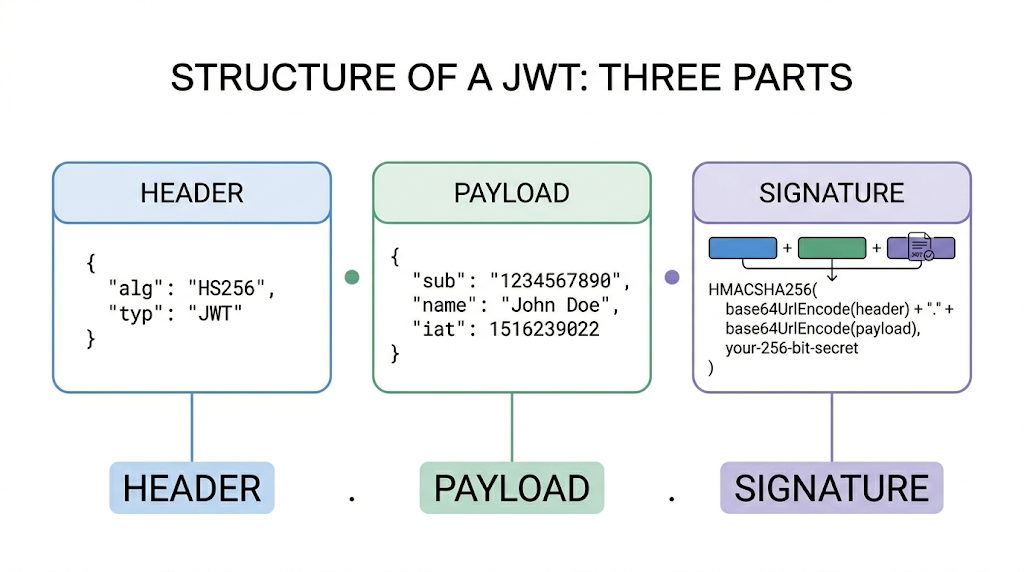
A JWT looks intimidating at first glance — just a long blob of characters. But it has a very precise structure: three Base64URL-encoded sections, separated by dots (.).
Part 1 — The Header
The header is a JSON object that declares the token type and the signing algorithm. It's Base64URL encoded and placed as the first segment.
{
  "alg": "HS256",   // Algorithm: HMAC + SHA-256
  "typ": "JWT"    // Token type: JSON Web Token
}
Common values for alg include HS256 (symmetric key, shared secret), RS256 (RSA asymmetric key pair), and ES256 (Elliptic Curve). The choice of algorithm has significant security implications, which we'll cover in the Signing section.
Part 2 — The Payload
The payload is the actual data — a JSON object of key-value pairs called claims. Claims describe the user or session and carry any additional information the application needs.
{
  "sub":  "user_123",       // Subject: who this token is about
  "name": "Kashyap",        // Custom claim: user's display name
  "role": "admin",         // Custom claim: access role
  "iat":  1716239022,      // Issued At (Unix timestamp)
  "exp":  1716242622       // Expires At (iat + 1 hour)
}
The Payload is NOT Secret The payload is base64‑encoded, not encrypted. Base64URL encoding is not encryption. Anyone who has the token can decode and read the payload. Never put passwords, credit card numbers, or anything sensitive in the payload. JWTs are designed to be tamper-proof, not confidential.
Part 3 — The Signature
The signature is the cryptographic stamp that proves the token has not been altered. The signature is created by combining the encoded header, encoded payload, a secret (or private key), and the algorithm specified in the header.
// Pseudocode
const data = base64url(header) + "." + base64url(payload);

// For HS256 (symmetric)
signature = HMAC_SHA256(data, SECRET_KEY);

// For RS256 (asymmetric)
signature = RSA_SHA256_SIGN(data, PRIVATE_KEY);
The final JWT is just these three parts concatenated with dots: header.payload.signature. If anyone changes even a single character in the payload, the signature will no longer match — and the server will reject the token.
Claims — The Heart of the Payload
A claim is simply a key-value pair inside the payload. The word "claim" reflects the fact that the token is asserting something about a subject — "I claim that this user is an admin" — and the signature is what makes that assertion trustworthy.
Claims are categorised into three types:
Registered Claims (Standardised)
These are defined in RFC 7519. They are not mandatory but are strongly recommended because they are understood by all JWT libraries. They are intentionally short (3 characters) to keep tokens compact.
| Claim | Full Name | Description |
|---|---|---|
iss | Issuer | Who created and signed the token (e.g., "auth.myapp.com") |
sub | Subject | Who the token is about (e.g., a user ID) |
aud | Audience | Who the token is intended for (e.g., "api.myapp.com") |
exp | Expiration | Unix timestamp after which the token must be rejected |
nbf | Not Before | Token is invalid before this Unix timestamp |
iat | Issued At | Unix timestamp when the token was created |
jti | JWT ID | A unique ID for this token — useful for preventing replay attacks |
Public Claims
These are custom claims that you define yourself. To avoid conflicts with other applications, they should either be registered in the IANA JWT Registry or use a collision-resistant name such as a URI (e.g., "https://myapp.com/claims/role").
Private Claims
These are custom claims agreed upon between the specific issuer and consumer of the token — your backend and your frontend, for example. Since they're not shared with anyone else, collision resistance doesn't matter here. Examples: "role", "plan", "teamId".
Practical tip Keep your payload small. Every API call transmits the entire token. Include only what the server actually needs to make an authorization decision — typically user ID, role, and expiration. Avoid embedding profile data that can be fetched on demand.
Signing Algorithms
JWT supports two families of signing algorithms. Choosing the right one depends on your architecture.
Symmetric — HMAC (HS256, HS384, HS512)
Both the issuer and the verifier use the same secret key to sign and verify. This is simple and fast, but requires all verifying services to share the secret — meaning if any one of them is compromised, an attacker can forge tokens.
Best for: single-service architectures or cases where you fully control all verifying parties.
Asymmetric — RSA / ECDSA (RS256, ES256)
The issuing server signs tokens with a private key. Verifying services only need the corresponding public key. Sharing a public key is safe — it cannot be used to forge tokens, only to verify them.
Best for: microservices, multi-tenant systems, and any architecture where tokens are verified by parties you don't fully control (e.g., third-party services).
Never Use
"alg": "none"The JWT specification technically allows a "none" algorithm meaning no signature at all. Some early libraries trusted this — and attackers exploited it to forge arbitrary tokens. Any production-grade library rejects unsigned tokens by default. Always verify that your library is configured to require a valid algorithm.
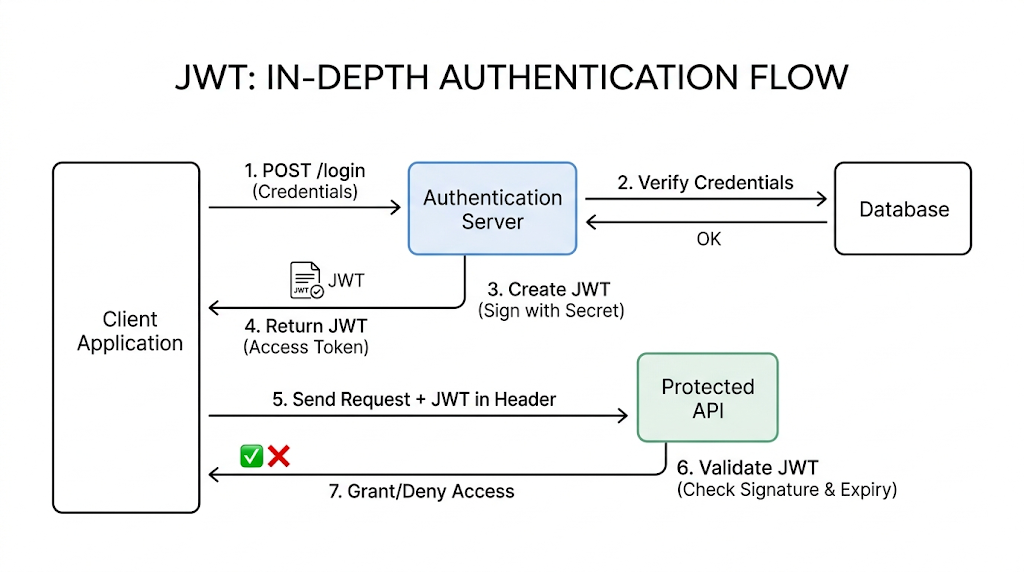
The JWT Authentication Flow
Here is the complete end-to-end flow of JWT-based authentication — from login to accessing a protected resource.
- User submits credentials
The client sends aPOST /loginrequest with username and password over HTTPS. - Server authenticates
The auth server validates the credentials against the database. If correct, it proceeds to generate a token. - Server issues a JWT
The server builds a payload with the user's ID, role, and expiration time, signs it with the secret key, and returns the full token to the client. - Client stores the token
The client stores the JWT — ideally in anHttpOnlycookie to prevent JavaScript access (XSS protection). Local storage is convenient but less secure.
Related read: if you want a practical comparison of where browser auth state should live, see Local Storage vs Session Storage vs Cookies. - Client sends the token on every request
For each API call to a protected endpoint, the client attaches the token in theAuthorizationheader using theBearerschema: - Server verifies and responds
The API server re-computes the signature and checks the claims (exp,iss,aud). If everything checks out, access is granted. No database call needed.
Step 5 — Authorization Header Format
GET /api/playlists HTTP/1.1
Host: api.musicapp.com
Authorization: Bearer eyJhbGciOiJIUzI1NiIsInR5cCI6IkpXVCJ9.eyJzdW...
Step 3 + 6 — Node.js Example (jsonwebtoken library)
const jwt = require('jsonwebtoken');
const SECRET = process.env.JWT_SECRET;

// On login: issue a token
function issueToken(user) {
  return jwt.sign(
    { sub: user.id, role: user.role },
    SECRET,
    { expiresIn: '1h', issuer: 'auth.myapp.com' }
  );
}

// On every protected request: verify the token
function verifyToken(token) {
  try {
    return jwt.verify(token, SECRET, {
      issuer: 'auth.myapp.com'
    }); // Returns decoded payload if valid
  } catch (err) {
    throw new Error('Invalid or expired token');
  }
}
Validation vs. Verification
These two terms are often used interchangeably, but they mean different things and both are necessary.
Verification (Cryptographic)
- Re-computes the signature using the secret/public key
- Confirms the token was issued by a trusted party
- Confirms the header and payload have not been altered
- A single failed bit in the signature rejects the token
Validation (Claims-based)
- Checks
exp: is the token still valid? - Checks
nbf: is it too early to use? - Checks
iss: is the issuer expected? - Checks
aud: is this token meant for us?
A token can pass cryptographic verification but still be invalid — for example, if it was issued yesterday and its exp claim has passed. Your server must always do both.
Trade-offs and Limitations
JWTs are powerful but not a silver bullet. Understanding their limitations will save you from real production incidents.
Strengths
- Stateless — no server memory or session store required
- Self-contained — all info is in the token itself
- Cross-domain — works across microservices and domains
- Language-agnostic — libraries exist for every platform
- Performance — eliminates per-request database lookups
Weaknesses
- Hard to revoke — a valid token stays valid until
exp - Size — larger than an opaque session ID cookie
- Key leak — a leaked secret allows unlimited token forgery
- Complexity — more moving parts than a simple session cookie
The Revocation Problem in Detail
This is the most common gotcha for beginners. Because JWTs are stateless, the server has no record of which tokens it issued. If a user logs out or you need to ban an account, you cannot invalidate a JWT that is already out in the wild — at least not without extra infrastructure.
The standard solutions are:
- Short expiration times
Setexpto a short window (5–15 minutes). Pair with a longer-lived refresh token to silently obtain a new access token. This limits the blast radius of any stolen token. - Token blocklist (denylist)
Store revokedjti(JWT ID) values in a fast store like Redis. On every request, check if the token'sjtiis on the blocklist. This reintroduces some state but only for the invalidated tokens. - Key rotation
Rotating the signing key instantly invalidates all existing tokens — a useful "nuclear option" in a security incident.
Best Practices
Security is not accidental. Here are some rules that matter most when implementing JWTs in production.
- Always Use HTTPS
A JWT transmitted over plain HTTP can be intercepted. Always enforce TLS. There are no exceptions to this rule. - Store Tokens in HttpOnly Cookies
Storing JWTs inlocalStorageorsessionStoragemakes them accessible to any JavaScript running on the page — including malicious scripts injected via XSS attacks. AnHttpOnlycookie is inaccessible to JavaScript by design.
If this choice still feels fuzzy, read Local Storage vs Session Storage vs Cookies next. It covers the browser storage tradeoffs in a more practical, frontend-plus-backend way. - Keep Expiration Times Short
Access tokens should expire in minutes or at most an hour. Use a separate, longer-lived refresh token to renew them silently. This way, even a stolen access token is only useful for a short window. - Never Store Sensitive Data in the Payload
The payload is only Base64URL encoded — not encrypted. Anyone who intercepts the token (even over HTTPS, if they have access to the client device) can decode it. Store only non-sensitive identifiers like user ID and role. - Validate All Registered Claims
Do not assume your library validates everything by default. Explicitly checkexp,iss, andaud. The few lines of code required here prevent entire categories of attacks. - Prefer RS256 / ES256 for Distributed Systems
In any system where multiple services verify tokens, use an asymmetric algorithm. Each service only needs the public key — sharing a private key across services is a security liability.
Verification with explicit claim checks:
// Always pass verification options explicitly
jwt.verify(token, publicKey, {
  algorithms: ['RS256'],      // Never allow 'none'
  issuer:     'auth.example.com',
  audience:   'api.example.com',
  // 'exp' is checked automatically by the library
});
Summary
Use JWTs for stateless, cross-service authorization. Keep them short-lived. Transmit only over HTTPS. Store in HttpOnly cookies. Never put secrets in the payload. Always verify the signature and all critical claims. For multi-service architectures, use RS256 so only one service ever touches the private key.