
Laravel interviews are rarely about memorizing method names. They test whether you understand how the framework fits together: what happens between a request hitting public/index.php and a JSON response going back out, why Eloquent runs one extra query per row when you forget to eager load, how a queued job gets picked up by a worker running in a completely separate process. Once those mental models click, you can reason your way through a question you have never seen phrased quite that way before, even under interview pressure.
This article collects 111 of the most commonly asked Laravel interview questions, aimed at developers with zero to three years of experience. It stays deliberately Laravel-specific: you will not find generic backend theory (HTTP status codes, database normalization, caching strategy in the abstract) or questions about other frameworks here, since those get their own dedicated articles on this site; for that framework-agnostic side of a backend interview, the Top 111 Backend Interview Questions article covers HTTP, databases, caching, and system design. If the PHP language itself feels rusty under the framework abstractions, the PHP Syntax Recap refreshes the syntax and idioms Laravel is built on. What you will find is the stuff that shows up in almost every Laravel interview: the request lifecycle, the service container, routing, middleware, Eloquent, migrations, Blade, authentication, queues and jobs, events, testing, and the practical trade-offs behind them. Each answer starts with a clear definition, explains the reasoning, and includes a short example or code snippet only where it genuinely helps the idea stick.
Laravel Basics and Architecture
1. What is Laravel, and why is it so widely used?
Laravel is a free, open-source PHP web framework for building web applications and APIs. It gives you a well-organized starting point with batteries included: routing, an ORM (Eloquent), a templating engine (Blade), authentication, queues, caching, and testing tools, all wired together and ready to use.
The reason it became so popular is developer experience. Common tasks that take a lot of boilerplate in plain PHP (database access, form validation, sending mail, background jobs) are reduced to a few expressive lines. It also has excellent documentation, a huge ecosystem of first-party packages (Sanctum, Horizon, Nova, Telescope), and a large community, which means most problems you hit already have a well-known solution.
2. How does Laravel implement the MVC pattern?
MVC stands for Model, View, Controller, a way of separating an application into three responsibilities. In Laravel:
- The Model (an Eloquent class in
app/Models) represents your data and the business rules around it, and talks to the database. - The View (a Blade template in
resources/views) is what the user sees, the HTML. - The Controller (a class in
app/Http/Controllers) sits in the middle: it receives the request, asks the model for data, and hands that data to a view to render.
A route maps a URL to a controller method, the controller pulls data from a model, and returns a view. Keeping these separate means your data logic, request handling, and presentation don't get tangled together, which makes the code far easier to change later.
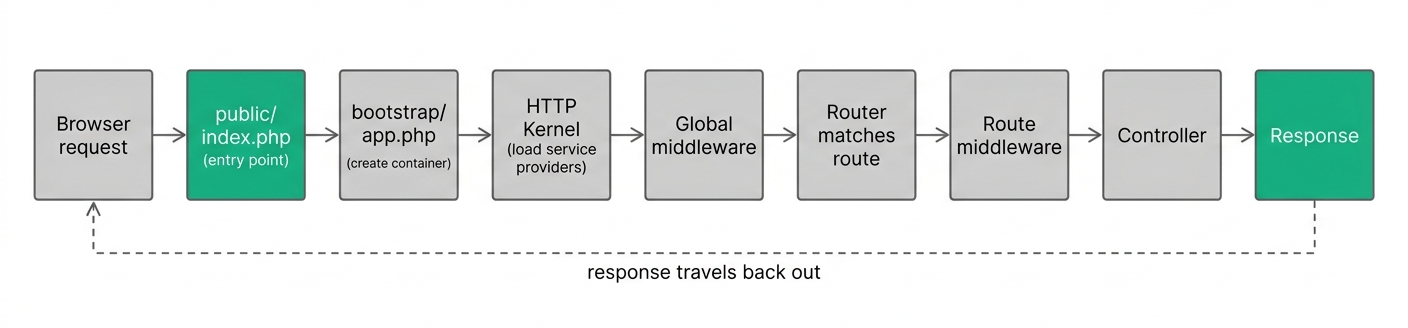
3. Can you walk through the Laravel request lifecycle?
Every request follows the same path, and knowing it explains where things like middleware and service providers fit in.
- The web server sends every request to
public/index.php, the single entry point. - That file loads Composer's autoloader and bootstraps the framework from
bootstrap/app.php, creating the application instance (the service container). - The request is sent into the HTTP kernel, which loads the configured service providers. This
bootphase registers routes, database connections, and everything the app needs. - The request passes through global middleware (things like maintenance-mode checks and CSRF verification).
- The router matches the request to a route, runs that route's middleware, and dispatches to a controller (or closure).
- The controller returns a response, which travels back out through the middleware and is sent to the browser.
4. What is the service container (IoC container) in Laravel?
The service container is Laravel's tool for managing class dependencies and resolving objects for you. Instead of manually creating objects with new everywhere, you ask the container for a class, and it figures out how to build it, including building anything that class itself depends on.
For example, if a controller needs a PaymentGateway, and PaymentGateway needs an HTTP client, you don't wire all that up by hand. You type-hint what you need, and the container constructs the whole chain. This is the foundation that makes dependency injection, facades, and much of Laravel's flexibility work. It's often called the IoC (Inversion of Control) container because the framework, not your code, controls how objects get created.
5. What is dependency injection, and how does Laravel use it?
Dependency injection means a class receives the objects it depends on from the outside, rather than creating them itself. This keeps classes loosely coupled and much easier to test, because you can swap a real dependency for a fake one.
Laravel does this automatically through the service container. The most common form is constructor injection: you type-hint a dependency, and the container provides it.
class OrderController extends Controller
{
    public function __construct(protected PaymentGateway $gateway) {}

    public function store(Request $request)
    {
        $this->gateway->charge($request->amount);
    }
}
You never call new PaymentGateway(); Laravel resolves it for you. You can also method inject by type-hinting parameters directly on a controller method, which is how Request $request shows up everywhere.
6. What are service providers, and what role do they play?
Service providers are the central place where your application is bootstrapped, meaning where things get registered and configured before the app handles a request. Almost every core Laravel feature (database, queues, mail) is booted through a service provider.
A provider is a class with two methods, register() and boot(). In register() you bind things into the service container; in boot() you do setup that may rely on other services already being registered (like defining routes, view composers, or event listeners). You register your own providers in bootstrap/providers.php (or config/app.php in older versions). They are the glue that tells the container how to build the pieces of your app.
7. What is the difference between the register() and boot() methods of a service provider?
Both run at startup, but at different times and for different purposes.
register()runs first, and its only job is to bind things into the service container. You should not try to use other services here, because they may not be registered yet.boot()runs after all providers have been registered, so at this point every binding in the whole application is available. This is where you do work that depends on other services being ready, like registering event listeners, defining gates, or publishing config.
A simple rule: put container bindings in register(), and anything that uses those bindings in boot().
8. What are facades, and how do they actually work under the hood?
A facade is a class that provides a simple, static-looking interface to an object stored in the service container. When you write Cache::get('key') or Route::get(...), you're using a facade.
The trick is that facades are not truly static. Under the hood, every facade extends a base Facade class and defines an accessor key. When you call a static method on it, Laravel intercepts the call, resolves the real underlying object from the container, and forwards your call to it.
// This facade call...
Cache::put('name', 'Kashyap', 60);

// ...is roughly equivalent to:
app('cache')->put('name', 'Kashyap', 60);
So facades give you clean, readable syntax while still using the real, fully testable object behind the scenes. That's why you can even fake a facade in tests with something like Cache::fake().
9. What are contracts in Laravel, and how do they relate to facades?
Contracts are a set of interfaces that define the core services Laravel provides, for example Illuminate\Contracts\Cache\Repository for caching or Illuminate\Contracts\Mail\Mailer for mail. They describe what a service does without tying you to a specific implementation.
The relationship to facades is that they are two ways to use the same underlying service. A facade (Cache::get()) uses a static-looking helper; a contract is injected as an interface through the constructor:
public function __construct(private \Illuminate\Contracts\Cache\Repository $cache) {}
Both end up talking to the same cache service. Contracts are often preferred in larger applications or packages because depending on an interface makes your code more explicit about its dependencies and easier to mock in tests.
10. How does Laravel handle environment configuration with the .env file?
The .env file holds environment-specific settings (database credentials, API keys, the app URL) that differ between your local machine, staging, and production. It's kept out of version control so secrets don't end up in your repository, and .env.example is committed as a template.
Laravel loads these values at startup, and you access them through configuration files in the config/ directory, which read from the environment using the env() helper. This separation means you can deploy the exact same code to different servers, and each behaves correctly just by having a different .env file. Sensitive values never get hard-coded into the application.
11. What is the difference between env() and config(), and why should you not call env() outside config files?
env() reads a raw value directly from the .env file (or the server environment). config() reads from the cached configuration files in config/, which themselves were populated using env().
The important gotcha: once you run php artisan config:cache in production (which you should, for performance), Laravel loads all config from a single cached file and stops reading .env at runtime. Any env() call made outside the config files will then return null. So the rule is: only use env() inside config/ files, and everywhere else in your app use config('services.stripe.key'). This keeps your app working correctly whether or not the config is cached.
Artisan and the Command Line
12. What is Artisan?
Artisan is Laravel's command-line interface, the php artisan tool you run in your terminal. It ships with dozens of helpful commands for common development tasks so you don't have to write repetitive code by hand.
You use it to generate boilerplate (make:controller, make:model, make:migration), run migrations, clear caches, start the dev server (serve), manage queues, and much more. You can also write your own custom commands. It's one of the biggest reasons Laravel feels fast to work with.
13. How do you create a custom Artisan command?
You generate one with php artisan make:command, then define its behavior. This is useful for tasks you run regularly, like sending a weekly report or cleaning up old records.
class SendReports extends Command
{
    protected $signature = 'reports:send {--month=}';
    protected $description = 'Send monthly reports to users';

    public function handle()
    {
        $this->info('Sending reports...');
        // your logic here
    }
}
The $signature defines the command name and any arguments or options, and handle() contains the logic. Once defined, you run it with php artisan reports:send, and (importantly) you can also schedule it to run automatically.
14. What does php artisan tinker do?
Tinker is an interactive REPL (a read-eval-print loop) that boots your full Laravel application and lets you run PHP code against it, live in the terminal. It's incredibly handy for quick experiments and debugging.
You can create records, query models, test a piece of logic, or inspect a relationship without writing a route or a test first:
>>> User::count()
=> 42
>>> User::factory()->create(['name' => 'Test'])
Because it loads the real app, everything (Eloquent, config, services) works exactly as it would in your code. It's often the fastest way to answer "does this query return what I think it does?"
15. What do the optimization commands like config:cache, route:cache, and view:cache do, and when should you run them?
These commands pre-compile parts of your app into fast, cached files so Laravel does less work on each request.
config:cachemerges all config files into one cached file, so Laravel doesn't parse dozens of files per request.route:cachecompiles all route definitions into a single fast-loading file.view:cachepre-compiles all Blade templates into plain PHP ahead of time.
You should run these in production (usually as part of your deployment), where the code doesn't change between requests. You should not use them during local development, because you'd have to rebuild the cache every time you edit a file. If something behaves strangely after deploying, php artisan optimize:clear clears all of these at once.
Routing
16. How do you define routes in Laravel, and what route files exist by default?
Routes map an incoming URL and HTTP method to the code that should handle it (a controller method or a closure). You define them in the routes/ directory.
Route::get('/posts', [PostController::class, 'index']);
Route::post('/posts', [PostController::class, 'store']);
Route::get('/posts/{post}', [PostController::class, 'show']);
By default there's routes/web.php for web pages (these get session state and CSRF protection) and, when you install API support, routes/api.php for stateless API endpoints (these are prefixed with /api and use token auth instead of sessions). There's also console.php for Artisan commands. Grouping routes by file keeps web and API concerns cleanly separated.
17. What are named routes, and why are they useful?
A named route is a route you give a name to, so you can refer to it by that name instead of hard-coding its URL throughout your app.
Route::get('/users/{id}/profile', [UserController::class, 'show'])->name('profile');

// Then generate the URL by name:
route('profile', ['id' => 1]); // /users/1/profile
return redirect()->route('profile', ['id' => 1]);
The benefit is maintainability: if you later change the URL from /users/{id}/profile to /members/{id}, you only change it in one place. Every route('profile') call keeps working, because it references the name, not the path.
18. What is route model binding, and what's the difference between implicit and explicit binding?
Route model binding automatically injects a model instance into your route or controller based on a route parameter, so you don't have to manually look it up.
With implicit binding, you type-hint an Eloquent model and name the route parameter to match. Laravel fetches the matching record by primary key automatically (and returns a 404 if it doesn't exist):
Route::get('/posts/{post}', function (Post $post) {
    return $post; // already fetched by id
});
With explicit binding, you manually tell Laravel how to resolve a parameter (for example, to bind by slug instead of id, or apply custom query logic) in a service provider using Route::model() or Route::bind(). Implicit binding covers the common case; explicit binding is for when you need custom resolution.
19. What are route groups, and what can you share across them?
Route groups let you apply shared attributes to a bunch of routes at once, so you don't repeat yourself. Common shared attributes are middleware, a URL prefix, a name prefix, and a controller.
Route::middleware(['auth'])
    ->prefix('admin')
    ->name('admin.')
    ->group(function () {
        Route::get('/dashboard', [DashboardController::class, 'index'])->name('dashboard');
        Route::get('/users', [UserController::class, 'index'])->name('users');
    });
Here every route inside the group requires authentication, sits under /admin, and gets an admin. name prefix (so the first becomes admin.dashboard). Groups keep related routes consistent and make bulk changes trivial.
20. What is the difference between the web and api middleware groups?
They are two sets of middleware applied to different kinds of routes, defined so web and API requests get the right defaults.
The web group (applied to routes/web.php) includes things like session handling, cookies, and CSRF protection, because browser-based pages need state and form security. The api group (applied to routes/api.php) is stateless: no sessions, no CSRF, and it typically applies rate limiting and expects token-based authentication instead. The distinction matters because an API consumed by mobile apps or JavaScript clients shouldn't rely on cookies and sessions the way a traditional web page does.
21. What is CSRF protection, and how does Laravel apply it?
CSRF (Cross-Site Request Forgery) is an attack where a malicious site tricks a logged-in user's browser into submitting a request to your app without their intent. Laravel protects against it by requiring a secret token on every state-changing request (POST, PUT, PATCH, DELETE) made through the web routes.
When you build a form in Blade, you include the token with the @csrf directive:
<form method="POST" action="/profile">
    @csrf
    <!-- form fields -->
</form>
Laravel generates a token, stores it in the session, and the middleware verifies that the submitted token matches. A forged request from another site won't have the correct token, so it's rejected. API routes don't use CSRF because they rely on tokens instead of session cookies.
22. What is a fallback route?
A fallback route defines what happens when no other route matches the incoming request. It's the last resort, and it lets you control the "not found" experience instead of showing the default 404 page.
Route::fallback(function () {
    return response()->json(['message' => 'Not Found'], 404);
});
This is especially useful for APIs, where you'd rather return a clean JSON error than an HTML error page. It must be defined last, since Laravel evaluates it only after all other routes fail to match.
Middleware
23. What is middleware in Laravel?
Middleware is a layer of code that sits between the incoming request and your application logic, filtering or modifying requests as they pass through. Think of it as a series of checkpoints every request goes through before reaching the controller.
Common uses are authentication (is the user logged in?), CSRF verification, logging, rate limiting, and forcing HTTPS. For example, the built-in auth middleware checks whether a user is authenticated and redirects them to the login page if not. Middleware keeps this cross-cutting logic out of your controllers, so each controller can focus on its actual job.
24. What is the difference between global, route, and group middleware?
They differ in which requests they apply to.
- Global middleware runs on every single HTTP request into the app (for example, checking for maintenance mode). It's registered in
bootstrap/app.php. - Route middleware is assigned to specific routes, so it only runs for those routes (for example,
->middleware('auth')on a dashboard route). - Group middleware is a named bundle of middleware (like the
webandapigroups) applied to a set of routes together.
The idea is to apply the right checks at the right scope: some things every request needs, others only certain routes need.
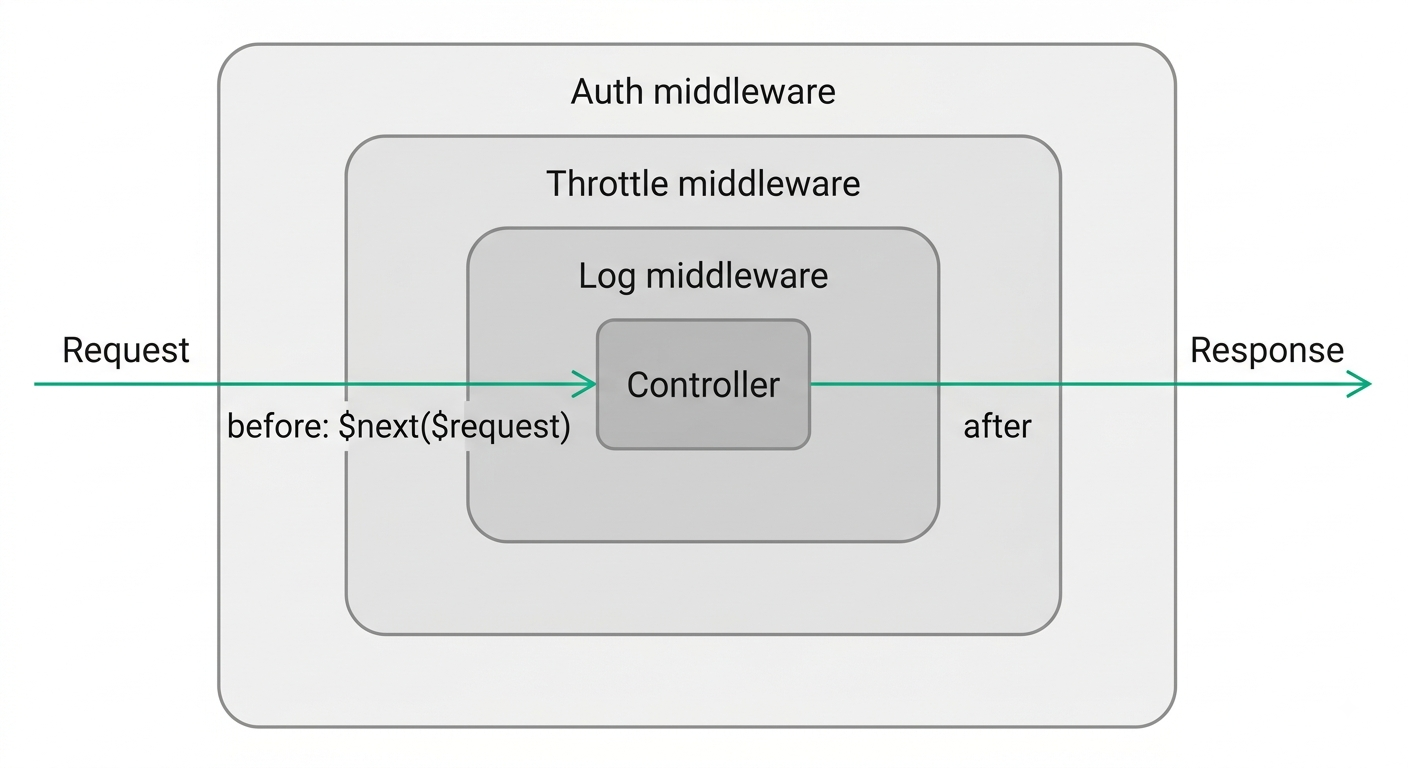
25. What is the difference between "before" and "after" middleware?
The difference is when the middleware does its work relative to the request reaching your application.
Before middleware runs its logic before the request is handled (for example, rejecting an unauthenticated user before the controller ever runs). After middleware runs its logic after the controller has produced a response, so it can inspect or modify that response (for example, adding a security header) on the way out.
public function handle($request, Closure $next)
{
    // "before" logic here (runs on the way in)

    $response = $next($request);

    // "after" logic here (runs on the way out)

    return $response;
}
Everything before $next($request) is "before" logic; everything after it is "after" logic. Because a request passes into each layer and the response passes back out, middleware is often pictured as an onion.
26. How do you pass parameters to a middleware?
You can pass extra arguments to middleware by appending them after a colon in the route definition, separated by commas. This is common for things like role checks.
// Route
Route::put('/post/{id}', ...)->middleware('role:editor');

// Middleware handle signature
public function handle($request, Closure $next, $role)
{
    if (! $request->user()->hasRole($role)) {
        abort(403);
    }
    return $next($request);
}
Here editor is passed into the $role parameter. This lets one flexible middleware handle many cases (role:admin, role:editor) instead of writing a separate class for each.
27. What is terminable middleware?
Terminable middleware is middleware that runs some logic after the response has already been sent to the browser. You define this by adding a terminate() method to the middleware class.
This is useful for slow, non-essential work you don't want to delay the response for, like writing detailed logs or updating session data. Because it happens after the user has already received their response, it doesn't affect how fast the page loads for them. Laravel's own session middleware uses this to save session data at the end of the request.
Controllers, Requests, and Validation
28. What are controllers, and what is a resource controller?
A controller groups related request-handling logic into a single class, instead of putting closures in your route file. For example, a PostController might hold the logic for showing, creating, updating, and deleting posts.
A resource controller is a shortcut for the standard set of CRUD actions. Running php artisan make:controller PostController --resource generates a controller with seven ready-made methods (index, create, store, show, edit, update, destroy), and a single route line wires them all up:
Route::resource('posts', PostController::class);
This creates all the conventional routes (GET /posts, POST /posts, GET /posts/{post}, and so on) at once, keeping your routes consistent and concise.
29. What is a single-action (invokable) controller?
A single-action controller is a controller that handles just one action, using the magic __invoke() method instead of a named method. It's ideal when an action is complex enough to deserve its own class but doesn't fit into a resourceful group.
class GenerateReport extends Controller
{
    public function __invoke(Request $request)
    {
        // build and return the report
    }
}

// Route (no method name needed)
Route::get('/report', GenerateReport::class);
You generate one with make:controller ReportController --invokable. It keeps each focused action neatly self-contained.
30. How does validation work in Laravel?
Validation checks that incoming request data meets your rules before you use it. The simplest way is $request->validate() in a controller, passing an array of field rules.
$validated = $request->validate([
    'title' => 'required|string|max:255',
    'email' => 'required|email|unique:users,email',
    'age'   => 'nullable|integer|min:18',
]);
If validation passes, $validated contains only the validated data, ready to use. If it fails, Laravel automatically stops and redirects the user back with the error messages and their old input (or returns a 422 JSON response for API requests). This means you never have to manually write "if invalid, send back errors" logic; the framework handles it.
31. What is a Form Request, and why would you use one?
A Form Request is a custom request class that holds your validation rules (and authorization logic) outside the controller, keeping the controller clean. You generate one with php artisan make:request StorePostRequest.
class StorePostRequest extends FormRequest
{
    public function authorize(): bool
    {
        return $this->user()->can('create', Post::class);
    }

    public function rules(): array
    {
        return ['title' => 'required|max:255', 'body' => 'required'];
    }
}
Then you just type-hint it in the controller, and validation runs automatically before the method body executes:
public function store(StorePostRequest $request)
{
    Post::create($request->validated());
}
You'd use one when validation rules get long, or when you want to reuse them, or to keep authorization and validation together in one tidy place.
32. What is the difference between $request->input(), $request->query(), and $request->all()?
All three read data from the request, but from different places.
$request->input('name')gets a value from the request body or the query string (it checks both), and is the general-purpose way to read a single field. You can pass a default:$request->input('name', 'guest').$request->query('page')reads only from the URL query string (the part after?).$request->all()returns all input as an array, combining body and query data.
In practice you use input() most of the time, query() when you specifically want a URL parameter, and all() when you want everything at once (though for mass assignment you'd usually prefer validated() or only() for safety).
33. How do you handle file uploads in Laravel?
When a form submits a file, you access it through the request and store it using the filesystem. Laravel makes this a one-liner.
$request->validate(['avatar' => 'required|image|max:2048']);

$path = $request->file('avatar')->store('avatars', 'public');
// $path is something like "avatars/abc123.jpg"
$request->file('avatar') gets the uploaded file, and store() saves it to a disk (here the public disk) with an automatically generated unique name, returning the path you can save to your database. You can also use storeAs() to control the filename. Behind the scenes this uses Laravel's storage abstraction, so switching from local disk to S3 later requires no code changes.
34. What is old input flashing, and how does ->withInput() help?
Old input flashing means temporarily storing the user's submitted form data in the session so you can re-populate the form after a failed submission, instead of making them retype everything.
When validation fails, Laravel does this automatically. If you redirect manually, you opt in with ->withInput():
return redirect()->back()->withInput()->withErrors($validator);
Then in Blade you retrieve a previous value with the old() helper:
<input name="email" value="{{ old('email') }}">
This is a small but important detail for good user experience: a form that clears itself on every error is frustrating, and old input prevents that.
Eloquent ORM
35. What is Eloquent, and what design pattern does it follow?
Eloquent is Laravel's ORM (Object-Relational Mapper). It lets you interact with your database using PHP objects and methods instead of writing raw SQL. Each database table has a corresponding model class, and each row becomes an instance of that model.
It follows the Active Record pattern, meaning the model is responsible both for representing a row of data and for the database operations on it (saving, updating, deleting). So a single $user object holds the data and knows how to persist itself:
$user = User::find(1);
$user->name = 'New Name';
$user->save();
This makes database code read almost like plain English, which is a big part of Eloquent's appeal.
36. What is the difference between Eloquent and the Query Builder?
Both let you query the database, but at different levels of abstraction.
Eloquent works with model objects and gives you relationships, accessors, events, and other high-level features. It returns model instances (or collections of them).
$users = User::where('active', true)->get(); // collection of User models
The Query Builder is a lower-level, fluent interface for building SQL queries. It returns plain stdClass objects or arrays, not models, and has no concept of relationships or model events.
$users = DB::table('users')->where('active', true)->get(); // generic objects
Eloquent is actually built on top of the Query Builder. You use Eloquent for most application code because of its convenience, and drop down to the Query Builder for performance-sensitive queries or complex reporting where you don't need model features. If the underlying SQL itself feels shaky (keys, joins, indexes, schema design), the SQL Made Dead Simple guide covers the relational fundamentals both of these build on.
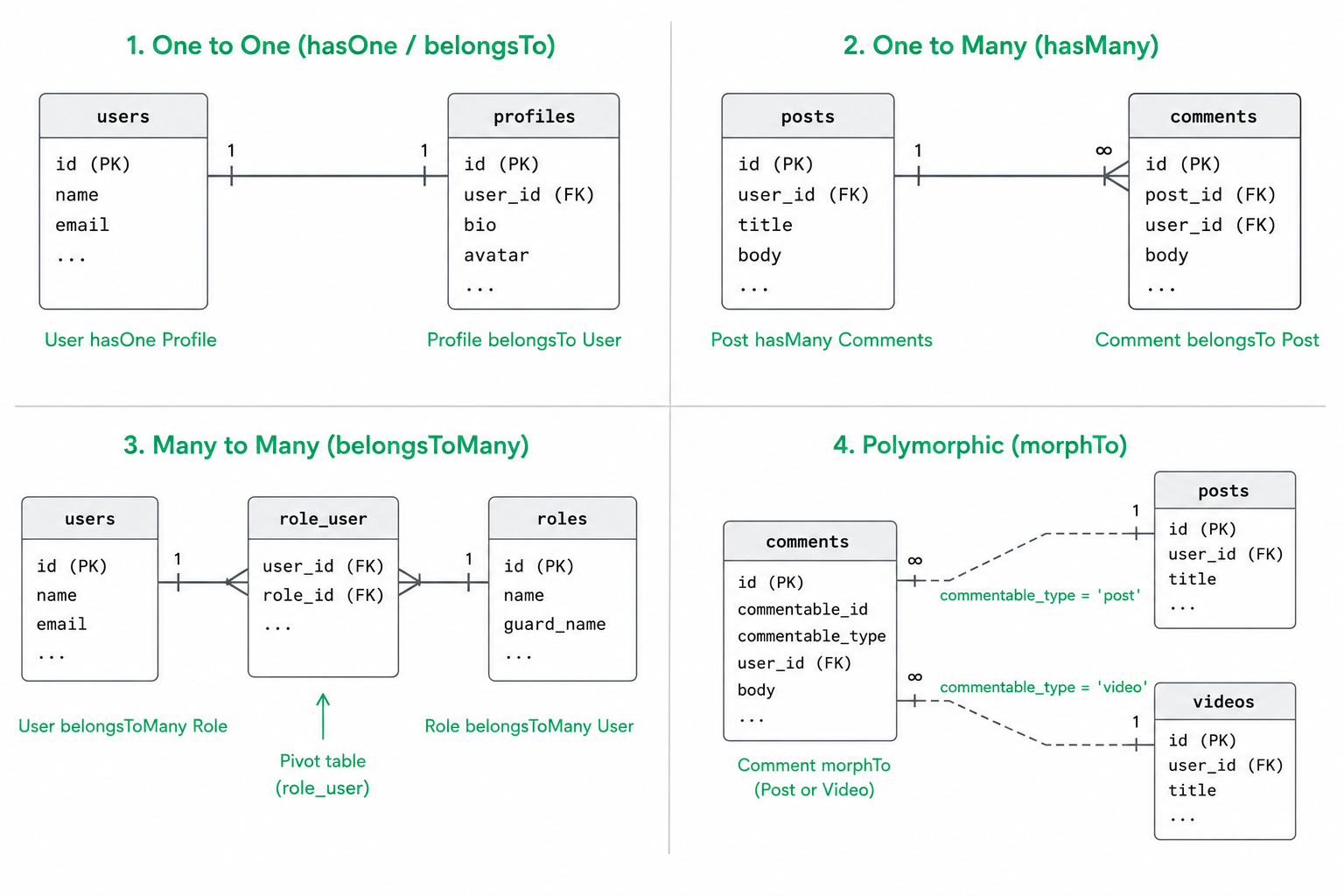
37. What Eloquent relationships does Laravel support?
Eloquent lets you define how models relate to each other, so you can navigate related data as if it were object properties. The main types are:
- One to One (
hasOne/belongsTo): aUserhas oneProfile. - One to Many (
hasMany/belongsTo): aPosthas manyComments. - Many to Many (
belongsToMany): aUserhas manyRoles and a role has many users, joined through a pivot table. - Has Many Through (
hasManyThrough): access distant relations, like aCountryhas manyPosts throughUser. - Polymorphic (
morphTo/morphMany): aCommentcan belong to either aPostor aVideothrough one relationship.
class Post extends Model
{
    public function comments()
    {
        return $this->hasMany(Comment::class);
    }
}

// Usage
$post->comments; // collection of related comments
Once defined, relationships also power eager loading and let you query related data expressively.
38. What is the N+1 query problem, and how does eager loading fix it?
The N+1 problem happens when you load a list of records and then access a relationship on each one inside a loop, causing one extra query per record. For 100 posts, that's 1 query for the posts plus 100 queries for their authors, so 101 queries total.
$posts = Post::all(); // 1 query
foreach ($posts as $post) {
    echo $post->author->name; // 1 query EACH time = N queries
}
Eager loading fixes it by fetching the related data upfront in just one additional query, using with():
$posts = Post::with('author')->get(); // 2 queries total, no matter how many posts
foreach ($posts as $post) {
    echo $post->author->name; // no extra queries
}
This is one of the most common and important Eloquent performance issues, and interviewers love asking about it because it's so easy to trip over.
39. What is the difference between with(), load(), and withCount()?
All three deal with relationships, but they're used in different situations.
with()is eager loading: you load the relationship at the same time as the main query. Use it when you know upfront you'll need the relation.load()is lazy eager loading: you load a relationship onto models you already fetched. Use it when you have a model in hand and then decide you need its relation.withCount()loads just the count of a relationship, not the records themselves, into an attribute likecomments_count. Use it when you only need "how many," not the actual related rows.
$posts = Post::with('comments')->get();     // load comments upfront
$posts->load('author');                      // add author afterwards
$posts = Post::withCount('comments')->get(); // gets $post->comments_count
40. What are accessors and mutators?
Accessors and mutators let you transform an attribute's value when you read it or write it on a model, so the transformation logic lives in the model instead of being scattered around.
An accessor formats a value when you get it; a mutator formats it when you set it. In modern Laravel both are defined together in one method:
protected function name(): Attribute
{
    return Attribute::make(
        get: fn ($value) => ucfirst($value),        // accessor
        set: fn ($value) => strtolower($value),     // mutator
    );
}
Now reading $user->name returns it capitalized, and setting it stores it lowercased. A classic use is hashing a password on set, or combining first and last name into a full_name on get.
41. What are attribute casts, and how do they differ from accessors?
Casts automatically convert an attribute to a common data type when you read it from or write it to the database, using a simple declaration instead of custom logic. Databases store everything as strings or numbers, so casts save you from converting manually every time.
protected function casts(): array
{
    return [
        'is_admin'   => 'boolean',
        'options'    => 'array',      // JSON column <-> PHP array
        'published_at' => 'datetime', // string <-> Carbon instance
    ];
}
Now $user->is_admin is a real true/false, and $user->options is an array you can work with directly. The difference from an accessor is that casts are for standard type conversions (boolean, array, date, decimal), declared in one line, whereas accessors are for custom formatting logic you write yourself. Reach for a cast first; use an accessor when no built-in cast fits.
42. What is mass assignment, and what's the difference between $fillable and $guarded?
Mass assignment is creating or updating a model by passing an array of attributes at once, like User::create($request->all()). It's convenient, but risky: if a user sneaks an unexpected field (like is_admin) into the request, it could get written to the database. This is a mass assignment vulnerability.
Laravel protects against this by requiring you to declare which attributes are safe to mass assign, using one of two opposite properties:
$fillableis an allowlist: only these attributes can be mass assigned.$guardedis a blocklist: everything except these can be mass assigned.
protected $fillable = ['name', 'email', 'password']; // only these are allowed
// OR
protected $guarded = ['id', 'is_admin']; // everything except these is allowed
You use one or the other, not both. $fillable is generally considered safer because you explicitly list what's permitted rather than trying to remember everything to block.
43. What are query scopes (local and global)?
Query scopes let you package common query constraints into reusable methods, so you don't repeat the same where clauses everywhere.
A local scope is a method you call explicitly. You define it with a scope prefix and call it without that prefix:
public function scopePublished($query)
{
    return $query->where('status', 'published');
}

// Usage
Post::published()->latest()->get();
A global scope is applied automatically to every query on a model until you explicitly remove it. A common use is a "tenant" scope that always filters records to the current user's organization, or soft deletes (which are implemented as a global scope). Local scopes keep your code DRY; global scopes enforce a constraint you never want to forget.
44. What are soft deletes, and how do they work?
Soft deletes let you "delete" a record without actually removing it from the database. Instead, Laravel sets a deleted_at timestamp, and the record is then automatically hidden from normal queries.
You enable it by adding the SoftDeletes trait to a model and a deleted_at column to the table:
use Illuminate\Database\Eloquent\SoftDeletes;

class Post extends Model
{
    use SoftDeletes;
}
Now $post->delete() just stamps deleted_at, and the row is excluded from queries by default. You can still retrieve trashed records with withTrashed(), restore them with restore(), or permanently remove them with forceDelete(). This is invaluable when you need an "undo" or an audit trail, like recovering an accidentally deleted account.
45. What are model events and observers?
Model events are hooks that fire automatically at points in a model's lifecycle, such as creating, created, updating, deleted, and so on. They let you run logic in response to database changes without cluttering your controllers.
An observer is a dedicated class that groups all of a model's event handlers together, which is cleaner than defining them inline.
class UserObserver
{
    public function created(User $user)
    {
        // e.g. send a welcome email whenever a user is created
    }
}
After registering the observer, its methods run automatically whenever the matching event occurs. This is perfect for side effects like sending notifications, logging changes, or setting a default value (for example, generating a slug in the creating event).
46. What is the difference between find(), first(), firstOrFail(), and findOrFail()?
They all retrieve a single record, but differ in how they find it and what they do when nothing matches.
find($id)looks up a record by its primary key and returnsnullif not found.first()returns the first record matching the current query constraints, ornullif none match.findOrFail($id)is likefind()but throws aModelNotFoundException(which Laravel turns into a 404 response) instead of returningnull.firstOrFail()is likefirst()but also throws a 404 when nothing matches.
User::find(1);                       // User or null
User::where('email', $e)->first();   // User or null
User::findOrFail(1);                 // User or 404
The OrFail variants are handy in controllers where a missing record should just return a 404 automatically, saving you a manual if (! $user) abort(404) check.
47. What is the difference between get() and all()?
Both return a collection of models, but they differ in whether you can constrain the query.
all() retrieves every row in the table with no conditions; it's a static shortcut. get() runs the query you've built up with conditions like where, orderBy, or limit.
User::all();                                  // every user
User::where('active', true)->orderBy('name')->get(); // filtered and sorted
So all() is fine for small tables you truly want in full, but for anything real you'll almost always use get() at the end of a query chain. A common beginner mistake is calling all() and then filtering in PHP, which pulls the whole table into memory; adding a where and using get() lets the database do the filtering.
48. What is the difference between save(), create(), and update()?
These are three ways to write data with Eloquent.
save()is called on a model instance. You set attributes, then callsave()to persist them (it inserts a new row if the model is new, or updates it if it already exists).create()is a static method that makes and saves a new record in one step from an array, and relies on mass assignment ($fillable).update()is called on an existing model (or a query) to change attributes and save in one step.
$user = new User;
$user->name = 'Kashyap';
$user->save();                       // insert

User::create(['name' => 'Kashyap']); // make + insert

$user->update(['name' => 'New']);    // update existing
create() and update() are the convenient array-based shortcuts; save() is the lower-level workhorse they build on.
49. What do firstOrCreate(), firstOrNew(), and updateOrCreate() do?
These are convenience methods for the common "find it, or make it" pattern, so you avoid writing a manual check-then-insert.
firstOrCreate($attributes)finds the first record matching the attributes, or creates and saves it if none exists.firstOrNew($attributes)is the same, but returns a new unsaved instance if none exists (you callsave()yourself later).updateOrCreate($search, $values)finds a matching record and updates it, or creates a new one if none is found.
// find a user by email, or create one
User::firstOrCreate(['email' => $email], ['name' => $name]);

// update a setting if it exists, otherwise create it
Setting::updateOrCreate(['key' => 'theme'], ['value' => 'dark']);
These prevent duplicate rows and race-y "check if exists first" code, which is why they show up so often in real projects (importing data, syncing settings, upserting records).
50. What is a pivot table, and how do you access extra pivot columns?
A pivot table is an intermediate table that connects two models in a many-to-many relationship. For a users and roles relationship, the pivot table role_user holds pairs of user_id and role_id linking them.
Sometimes the pivot needs extra data, like when a role was assigned. You declare those columns with withPivot() and then read them via the pivot property:
public function roles()
{
    return $this->belongsToMany(Role::class)->withPivot('assigned_at');
}

// Access it:
foreach ($user->roles as $role) {
    echo $role->pivot->assigned_at;
}
You can also add withTimestamps() so the pivot auto-manages created_at/updated_at. Understanding the pivot is key to working with many-to-many relationships correctly.
51. What are polymorphic relationships?
A polymorphic relationship lets a single model belong to more than one other type of model using just one association. The classic example is comments: a Comment might belong to a Post, a Video, or a Photo, and you don't want a separate comments table for each.
Instead of many foreign keys, the comments table gets two columns: commentable_id (the related record's id) and commentable_type (which model class it is). The pair together identifies exactly what the comment belongs to.
class Comment extends Model
{
    public function commentable()
    {
        return $this->morphTo();
    }
}

class Post extends Model
{
    public function comments()
    {
        return $this->morphMany(Comment::class, 'commentable');
    }
}
Now $post->comments and $video->comments both work through the same Comment model. It keeps your schema clean when several unrelated models share the same kind of child records.
52. How do you efficiently process very large result sets?
Loading millions of rows at once with get() will exhaust your memory. Laravel provides ways to process big datasets in small pieces instead.
chunk()fetches records in batches of a given size, running a callback on each batch:
User::chunk(500, function ($users) {
    foreach ($users as $user) {
        // process each user
    }
});
cursor()uses a database cursor and PHP generators to fetch one row at a time, keeping only a single model in memory (great for read-only iteration).lazy()is similar to chunk but gives you a single flatLazyCollectionto iterate over.
The key idea is the same: never pull an enormous table fully into memory; stream it in manageable pieces so memory usage stays flat regardless of table size.
53. What are model factories and seeders?
Factories define blueprints for generating fake model data, and seeders use them to populate your database. Together they let you fill your app with realistic test data quickly.
A factory describes what a fake model looks like, using the Faker library:
class UserFactory extends Factory
{
    public function definition(): array
    {
        return [
            'name'  => fake()->name(),
            'email' => fake()->unique()->safeEmail(),
        ];
    }
}
A seeder then creates many of them:
User::factory()->count(50)->create();
Factories are essential in testing (each test can spin up exactly the records it needs), and seeders are great for local development so you're not staring at an empty app.
54. What is the difference between pluck() and select()?
Both narrow down what you get back, but they operate differently.
select() limits which columns the query fetches from the database, but you still get full model objects (with only those columns populated):
User::select('id', 'name')->get(); // collection of User models
pluck() returns a simple collection of a single column's values (optionally keyed by another column), not model objects:
User::pluck('name');          // ['Alice', 'Bob', ...]
User::pluck('name', 'id');    // [1 => 'Alice', 2 => 'Bob']
Use select() when you want models but fewer columns for efficiency, and pluck() when you just want a flat list of values, like for a dropdown.
Migrations and Database
55. What are migrations, and why are they useful?
Migrations are version control for your database schema. Each migration is a PHP file describing a change to the database (creating a table, adding a column), so your schema lives in code alongside your app.
Schema::create('posts', function (Blueprint $table) {
    $table->id();
    $table->string('title');
    $table->text('body');
    $table->timestamps();
});
The big win is teamwork and consistency: instead of emailing SQL scripts around, everyone runs php artisan migrate and gets the exact same schema. It also makes changes reproducible across local, staging, and production environments, and gives you a clear history of how the schema evolved.
56. What is the difference between migrate, migrate:rollback, migrate:refresh, and migrate:fresh?
These commands manage the state of your migrations, and mixing them up in production can be dangerous, so it's worth knowing precisely.
migrateruns any migrations that haven't run yet.migrate:rollbackundoes the last batch of migrations by calling theirdown()methods.migrate:refreshrolls back all migrations and then re-runs them (rollback + migrate), preserving thedown()logic.migrate:freshdrops all tables and re-runs every migration from scratch (it ignoresdown()entirely).
The critical distinction: refresh walks back through your down() methods, while fresh just wipes the whole database. Both destroy data, so they're for development only, never production.
57. How do you define foreign key constraints in a migration?
A foreign key enforces a relationship between tables at the database level, ensuring, for example, that a comment's post_id actually points to a real post. Laravel gives you a clean helper for this.
Schema::create('comments', function (Blueprint $table) {
    $table->id();
    $table->foreignId('post_id')
        ->constrained()
        ->onDelete('cascade');
    $table->text('body');
});
foreignId('post_id')->constrained() creates the column and links it to the posts table's id automatically (by convention). onDelete('cascade') says that when a post is deleted, its comments should be deleted too. This keeps your data consistent and prevents orphaned rows.
58. How does Laravel protect against SQL injection?
SQL injection is when an attacker sneaks malicious SQL into an input to manipulate your query. Laravel protects against it by using parameter binding through PDO under the hood: user values are sent to the database separately from the SQL statement, so they're always treated as data, never as executable SQL.
Whenever you use Eloquent or the Query Builder, this happens automatically:
// Safe: the email is bound as a parameter, not concatenated into SQL
User::where('email', $request->email)->first();
The main way to lose this protection is by writing raw queries that concatenate user input directly, like DB::raw("... = $input"). As long as you pass user input through bindings (whereRaw('email = ?', [$input])) or stick to the builder, you're safe by default.
59. What are database transactions in Laravel, and how do you use them?
A transaction groups several database operations so they all succeed together or all fail together, leaving no half-finished state. If something throws an exception midway, everything rolls back.
The easiest way is the DB::transaction() closure, which commits automatically on success and rolls back on any exception:
DB::transaction(function () {
    $order = Order::create([...]);
    $order->items()->createMany([...]);
    Inventory::decrement('stock', $qty);
});
If the inventory update fails, the order and its items are undone too, so you never end up with an order that has no items. This is essential for operations that must stay consistent, like transferring money or processing a multi-step checkout.
Blade Templating
60. What is Blade?
Blade is Laravel's templating engine, used to build the HTML views your users see. It lets you write clean templates with special directives (like @if and @foreach) mixed into HTML, without the clutter of raw PHP tags everywhere.
Blade templates are compiled into plain PHP and cached, so they add virtually no runtime overhead. Its main benefits are readable syntax, template inheritance (so you define a layout once and reuse it), reusable components, and built-in protection against XSS when you echo data. Files live in resources/views with a .blade.php extension.
61. What is the difference between {{ }} and {!! !!}?
Both output data in a Blade template, but they differ in a security-critical way.
{{ $value }} escapes the output, converting HTML characters into harmless entities. This protects you from XSS (cross-site scripting) attacks, so it's the safe default you should use almost always.
{!! $value !!} outputs the value as raw, unescaped HTML. You'd only use it when you intentionally want to render HTML (for example, content from a trusted rich-text editor).
{{ $comment }}   {{-- <script> becomes harmless text --}}
{!! $trustedHtml !!}  {{-- renders actual HTML --}}
The rule: use {{ }} by default, and only reach for {!! !!} when you're certain the content is safe, because using it on user input opens an XSS hole.
62. What are Blade layouts using @extends, @section, and @yield?
Blade layouts let you define a common page skeleton once (header, footer, navigation) and have individual pages fill in just the parts that change, avoiding repetition across every view.
The layout defines placeholders with @yield:
{{-- layouts/app.blade.php --}}
<html>
<body>
    <main>@yield('content')</main>
</body>
</html>
A child page extends it and provides content for those placeholders with @section:
@extends('layouts.app')

@section('content')
    <h1>Welcome</h1>
@endsection
You can also use @stack and @push to inject page-specific scripts or styles into the layout. This inheritance model keeps your markup DRY. Newer Laravel also offers component-based layouts as an alternative approach.
63. What are Blade components and slots?
Blade components are reusable pieces of UI (a button, a card, an alert) that you define once and reuse anywhere, with the ability to pass in data. They make templates modular, like small building blocks.
{{-- resources/views/components/alert.blade.php --}}
<div class="alert alert-{{ $type }}">
    {{ $slot }}
</div>
You use it as a custom HTML-like tag, and whatever you put inside becomes the $slot:
<x-alert type="danger">
    Something went wrong!
</x-alert>
The $slot is the main content passed between the tags. Components can also have named slots (for a title and body, say) and can be class-backed for more logic. They're the modern, cleaner alternative to @include for building a component library.
64. What is the difference between @include and a Blade component?
Both let you reuse a piece of a view, but they work differently.
@include simply pulls another Blade file into the current one, and that partial shares all the variables of the parent view by default. It's a straightforward "paste this file here" tool, fine for simple partials.
A component is more encapsulated: it has its own isolated data (you pass in exactly the props it needs), supports slots for content, and can be backed by a class with logic. It behaves like a self-contained widget rather than an inlined snippet.
Use @include for a quick, dumb partial that just needs the parent's data; use a component when you want a reusable, well-defined element with a clear interface, which scales better as the app grows.
65. What do directives like @forelse, @isset, and @auth do?
Blade has many convenience directives that make templates cleaner than writing raw PHP conditions. A few common ones:
@forelse ... @empty ... @endforelseloops over a collection but has a built-in fallback for when it's empty:
@forelse ($posts as $post)
    <li>{{ $post->title }}</li>
@empty
    <li>No posts yet.</li>
@endforelse
@isset($var)renders its block only if the variable is set (and not null), and@empty($var)checks the opposite.@authand@guestrender content based on whether the user is logged in, so you can show a "Dashboard" link to authenticated users and a "Login" link to guests without writing anifaroundauth()->check().
These directives express common view logic more readably and are worth knowing because they come up constantly in real templates.
Authentication and Authorization
66. How does authentication work in Laravel?
Authentication is the process of verifying who a user is (logging them in). Laravel handles the heavy lifting: it provides the Auth system, session management, password hashing, and helpers to check the logged-in user.
At a high level, when a user submits valid credentials, Laravel verifies the password against the stored hash and, if it matches, marks them as authenticated (storing their identity in the session for web apps, or issuing a token for APIs). You then access the current user with auth()->user() or the Auth facade, and protect routes with the auth middleware. Rather than building all this from scratch, you typically use a starter kit that scaffolds the login, registration, and password reset flows for you.
67. What are the official auth starter kits, and how do they differ?
Laravel offers a few first-party packages to scaffold authentication so you don't build it from zero. The main ones:
- Breeze is the simplest: minimal, easy to read, with login, registration, password reset, and email verification. Great for learning and for straightforward apps. It comes in Blade, React/Vue (Inertia), or API flavors.
- Jetstream is more feature-rich: it adds two-factor authentication, session management, team support, and profile management, built on Livewire or Inertia.
- Fortify is a headless backend-only implementation (no views). It provides the authentication logic and routes, and you build your own UI on top. Jetstream actually uses Fortify under the hood.
You'd pick Breeze to start simple, Jetstream when you need those extra features out of the box, and Fortify when you want full control over the frontend.
68. What is Laravel Sanctum, and when should you use it?
Sanctum is Laravel's lightweight package for API authentication. It handles two main use cases: issuing simple API tokens for things like mobile apps or third-party access, and SPA authentication where a JavaScript frontend (React, Vue) talks to your Laravel backend using cookies.
// Issue a token
$token = $user->createToken('mobile-app')->plainTextToken;

// Protect a route
Route::middleware('auth:sanctum')->get('/user', fn (Request $r) => $r->user());
You reach for Sanctum when you need straightforward API authentication without the complexity of full OAuth. For most apps (a mobile client, or a first-party SPA), it's the recommended choice because it's simple and covers the common needs.
69. What is Laravel Passport, and how is it different from Sanctum?
Passport is a full OAuth2 server implementation for Laravel. It's heavier and more complex than Sanctum, providing the complete OAuth2 flow with authorization codes, access and refresh tokens, scopes, and the ability for third-party applications to request access on a user's behalf. Its access tokens are JWTs, so for how those are structured, signed, and verified under the hood, see Everything You Actually Need to Know About JWT.
The difference comes down to needs. Sanctum is for simple token or SPA authentication (most apps). Passport is for when you genuinely need OAuth2, for example, you're building a public API that external developers will integrate with, and you need standardized OAuth flows. As a rule of thumb: start with Sanctum, and only move to Passport if you specifically require OAuth2 features. Using Passport when you just need simple tokens is overkill.
70. What are guards and providers in the auth config?
These are two concepts in config/auth.php that define how users are authenticated and where they come from.
A guard defines how users are authenticated for each request. The web guard uses sessions and cookies; the sanctum or api guard uses tokens. Guards let one app authenticate different clients in different ways.
A provider defines how users are actually retrieved from storage, for example the users provider using Eloquent to fetch from the users table.
'guards' => [
    'web' => ['driver' => 'session', 'provider' => 'users'],
],
'providers' => [
    'users' => ['driver' => 'eloquent', 'model' => App\Models\User::class],
],
So a guard answers "how do I check who this is?" and a provider answers "where do I look them up?" You can define multiple guards if, say, admins and customers live in different tables.
71. What is the difference between authentication and authorization in Laravel?
They sound similar but answer different questions. Authentication is "who are you?", verifying identity through login. Authorization is "what are you allowed to do?", checking permissions once we know who someone is.
In Laravel, authentication is handled by the Auth system, guards, and the auth middleware. Authorization is handled by Gates and Policies, which you check with methods like $user->can('update', $post) or the @can Blade directive. A user can be authenticated (logged in) but not authorized (not allowed to delete someone else's post). Interviewers ask this to make sure you don't conflate logging in with having permission.
72. What are Gates?
Gates are simple, closure-based checks for authorizing actions that aren't tied to a specific model. You define them (usually in a service provider) with a name and a closure that returns true or false.
Gate::define('access-admin', function (User $user) {
    return $user->is_admin;
});

// Check it
if (Gate::allows('access-admin')) {
    // user can access the admin area
}
You can also check with $user->can('access-admin') or the @can('access-admin') Blade directive. Gates are best for broad, app-wide permissions (like "can view the dashboard") that don't revolve around a particular record.
73. What are Policies, and when do you use them over Gates?
Policies are classes that organize authorization logic around a specific model. Where a gate is a standalone closure, a policy groups all the permission checks for one model (a PostPolicy holds view, update, delete, and so on).
class PostPolicy
{
    public function update(User $user, Post $post): bool
    {
        return $user->id === $post->user_id;
    }
}

// Check it
$this->authorize('update', $post); // in a controller
You use a policy when authorization is about a model and its ownership (can this user edit this post?), and a gate for simpler, model-independent checks. Policies keep model-related permission rules tidy and discoverable in one class instead of scattered closures.
74. How does Laravel hash and store passwords?
Laravel never stores passwords in plain text. It hashes them using the bcrypt algorithm by default (Argon2 is also available), which is a slow, one-way function designed specifically for passwords.
use Illuminate\Support\Facades\Hash;

$user->password = Hash::make($request->password); // store the hash

// Later, to verify at login:
Hash::check($request->password, $user->password); // true or false
Because hashing is one-way, you can't reverse a hash back into the original password; at login you hash the attempt and compare. Bcrypt is deliberately slow and includes an automatic random salt per password, which makes brute-force and precomputed attacks impractical. Laravel's auth scaffolding does all this for you, so you rarely call Hash directly except when building custom flows.
Events, Queues, and Scheduling
75. What are events and listeners in Laravel?
Events and listeners implement the observer pattern, letting you decouple parts of your application. An event announces that something happened (like OrderShipped), and one or more listeners react to it, without the code that fired the event needing to know who's listening.
// Fire an event
OrderShipped::dispatch($order);

// A listener reacts to it
class SendShipmentNotification
{
    public function handle(OrderShipped $event)
    {
        // notify the customer
    }
}
The benefit is separation of concerns: your checkout code just says "an order shipped," and separate listeners handle emailing the customer, updating analytics, and notifying the warehouse. You can add or remove listeners without touching the code that fires the event, which keeps things flexible and clean.
76. What is the difference between an observer and an event listener?
Both react to something happening, but they're scoped differently.
An observer is specifically tied to a model's lifecycle events (created, updated, deleted). It's the natural choice when your logic responds to database changes on a particular model, and its methods map directly to those model events.
An event listener responds to any custom event you define anywhere in your app, not just model changes. It's more general-purpose: you dispatch an event manually (like PaymentReceived) and the listener handles it.
In short, use an observer for "when this model changes," and an event/listener for broader "when this business thing happens." Observers are really a specialized, model-focused convenience built on the same event system.
77. What are queues, and what problem do they solve?
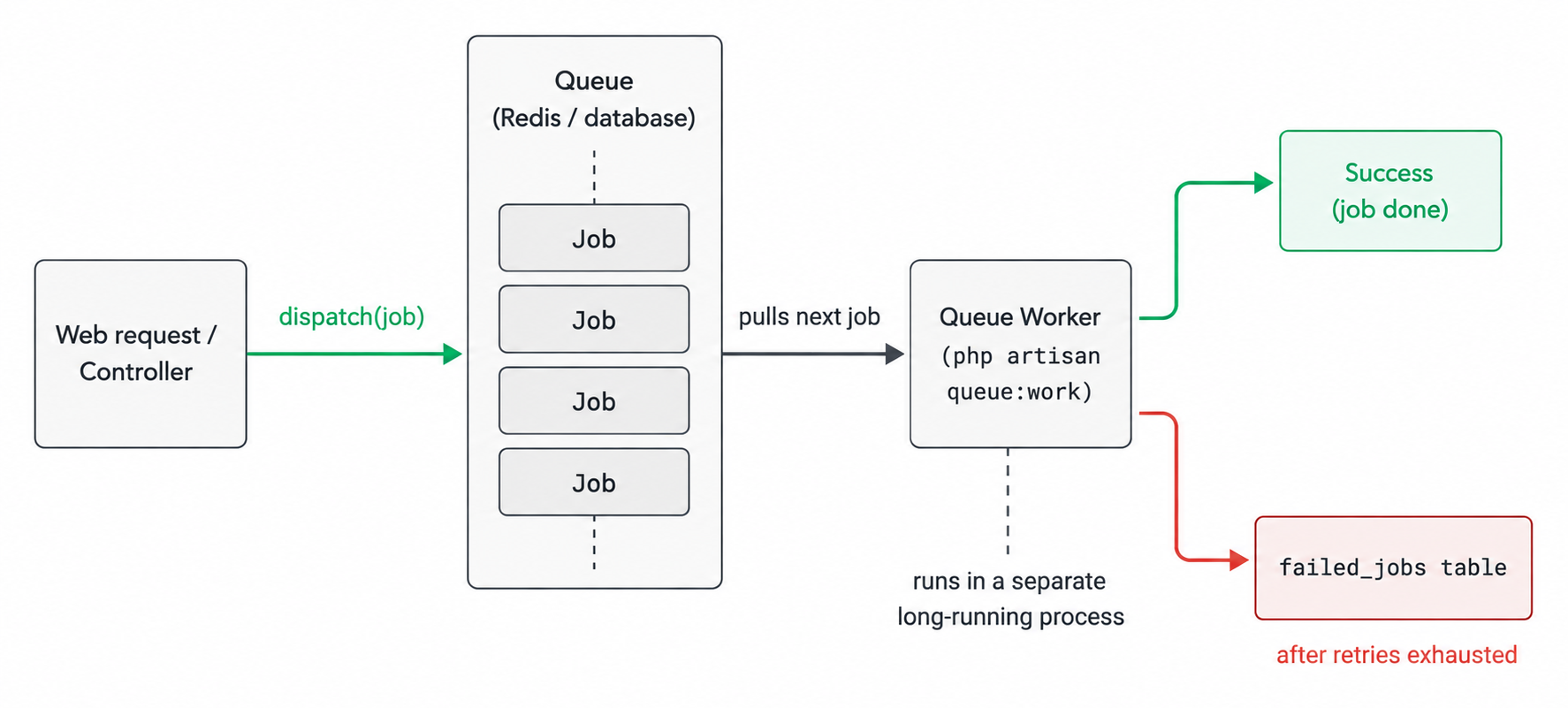
A queue lets you defer time-consuming tasks to be processed in the background, instead of making the user wait for them during a web request. Things like sending emails, processing images, or calling a slow external API don't need to block the response.
Without a queue, a user submitting a form that sends an email waits for the email to send before seeing "Success." With a queue, you push the email onto the queue and respond instantly; a separate worker process picks it up and sends it a moment later. This makes your app feel fast and helps it handle spikes in load, because heavy work is spread out and processed steadily rather than all at once.
78. What is a Job, and how do you dispatch one?
A Job is a class that represents a single unit of work to be run, usually on a queue. You generate one with php artisan make:job, and put the task logic in its handle() method.
class ProcessPodcast implements ShouldQueue
{
    public function __construct(public Podcast $podcast) {}

    public function handle(): void
    {
        // heavy processing here
    }
}

// Dispatch it onto the queue
ProcessPodcast::dispatch($podcast);
Implementing the ShouldQueue interface tells Laravel to run the job in the background rather than immediately. You can also delay it (->delay(now()->addMinutes(5))) or send it to a specific queue. Dispatching is how you hand work off to be processed later by a worker.
79. What is the difference between queue:work and queue:listen?
Both are commands that start a worker to process queued jobs, but they behave differently regarding code changes.
queue:work starts a long-running process that boots the framework once and keeps it in memory to process jobs quickly. Because it holds the code in memory, it does not pick up code changes until you restart it, which makes it efficient and the right choice for production (usually managed by a process supervisor).
queue:listen boots the framework fresh for every job, so it automatically uses your latest code without a restart. That's convenient during development but much slower and heavier.
The rule: use queue:work in production for performance (and remember to restart it on deploy with queue:restart), and queue:listen only when you're actively developing and want changes picked up immediately.
80. How does Laravel handle failed jobs and retries?
When a queued job throws an exception, Laravel can automatically retry it a set number of times before giving up. You control this with the --tries option on the worker (or a $tries property on the job).
php artisan queue:work --tries=3 --backoff=10
--backoff adds a delay between retries (useful when waiting for a flaky service to recover). Once a job has exhausted its attempts, it's recorded in the failed_jobs table so it isn't lost. You can then inspect failures, retry them with php artisan queue:retry, and define a failed() method on the job to run cleanup or alerting when it ultimately fails. This makes background processing resilient rather than silently losing work.
81. What is the sync queue driver, and when is it used?
The sync driver is a special "queue" that doesn't actually queue anything; it runs jobs immediately and synchronously, in the same request that dispatched them.
It's the default in local development because it means you don't need to run a separate worker or set up Redis just to test that dispatching works. Your ProcessPodcast::dispatch() call simply executes right away.
The catch is that with sync, background jobs no longer happen in the background; the user does wait for them. So it's purely for convenience during development or simple testing. In production you switch QUEUE_CONNECTION to a real driver like redis or database so jobs actually run asynchronously.
82. What is job batching and job chaining?
Both coordinate multiple jobs, but in different shapes.
Job chaining runs jobs in a sequence, where each one runs only after the previous succeeds. If any job in the chain fails, the rest don't run.
Bus::chain([
    new ProcessPayment,
    new SendReceipt,
    new UpdateInventory,
])->dispatch();
Job batching runs a group of jobs (often in parallel) and lets you track their collective progress, with a callback that fires when they all finish.
Bus::batch([
    new ImportUsers(1),
    new ImportUsers(2),
])->then(fn () => Log::info('All done'))->dispatch();
Use chaining when steps must happen in order, and batching when many independent jobs should run together and you want to know when the whole set completes (like processing a large CSV in chunks).
83. What is task scheduling, and how does the scheduler work?
Task scheduling lets you run commands or code on a recurring schedule (hourly, daily, weekly) defined in code, instead of manually editing server cron files for each task.
You define the schedule in your app (in routes/console.php or the console kernel):
Schedule::command('reports:send')->daily();
Schedule::job(new PruneOldRecords)->weekly();
The clever part: you add one cron entry on the server that runs php artisan schedule:run every minute. Laravel checks which of your scheduled tasks are due at that moment and runs them. So you manage all scheduled tasks in readable PHP code, version-controlled with the rest of your app, instead of a tangle of raw crontab lines.
Caching, Sessions, and Config
84. How does caching work in Laravel, and what drivers are available?
Caching stores the result of an expensive operation (a slow query, an API call, a computed value) so future requests can reuse it instead of recomputing, which speeds up your app.
Laravel offers a unified Cache API that works the same regardless of the underlying store, so you can swap backends without changing code. Supported drivers include redis, memcached, database, file, and array (for testing).
Cache::put('key', $value, now()->addMinutes(10)); // store for 10 minutes
$value = Cache::get('key');                        // retrieve
Cache::forget('key');                              // remove
For real applications you'd typically use Redis or Memcached, which keep data in memory for very fast access. The file and database drivers work without extra infrastructure and are fine for smaller apps.
85. What does Cache::remember() do?
Cache::remember() is a convenient method that combines "check the cache, and if it's missing, compute the value and store it," all in one call. It's the most common caching pattern (cache-aside) expressed cleanly.
$users = Cache::remember('active_users', 600, function () {
    return User::where('active', true)->get();
});
Here Laravel first checks for active_users in the cache. If it's there, it returns it immediately. If not, it runs the closure (the expensive query), stores the result for 600 seconds, and returns it. This saves you from writing the manual "if cached return it, else fetch and cache" logic every time. There's also rememberForever() for values that don't expire.
What Cache::remember() does not decide for you is when that key should be cleared after the underlying rows change, which is the harder half of caching and works the same way in Laravel as anywhere else. Cache Invalidation Strategies Explained covers TTLs, invalidating on write, and the traps around both.
86. How does session management work, and what session drivers exist?
A session stores information about a user across multiple requests (since HTTP itself is stateless), like keeping them logged in or holding flash messages. Laravel manages this for you and gives a simple API.
session(['cart_id' => 42]);   // store
$id = session('cart_id');     // retrieve
session()->forget('cart_id'); // remove
Where the session data actually lives depends on the driver, configured in config/session.php: file (the default, stored on disk), cookie, database, redis, or memcached. For a single server the file driver is fine, but once you scale to multiple servers behind a load balancer you'd use redis or database so the session is shared and any server can read it. For how the session cookie itself compares to other browser storage options like localStorage, see Local Storage vs Session Storage vs Cookies.
87. How does config caching affect the use of env()?
When you run php artisan config:cache, Laravel compiles all your config files into a single cached file for speed, and from then on it no longer reads the .env file on each request. This is great for production performance, but it has an important consequence: any env() call made outside the config/ directory will return null, because the environment isn't being loaded anymore.
This is exactly why the best practice is to only call env() inside config files, and everywhere else use config(). If you follow that rule, config caching is a free performance win. If you sprinkle env() throughout your code and then cache config in production, you'll get confusing bugs where values suddenly become null.
Collections and Helpers
88. What are Laravel Collections, and how do they differ from plain arrays?
A Collection is a wrapper around an array that provides a fluent, chainable set of methods for working with data. Eloquent queries return collections, and you can wrap any array with the collect() helper.
The advantage over a plain array is readability and expressiveness. Compare filtering and transforming with a collection versus nested PHP array functions:
$names = collect($users)
    ->filter(fn ($u) => $u->active)
    ->map(fn ($u) => $u->name)
    ->values();
Collections offer dozens of helpful methods (map, filter, reduce, pluck, groupBy, sortBy, sum), all chainable, which makes data manipulation far cleaner than juggling the raw array_map, array_filter, and friends directly. Under the hood it's still an array, but the API is much nicer to work with.
89. What is the difference between map(), filter(), reduce(), and each() on a collection?
These are four common collection methods, each with a distinct purpose:
map()transforms each item and returns a new collection of the same size.filter()keeps only items that pass a truth test, returning a smaller collection.reduce()boils the whole collection down to a single value (like a total).each()simply loops over items to perform a side effect, without building a new collection.
$c = collect([1, 2, 3, 4]);

$c->map(fn ($n) => $n * 2);           // [2, 4, 6, 8]
$c->filter(fn ($n) => $n % 2 === 0);  // [2, 4]
$c->reduce(fn ($carry, $n) => $carry + $n, 0); // 10
$c->each(fn ($n) => Log::info($n));   // just iterates
The key distinction: map and filter return new collections (so they're chainable and don't mutate the original), reduce returns one aggregated value, and each is for side effects only.
90. What is the difference between a Collection and a LazyCollection?
A regular Collection loads all its items into memory at once. A LazyCollection uses PHP generators to process items one at a time, only pulling the next item when needed, which keeps memory usage low for huge datasets.
The difference matters when you're dealing with something too big to fit in memory, like reading a massive file or streaming millions of database rows.
LazyCollection::make(function () {
    $handle = fopen('huge.csv', 'r');
    while (($line = fgets($handle)) !== false) {
        yield $line;
    }
})->each(fn ($line) => /* process one line */);
You get the same friendly collection methods, but items flow through lazily instead of all being held at once. Eloquent's cursor() returns a LazyCollection for exactly this reason. Use a normal Collection for typical sized data, and a LazyCollection when memory would otherwise be a problem.
91. What are helper functions in Laravel? Give some common ones.
Helpers are globally available functions that provide handy shortcuts for common tasks, so you don't have to reach for a class or facade for small things. They cover strings, arrays, paths, URLs, and more.
Some you'll use constantly:
route('name')generates a URL for a named route,url('/path')for any URL.config('app.name')reads a config value,auth()->user()gets the current user.collect([...])wraps an array in a collection,now()gives the current time as a Carbon instance.old('field')retrieves old input in forms,abort(404)throws an HTTP error.dd($var)dumps a value and stops execution for debugging.
They keep everyday code concise and readable. There are also string and array helper classes (Str::slug(), Arr::get()) for more specialized work.
APIs and Resources
92. How do you build a JSON API in Laravel?
To build an API you define routes in routes/api.php (automatically prefixed with /api and stateless), point them at controllers, and return data that Laravel serializes to JSON.
// routes/api.php
Route::get('/posts', [PostController::class, 'index']);

// Controller
public function index()
{
    return Post::all(); // automatically returned as JSON
}
Returning an Eloquent model or collection automatically produces a JSON response. For real APIs you'd typically add API Resources to control the exact JSON shape, apply the auth:sanctum middleware for authentication, use throttling for rate limits, and validate input with Form Requests. Laravel gives you everything needed for a clean, well-structured API out of the box.
93. What are API Resources (Eloquent Resources)?
API Resources are classes that act as a transformation layer between your Eloquent models and the JSON your API returns. They let you control exactly which fields are exposed and how they're formatted, instead of dumping the raw model (which might leak internal columns).
class UserResource extends JsonResource
{
    public function toArray($request): array
    {
        return [
            'id'    => $this->id,
            'name'  => $this->name,
            'email' => $this->email,
            // note: no password, no internal flags
        ];
    }
}

// In a controller
return UserResource::collection(User::all());
Resources give you a clean, consistent API contract: you decide the field names, hide sensitive data, rename or nest fields, and include related data conditionally. They're the recommended way to shape API output, keeping your JSON stable even if your database columns change.
94. What is API rate limiting, and how do you apply throttling?
Rate limiting restricts how many requests a client can make in a given time window, protecting your API from abuse and overload. Laravel provides the throttle middleware for this.
Route::middleware('throttle:60,1')->group(function () {
    // max 60 requests per 1 minute per client
});
You can also define named rate limiters in code for more control, for example limiting by the user's ID (so authenticated users get a higher allowance) or returning a custom response when the limit is hit:
RateLimiter::for('api', function (Request $request) {
    return Limit::perMinute(100)->by($request->user()?->id ?: $request->ip());
});
When a client exceeds the limit, Laravel automatically returns a 429 Too Many Requests response. This is standard practice for any public-facing API.
95. How do you authenticate an API with Sanctum tokens?
With Sanctum, a user generates a personal access token, and clients send it as a Bearer token on each request. The server validates it and identifies the user, all without sessions.
First, issue a token (for example, after the user logs in):
$token = $user->createToken('mobile')->plainTextToken;
// return this token to the client
The client then includes it in the Authorization header on every request:
Authorization: Bearer 1|abcdef123456...
You protect routes with the auth:sanctum middleware, which verifies the token and makes $request->user() available. Tokens can be given abilities (scopes) to limit what they can do, and revoked at any time. This is the standard way to secure a stateless API for mobile apps and third-party clients.
96. How should you return and structure error responses in an API?
A good API returns errors as JSON with a meaningful HTTP status code and a clear message, so clients can handle them programmatically. Laravel does a lot of this automatically: failed validation returns a 422 with the field errors, a missing model returns a 404, and unauthenticated requests return a 401.
{
    "message": "The given data was invalid.",
    "errors": {
        "email": ["The email field is required."]
    }
}
For custom errors you control the shape and status:
return response()->json([
    'message' => 'Order not found',
], 404);
The key is consistency: use appropriate status codes (Laravel's exception handler already maps common exceptions to the right ones), always return JSON for API routes rather than HTML error pages, and keep the error structure the same across your endpoints so clients can parse it reliably.
File Storage, Mail, Notifications, and More
97. How does Laravel's filesystem/storage abstraction work?
Laravel's filesystem gives you one consistent API for storing and reading files, whether they live on the local disk, on Amazon S3, or elsewhere. It's built on the Flysystem library, and you configure "disks" in config/filesystems.php.
Storage::disk('public')->put('avatars/1.jpg', $contents);
$url = Storage::disk('s3')->url('avatars/1.jpg');
Storage::delete('old-file.txt');
The big benefit is that your code doesn't care where the files actually are. You can develop against the local disk and switch to S3 in production just by changing configuration, with no code changes. This abstraction is why file uploads ($request->file(...)->store(...)) work the same regardless of backend.
98. How do you send email in Laravel?
Laravel provides a clean Mail API built around Mailable classes, each representing a type of email (a welcome email, an invoice). You generate one with php artisan make:mail.
class WelcomeMail extends Mailable
{
    public function build()
    {
        return $this->subject('Welcome!')
            ->markdown('emails.welcome');
    }
}

// Send it
Mail::to($user->email)->send(new WelcomeMail());
The email content is typically a Blade or Markdown template, and you configure the mail driver (SMTP, Mailgun, SES, or log for local testing) in config/mail.php. Because sending email can be slow, you'll often queue it by having the Mailable implement ShouldQueue, so Mail::to(...)->send(...) returns instantly and the email goes out in the background.
99. What are notifications, and how do they support multiple channels?
Notifications are a way to inform users about something across different channels (email, SMS, Slack, database, and more) using a single, unified class. Instead of writing separate code for each medium, one notification defines how it looks on each channel.
class InvoicePaid extends Notification
{
    public function via($notifiable): array
    {
        return ['mail', 'database']; // send via email AND store in DB
    }

    public function toMail($notifiable) { /* build the email */ }
    public function toDatabase($notifiable) { /* build the DB record */ }
}

// Send it
$user->notify(new InvoicePaid($invoice));
The via() method decides which channels to use, and a method per channel formats the content. This is powerful for things like "email the user and save an in-app notification" from one place, and adding a new channel (say, SMS) later is just another method.
100. How does localization work in Laravel?
Localization lets your app present text in multiple languages. You store translation strings in language files (under lang/) and retrieve them by key, so the same code shows different text depending on the active locale.
// lang/en/messages.php  =>  ['welcome' => 'Welcome']
// lang/es/messages.php  =>  ['welcome' => 'Bienvenido']

__('messages.welcome'); // returns based on current locale
You set the active locale (for example, from the user's preference) with App::setLocale('es'), and translations can include placeholders (:name) and handle pluralization. Blade has the @lang directive too. This keeps user-facing text out of your code and makes supporting new languages a matter of adding translation files, not editing logic.
101. What is broadcasting, and how does Laravel do real-time events?
Broadcasting pushes server-side events to the browser in real time over WebSockets, so your UI can update instantly without polling. Think live chat, notifications, or a dashboard that updates as data changes.
It works by taking a Laravel event and "broadcasting" it over a WebSocket connection to listening clients. You mark an event with ShouldBroadcast, and on the frontend, Laravel Echo subscribes to a channel and reacts when the event arrives.
class MessageSent implements ShouldBroadcast
{
    public function broadcastOn()
    {
        return new PrivateChannel('chat.' . $this->message->room_id);
    }
}
For the WebSocket server itself, Laravel offers Reverb (its own first-party server), or you can use Pusher. Channels can be public, private (requiring authorization), or presence (tracking who's online). It's the standard way to add real-time features to a Laravel app.
102. How does pagination work, and what's the difference between paginate() and simplePaginate()?
Pagination splits a large result set into pages so you don't load everything at once. Eloquent makes it a one-liner, and it even reads the current page from the URL's ?page= query automatically.
$posts = Post::paginate(15); // 15 per page
The difference between the two methods:
paginate()also runs a count query to know the total number of records, so it can render numbered page links (1, 2, 3, ... 10) and "showing X of Y".simplePaginate()skips the count and only provides "Previous" and "Next" links, which is faster on huge tables where counting every row is expensive.
Use paginate() when you want full numbered navigation, and simplePaginate() when you only need next/previous and want to avoid the cost of counting a very large table. In Blade, {{ $posts->links() }} renders the page links automatically.
Testing and Debugging
103. How does testing work in Laravel (PHPUnit and Pest)?
Laravel ships with first-class testing support so you can verify your app behaves correctly. Tests live in the tests/ directory and run with php artisan test. You can write them using PHPUnit (the traditional, class-based style) or Pest (a newer, cleaner function-based syntax built on top of PHPUnit).
// PHPUnit style
public function test_homepage_loads()
{
    $this->get('/')->assertStatus(200);
}

// Pest style
it('loads the homepage', function () {
    $this->get('/')->assertOk();
});
Laravel provides expressive testing helpers: you can make fake HTTP requests, assert on responses, interact with the database, fake queues and mail, and act as a logged-in user. This makes it easy to write tests that exercise real application behavior, and interviewers like to see that you actually write them.
104. What is the difference between feature tests and unit tests?
The two live in different folders (tests/Feature and tests/Unit) and test at different levels.
A unit test checks a small, isolated piece of code, like a single method or class, without booting the whole framework or touching the database. It's fast and focused: given this input, does this function return the right output?
A feature test checks a larger slice of behavior, often a full request-to-response cycle, with the framework booted and the database available. For example, "posting to /register creates a user and redirects to the dashboard."
// Feature test
$this->post('/register', [...])->assertRedirect('/dashboard');
$this->assertDatabaseHas('users', ['email' => 'a@b.com']);
In Laravel apps you'll usually write more feature tests, because they verify that the pieces actually work together, which is closer to what users experience.
105. What do the RefreshDatabase and DatabaseTransactions traits do?
Both keep your database clean between tests so one test doesn't leave data behind that affects another, but they work differently.
RefreshDatabase runs your migrations for the test database and resets it between tests (using transactions where possible) so every test starts from a known, empty schema.
DatabaseTransactions wraps each test in a transaction and rolls it back at the end, undoing any changes without re-migrating. It's faster but assumes the schema is already in place.
class PostTest extends TestCase
{
    use RefreshDatabase; // fresh, migrated DB for each test
}
The practical takeaway is that these traits give each test an isolated, predictable database state, which is essential for reliable tests. RefreshDatabase is the most commonly used because it's the safest default.
106. What is the difference between dd(), dump(), and ddd()?
All three are debugging helpers for inspecting values, differing in whether they stop execution and how much detail they show.
dump($var)prints the value in a readable format and keeps going, so you can dump several things in one run.dd($var)means "dump and die": it prints the value and halts execution immediately, so nothing after it runs.ddd($var)is "dump, die, and debug": likedd(), but also shows extra debugging context (a stack trace and more), when Laravel Ignition is available.
dump($user);   // shows it, continues
dd($user);     // shows it, stops here
You reach for dump() when you want to peek without interrupting the flow, and dd() when you want to stop and examine a value at a specific point. They're the quickest way to see what your code is actually doing.
Advanced and Best Practices
107. What is the difference between using a facade and dependency injection, and when should you prefer each?
Both give you access to a service, but they express the dependency differently.
A facade (Cache::get()) is a convenient static-looking call you can use anywhere without declaring anything. Dependency injection asks for the service in the constructor, so the class's dependencies are explicit and visible.
// Facade: convenient, but the dependency is hidden
Cache::get('key');

// Injection: explicit and easy to mock in tests
public function __construct(private Repository $cache) {}
Facades are great for quick, readable code and are perfectly testable (they can be faked). Dependency injection is often preferred in larger classes or packages because it makes dependencies obvious and swappable, which many teams consider cleaner architecture. In practice, plenty of Laravel code mixes both; the important thing is understanding they resolve to the same underlying service.
108. What are macros in Laravel?
Macros let you add your own custom methods to Laravel's built-in classes (like Collection, Str, Request, or the query builder) at runtime, without editing the framework's source. Any class using the Macroable trait can be extended this way.
// Add a custom method to Collection (e.g. in a service provider's boot())
Collection::macro('toUpper', function () {
    return $this->map(fn ($value) => strtoupper($value));
});

// Now available everywhere
collect(['a', 'b'])->toUpper(); // ['A', 'B']
Macros are handy for adding a reusable helper you wish the framework had, in a clean way. You typically register them in a service provider's boot() method so they're available throughout the app. They're a good example of how extensible Laravel is.
109. What is the Repository pattern, and is it necessary in Laravel?
The Repository pattern puts a layer of abstraction between your business logic and your data access, so the rest of the app talks to a repository interface instead of Eloquent directly. The idea is that you could swap the data source without touching the code that uses it.
interface UserRepository
{
    public function findActive(): Collection;
}
Whether it's necessary is a genuine debate, and a good answer shows you understand the trade-off. Because Eloquent already acts as an abstraction over the database, many Laravel developers consider a repository layer redundant boilerplate for typical apps. It can add value in very large codebases where you want to isolate business logic from the ORM or make swapping implementations easier, but for most projects it adds complexity without much benefit. The honest answer is "it depends on the project," not "always use it."
110. What is the difference between hash and encrypt in Laravel?
They both protect data, but with a crucial difference: hashing is one-way, and encryption is two-way.
Hashing (Hash::make()) transforms data into a fixed fingerprint that cannot be reversed. You use it for passwords, where you never need the original back; you only compare a fresh hash against the stored one at login.
Encryption (Crypt::encryptString()) transforms data so it can be decrypted back to the original with the app key. You use it for sensitive data you need to read again later, like storing an API token or a user's private note.
Hash::make($password);          // one-way, for passwords
Crypt::encryptString($secret);  // reversible, decrypt later
The key insight interviewers look for: never "encrypt" a password (you should never be able to recover it), and never "hash" data you'll need to read back. Choosing the wrong one is a real security mistake.
111. What are some common ways to optimize a Laravel application for production?
Optimizing a Laravel app is a mix of framework-level caching and good coding practices. The most common steps:
- Cache config, routes, and views on deploy with
php artisan optimize(which runsconfig:cache,route:cache, andview:cache), so Laravel does less work per request. - Fix N+1 queries with eager loading (
with()), and add database indexes for columns you filter and sort on. - Use queues for slow tasks (email, image processing) so requests return fast.
- Cache expensive data (queries, computed values) with
Cache::remember()using Redis. - Enable OPcache on the server so PHP doesn't recompile your code on every request, and use
composer install --optimize-autoloader --no-dev. - Use a long-running worker (
queue:work) managed by a supervisor, and consider Laravel Octane for high-traffic apps.
The theme is: do work ahead of time (caching), avoid unnecessary database round-trips, and push slow work into the background. These few habits handle the vast majority of real-world performance problems.
Final Thoughts
These 111 questions cover the ground that comes up again and again in Laravel interviews, from the request lifecycle and the service container to Eloquent relationships, queues, and authentication. Don't try to memorize every answer word for word. Build the underlying mental model instead: understand why eager loading fixes N+1, why config caching breaks stray env() calls, why a facade and an injected contract reach the same service. Once that understanding is solid, you'll be able to reason through questions phrased in ways you've never seen before, which is really what interviewers are testing for.
Good luck with your interviews.