
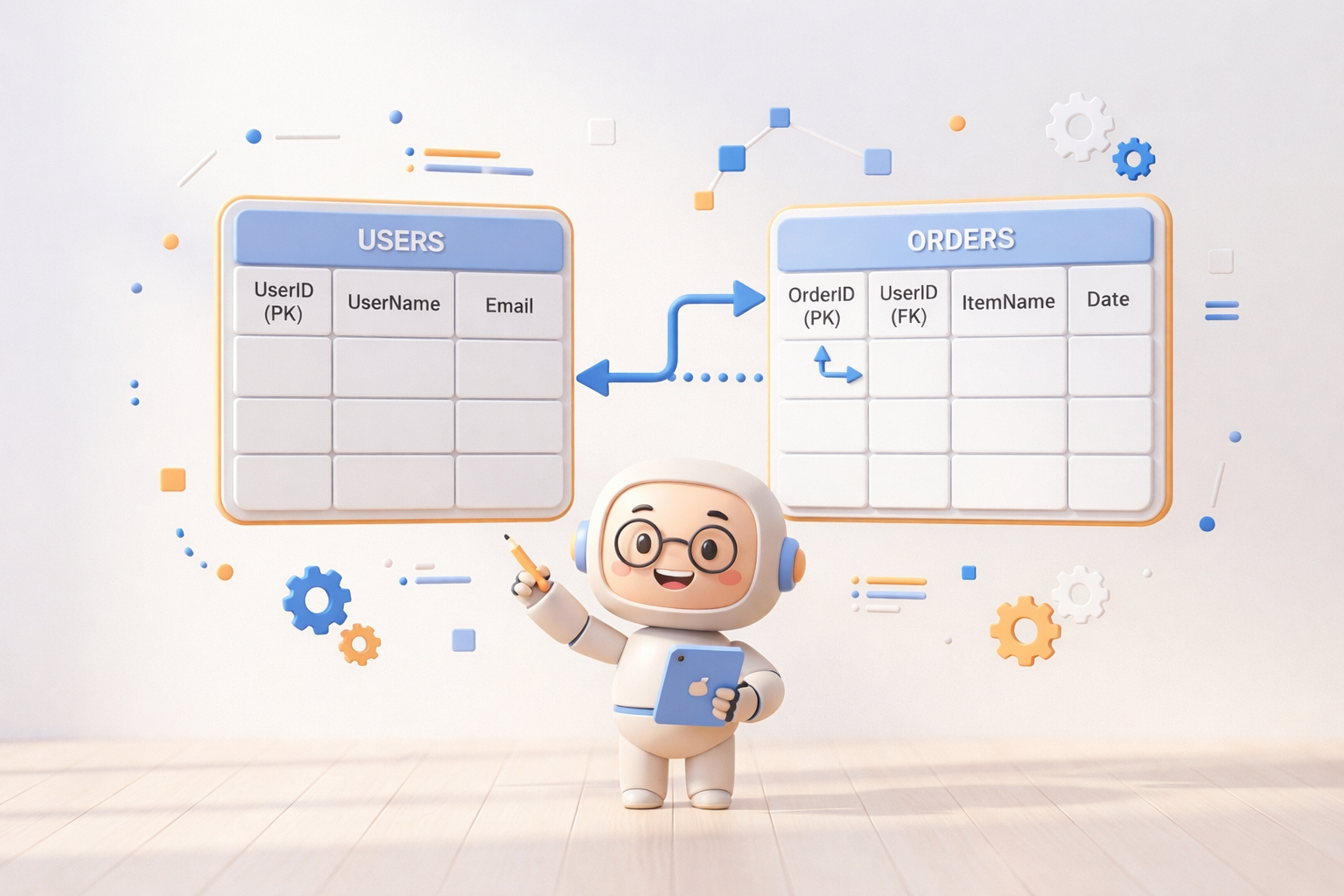
1. Overview
Every app you use daily — Instagram, Zomato, Google Pay, your college's exam portal — stores its data somewhere. That somewhere is almost always a database, and the most widely used kind of database in the world is the Relational Database.
A Relational Database Management System (RDBMS) is software that lets you store, organize, and retrieve structured data using a language called SQL (Structured Query Language). SQL has been the industry standard since the 1970s, and despite decades of new technology, it remains one of the most in-demand skills for any software engineer, data analyst, or backend developer. Whether you want to learn SQL from scratch or sharpen your existing skills, understanding RDBMS concepts deeply is a must.
Real-World Example: An E-Commerce Platform
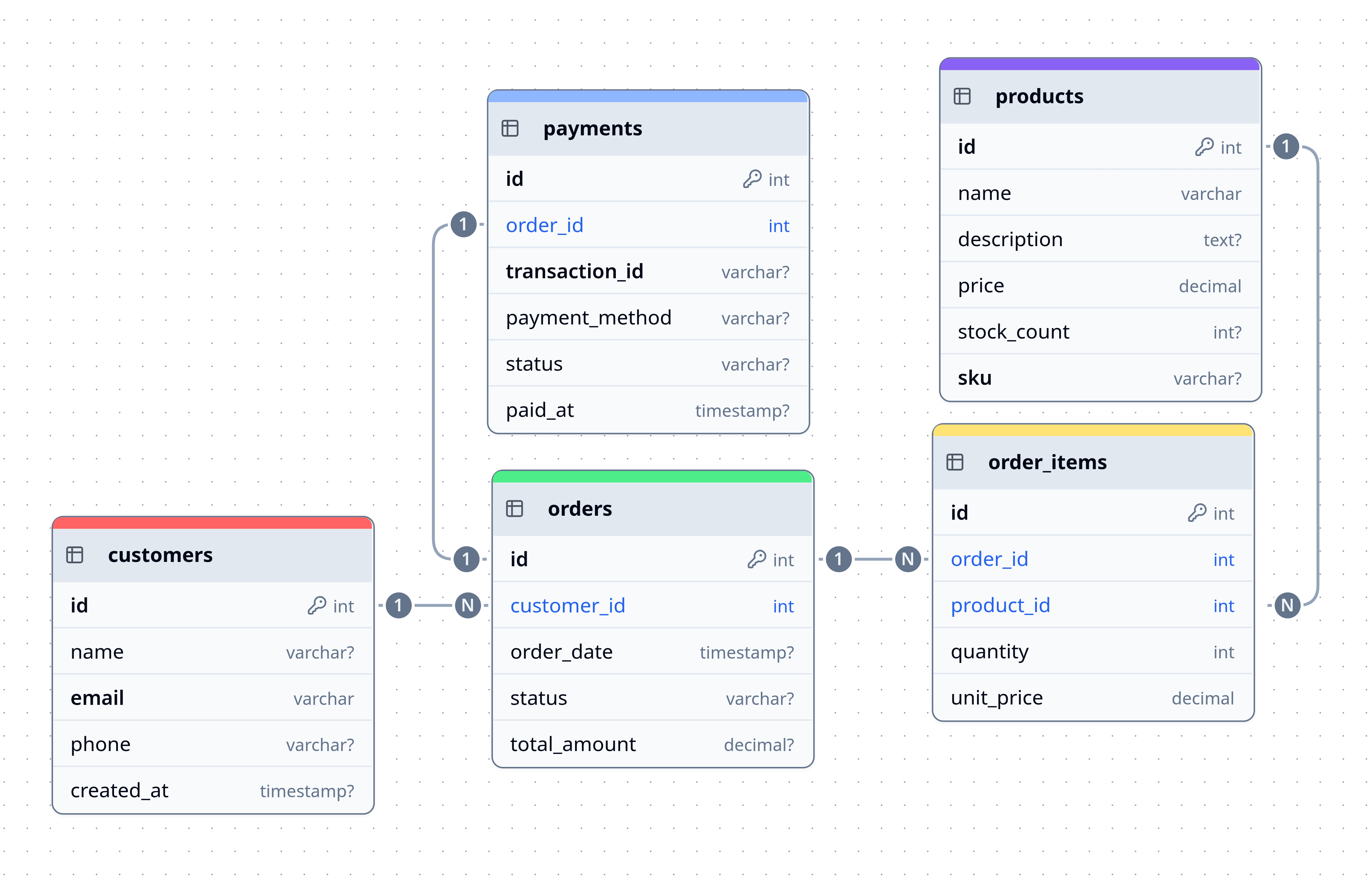
Imagine you are building something like Amazon. You need to keep track of:
- Customers — who they are, their email, their address
- Products — names, prices, stock counts
- Orders — which customer bought which product, when, and for how much
- Payments — transaction IDs, payment method, status
All of this data is related to each other. An order belongs to a customer. An order contains products. A payment belongs to an order. The relational database model gives us a clean, structured, and efficient way to represent these connections — and SQL gives us the power to query across all of them instantly.
Why SQL still matters in 2026: Despite the rise of NoSQL databases like MongoDB, the vast majority of production systems still rely on relational databases (PostgreSQL, MySQL, SQLite, Oracle, SQL Server). When comparing RDBMS vs NoSQL, the relational model wins for structured, transactional data. Understanding SQL deeply makes you a far more capable engineer, regardless of your specialization.
2. Foundational Concepts
2.1 What is a Database?
A database is an organized collection of structured data stored electronically. Think of it like a digital filing cabinet — but one that can find any document in milliseconds, even if there are a billion of them.
| Analogy | Real World | Database World |
|---|---|---|
| Filing Cabinet | Physical storage room | Database |
| File Folder | A category of documents | Table |
| One Document | A single record | Row (tuple) |
| A field on the document | One piece of info | Column (attribute) |
2.2 What is an RDBMS?
An RDBMS (Relational Database Management System) is the software engine that manages the database. It handles:
- Storing data safely to disk
- Letting multiple users read/write simultaneously without corruption
- Enforcing rules (e.g., "every order must have a valid customer")
- Executing SQL queries with high performance
Popular RDBMS options:
| RDBMS | Best Known For |
|---|---|
| PostgreSQL | Open-source, feature-rich, industry favourite |
| MySQL / MariaDB | Web applications (LAMP stack) |
| SQLite | Lightweight, embedded (used in Android, iOS) |
| Oracle DB | Enterprise, banking systems |
| Microsoft SQL Server | Windows/enterprise ecosystems |
For learning, SQLite is recommended because it requires zero setup. For production projects, use PostgreSQL. Both are covered in this complete SQL guide.
2.3 Tables, Rows, and Columns
A table is the fundamental unit of storage in a relational database. It looks exactly like a spreadsheet grid.
Table: students
+------------+------------------+-----+--------+
| student_id | name             | age | grade  |
+------------+------------------+-----+--------+
|     1      | Priya Sharma     |  20 |  A     |
|     2      | Rahul Das        |  21 |  B+    |
|     3      | Aisha Khan       |  19 |  A+    |
+------------+------------------+-----+--------+
- Each column represents one attribute or property (name, age, grade).
- Each row (also called a record or tuple) represents one complete entity — in this case, one student.
- The schema is the blueprint of the table — its column names and their data types. Good database schema design is the cornerstone of a well-structured application.
2.4 Keys — The Identity System
This is one of the most important concepts in all of RDBMS. Understanding the difference between a primary key vs foreign key is fundamental to relational database design.
Primary Key (PK)
A Primary Key is a column (or combination of columns) that uniquely identifies each row in a table. No two rows can have the same primary key value, and it can never be NULL.
Think of it like an Aadhaar number — every citizen has one, it's unique, and it never changes.
-- student_id is the Primary Key
CREATE TABLE students (
    student_id INT PRIMARY KEY,
    name       VARCHAR(100),
    age        INT
);
Foreign Key (FK)
A Foreign Key is a column in one table that references the Primary Key of another table. This is how relationships between tables are enforced. The primary key vs foreign key distinction is what makes the "relational" in RDBMS meaningful.
-- course_id in enrollments REFERENCES the courses table
CREATE TABLE enrollments (
    enrollment_id INT PRIMARY KEY,
    student_id    INT REFERENCES students(student_id),
    course_id     INT REFERENCES courses(course_id),
    enrolled_on   DATE
);
Analogy: If
studentsis a list of employees andenrollmentsis a list of projects, then the foreign key is like writing an employee's badge number on the project sheet — it links back to the actual person.
Candidate Key, Composite Key, Surrogate Key
| Key Type | Definition | Example |
|---|---|---|
| Candidate Key | Any column that could be a PK | email or student_id |
| Composite Key | PK made of two or more columns | (student_id, course_id) together |
| Surrogate Key | An artificial PK (like an auto-increment ID) | id SERIAL |
| Natural Key | A PK from real-world data | PAN_number |
2.5 Relationships Between Tables
The "relational" in RDBMS refers to the relationships between tables, which is a central part of entity relationship modelling. There are three fundamental types:
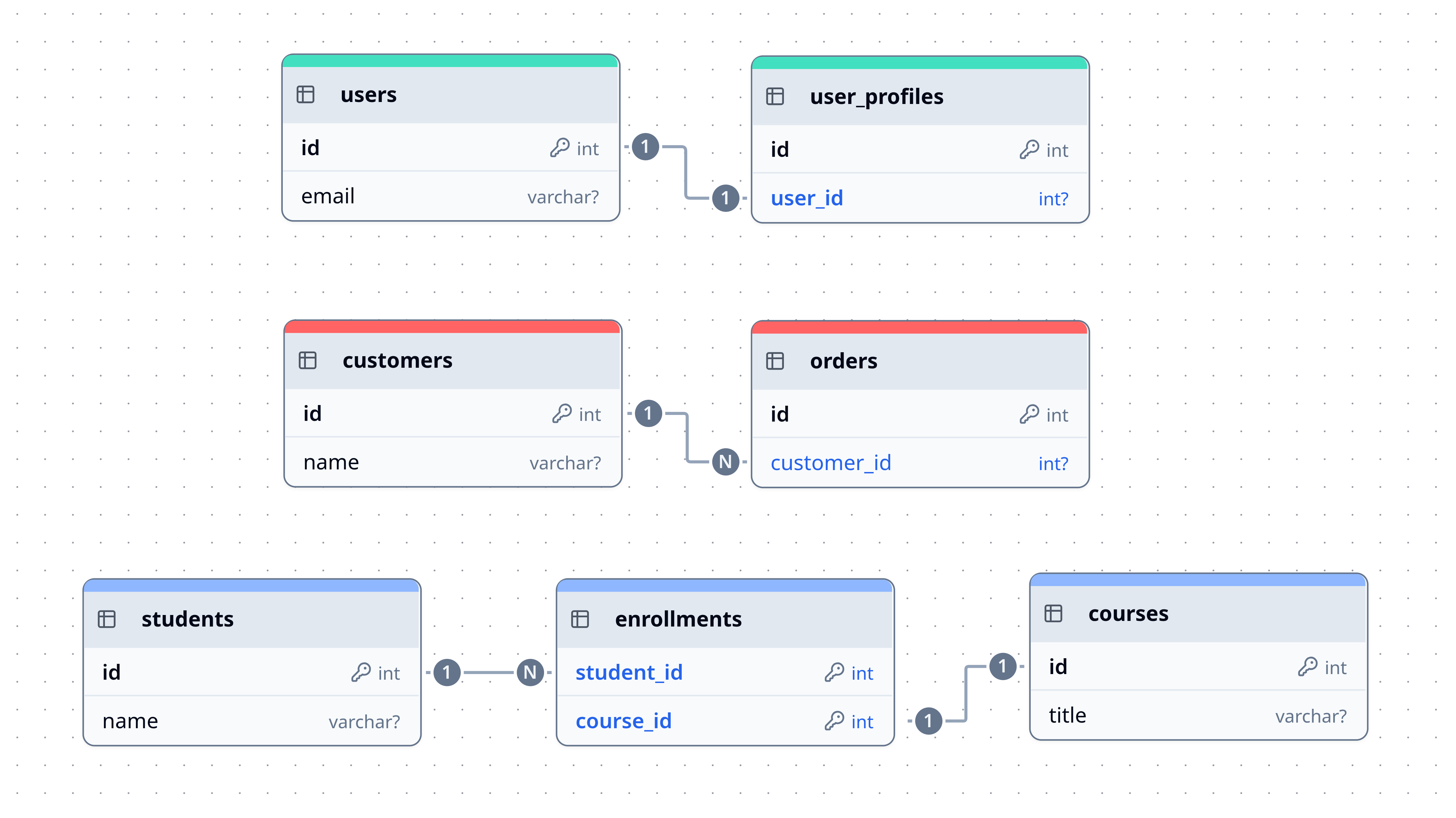
One-to-One (1:1)
One row in Table A corresponds to exactly one row in Table B.
Example: One user has exactly one user_profile.
users             user_profiles
+----+--------+   +----+---------+-----------+
| id | name   |   | id | user_id | bio       |
+----+--------+   +----+---------+-----------+
|  1 | Rahul  |   |  1 |    1    | Developer |
|  2 | Priya  |   |  2 |    2    | Designer  |
+----+--------+   +----+---------+-----------+
One-to-Many (1:N) ← Most Common
One row in Table A corresponds to many rows in Table B.
Example: One customer can place many orders.
customers                orders
+----+--------+          +----+-------------+----------+
| id | name   |          | id | customer_id | amount   |
+----+--------+          +----+-------------+----------+
|  1 | Rahul  |          |  1 |      1      | ₹500     |
|  2 | Priya  |          |  2 |      1      | ₹1200    |
+----+--------+          |  3 |      2      | ₹800     |
                         +----+-------------+----------+
Many-to-Many (M:N)
Many rows in Table A correspond to many rows in Table B. This requires a junction table (also called a bridge or pivot table) in the middle.
Example: A student can enroll in many courses, and a course can have many students.
CREATE TABLE enrollments (
    student_id INT REFERENCES students(id),
    course_id  INT REFERENCES courses(id),
    PRIMARY KEY (student_id, course_id)   -- Composite PK
);
2.6 Data Types
Every column has a data type that restricts what kind of data it can hold. Choosing the right data types in SQL is crucial for data integrity and storage efficiency.
| Category | Common Types | Example Values |
|---|---|---|
| Integer | INT, BIGINT, SMALLINT | 1, 99, 1000000 |
| Decimal | DECIMAL(p,s), NUMERIC, FLOAT | 9.99, 3.14159 |
| Text | VARCHAR(n), TEXT, CHAR(n) | 'Rahul', 'Hello World' |
| Boolean | BOOLEAN | TRUE, FALSE |
| Date/Time | DATE, TIME, TIMESTAMP | 2024-01-15, 09:30:00 |
| Binary | BYTEA, BLOB | Image files, PDFs |
VARCHAR(n)vsTEXT: UseVARCHAR(n)when you know the max length (e.g., a phone number is always ≤15 chars). UseTEXTfor open-ended strings like comments or descriptions.
2.7 NULL — The Absence of a Value
NULL in SQL means the value is unknown or does not exist. It is not
zero, it is not an empty string — it is the complete absence of a value.
This is a frequent source of confusion for beginners learning SQL.
-- These are all DIFFERENT:
age = 0        -- The person is 0 years old
age = ''       -- Invalid for INT; for text, it's an empty string
age = NULL     -- We simply don't know the person's age
Critical Rule: You cannot compare NULL using
=. You must useIS NULLorIS NOT NULL.
-- WRONG — this will never return results even if age is NULL
SELECT * FROM students WHERE age = NULL;

-- CORRECT
SELECT * FROM students WHERE age IS NULL;
3. SQL — The Language of Databases
SQL (pronounced "sequel" or "S-Q-L") is divided into sub-languages based on what they do. This is essential knowledge when you learn SQL from scratch:
| Sub-language | Full Name | Purpose | Commands |
|---|---|---|---|
| DDL | Data Definition Language | Define/modify structure | CREATE, ALTER, DROP, TRUNCATE |
| DML | Data Manipulation Language | Add/change/delete data | INSERT, UPDATE, DELETE |
| DQL | Data Query Language | Read/fetch data | SELECT |
| DCL | Data Control Language | Manage permissions | GRANT, REVOKE |
| TCL | Transaction Control Language | Manage transactions | COMMIT, ROLLBACK, SAVEPOINT |
3.1 DDL — Defining Structure
CREATE TABLE
CREATE TABLE products (
    product_id   SERIAL PRIMARY KEY,       -- auto-incrementing ID
    name         VARCHAR(200) NOT NULL,
    description  TEXT,
    price        DECIMAL(10, 2) NOT NULL,  -- up to 10 digits, 2 decimal places
    stock_count  INT DEFAULT 0,
    created_at   TIMESTAMP DEFAULT NOW()
);
ALTER TABLE
-- Add a new column
ALTER TABLE products ADD COLUMN category VARCHAR(100);

-- Change a column's data type
ALTER TABLE products ALTER COLUMN name TYPE TEXT;

-- Rename a column
ALTER TABLE products RENAME COLUMN stock_count TO quantity;

-- Drop a column
ALTER TABLE products DROP COLUMN description;
DROP & TRUNCATE
-- Deletes the entire table structure AND all data (irreversible)
DROP TABLE products;

-- Deletes ALL data inside the table, but keeps the structure
TRUNCATE TABLE products;
Warning:
DROPandTRUNCATEare dangerous. Always double-check before running them, especially in production.
3.2 DML — Manipulating Data
INSERT
-- Insert one row
INSERT INTO products (name, price, stock_count)
VALUES ('Mechanical Keyboard', 3499.00, 50);

-- Insert multiple rows at once
INSERT INTO products (name, price, stock_count) VALUES
    ('Wireless Mouse', 999.00, 120),
    ('USB-C Hub', 1499.00, 75),
    ('Laptop Stand', 2199.00, 30);
UPDATE
-- ALWAYS use WHERE with UPDATE, or you'll update every single row!
UPDATE products
SET price = 3199.00, stock_count = 45
WHERE product_id = 1;

-- Increase all prices by 10%
UPDATE products
SET price = price * 1.10;
DELETE
-- Delete a specific row
DELETE FROM products WHERE product_id = 3;

-- Delete all products that are out of stock
DELETE FROM products WHERE stock_count = 0;
Golden Rule of DML: Always write your
WHEREclause first in your head before writingUPDATEorDELETE. A missingWHEREclause affects every row in the table.
3.3 DQL — Querying Data
SELECT is the most important and most used SQL command. Knowing how to
write SQL queries step by step starts here.
-- Basic syntax
SELECT column1, column2, ...
FROM   table_name
WHERE  condition
ORDER BY column ASC|DESC
LIMIT  n;

-- Select all columns (use sparingly in production)
SELECT * FROM products;

-- Select specific columns with an alias
SELECT
    name        AS product_name,
    price       AS selling_price,
    stock_count AS qty_available
FROM products;
3.4 DCL & TCL — Control & Transactions
-- DCL: Grant read access to a user
GRANT SELECT ON products TO 'readonly_user';

-- TCL: Transaction block
BEGIN;
    UPDATE accounts SET balance = balance - 500 WHERE id = 1;
    UPDATE accounts SET balance = balance + 500 WHERE id = 2;
COMMIT;  -- Make it permanent

-- If something goes wrong, undo everything
ROLLBACK;
4. Querying in Depth
4.1 Filtering with WHERE
The SQL WHERE clause filters which rows are returned. It's one of the most frequently used tools when writing SQL queries.
-- Comparison operators
SELECT * FROM products WHERE price > 1000;
SELECT * FROM products WHERE stock_count = 0;
SELECT * FROM products WHERE name != 'USB-C Hub';

-- Range
SELECT * FROM products WHERE price BETWEEN 500 AND 2000;

-- Pattern matching (% = any sequence of chars, _ = exactly one char)
SELECT * FROM products WHERE name LIKE 'Wire%';    -- starts with "Wire"
SELECT * FROM products WHERE name LIKE '%Mouse%';  -- contains "Mouse"
SELECT * FROM products WHERE name LIKE 'M____';    -- "M" + exactly 4 chars

-- Match against a list
SELECT * FROM products WHERE category IN ('Electronics', 'Accessories');

-- NULL check
SELECT * FROM products WHERE category IS NULL;

-- Combining conditions
SELECT * FROM products
WHERE price < 2000 AND stock_count > 10;

SELECT * FROM products
WHERE category = 'Electronics' OR price < 500;

-- NOT operator
SELECT * FROM products WHERE NOT (price > 3000);
4.2 Sorting with ORDER BY
-- Ascending (default)
SELECT * FROM products ORDER BY price ASC;

-- Descending
SELECT * FROM products ORDER BY price DESC;

-- Sort by multiple columns
SELECT * FROM products ORDER BY category ASC, price DESC;

-- Limit results (great for pagination)
SELECT * FROM products ORDER BY price DESC LIMIT 5;

-- Pagination: skip the first 10 rows, get the next 10
SELECT * FROM products ORDER BY product_id LIMIT 10 OFFSET 10;
4.3 Aggregate Functions & GROUP BY
SQL aggregate functions calculate a single result from a set of rows. They are essential for reporting, analytics, and summarizing structured data.
| Function | Description | Example |
|---|---|---|
COUNT(*) | Number of rows | COUNT(*) → 4 |
SUM(col) | Total of a numeric column | SUM(price) → 8196.00 |
AVG(col) | Average value | AVG(price) → 2049.00 |
MIN(col) | Smallest value | MIN(price) → 999.00 |
MAX(col) | Largest value | MAX(price) → 3499.00 |
-- How many products do we have?
SELECT COUNT(*) AS total_products FROM products;

-- What is the average price?
SELECT AVG(price) AS avg_price FROM products;

-- Aggregation per group using GROUP BY
SELECT
    category,
    COUNT(*)       AS num_products,
    AVG(price)     AS avg_price,
    SUM(stock_count) AS total_stock
FROM products
GROUP BY category;
Output:
category      | num_products | avg_price | total_stock
--------------+--------------+-----------+-------------
Electronics   |      3       |  2332.33  |     275
Accessories   |      1       |   999.00  |     120
HAVING — Filtering Groups
WHERE filters rows before grouping. HAVING filters groups after
aggregation. Understanding SQL GROUP BY and HAVING explained with examples
is key to writing analytical queries.
-- Only show categories that have more than 2 products
SELECT category, COUNT(*) AS num_products
FROM products
GROUP BY category
HAVING COUNT(*) > 2;

-- Categories where the average price exceeds ₹2000
SELECT category, AVG(price) AS avg_price
FROM products
GROUP BY category
HAVING AVG(price) > 2000;
Memory trick:
WHEREis for rows,HAVINGis for groups.
The Logical Order of SQL Clauses
SQL clauses are written in one order but executed in another:
Written Order:             Execution Order:
1. SELECT                  1. FROM
2. FROM                    2. WHERE
3. WHERE                   3. GROUP BY
4. GROUP BY                4. HAVING
5. HAVING                  5. SELECT
6. ORDER BY                6. ORDER BY
7. LIMIT                   7. LIMIT
Understanding execution order explains why you can't use a SELECT alias
in a WHERE clause — the alias hasn't been created yet at that point.
4.4 JOINs — Combining Tables
SQL JOIN types explained — JOINs are the most powerful feature in SQL. They let you query multiple tables at once by linking them through their related keys. Knowing the difference between INNER JOIN and LEFT JOIN is one of the most practical skills in relational databases.
Let's use a concrete example:
-- Our tables:
-- customers(id, name, email)
-- orders(id, customer_id, total_amount, order_date, status)
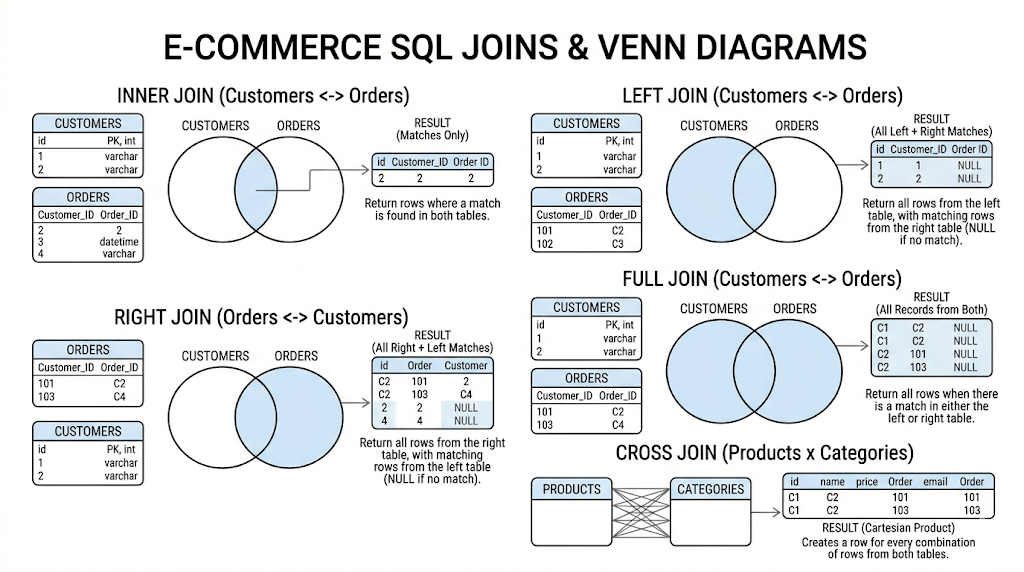
INNER JOIN
Returns only the rows where there is a match in both tables.
SELECT
    c.name        AS customer_name,
    o.id          AS order_id,
    o.total_amount,
    o.order_date
FROM customers c
INNER JOIN orders o ON c.id = o.customer_id;
Customers who have never placed an order will NOT appear here.
LEFT JOIN (LEFT OUTER JOIN)
Returns all rows from the left table, and matched rows from the right. If there is no match, the right side columns return NULL.
-- All customers, even those with no orders
SELECT
    c.name        AS customer_name,
    o.id          AS order_id,
    o.total_amount
FROM customers c
LEFT JOIN orders o ON c.id = o.customer_id;
A customer with no orders will show up with
order_id = NULL.
RIGHT JOIN (RIGHT OUTER JOIN)
The mirror of LEFT JOIN — all rows from the right table, matched rows from the left. (Less common; usually rewritten as a LEFT JOIN for clarity.)
FULL OUTER JOIN
Returns all rows from both tables. NULLs fill in where there is no match on either side.
SELECT c.name, o.id AS order_id
FROM customers c
FULL OUTER JOIN orders o ON c.id = o.customer_id;
CROSS JOIN
Returns the Cartesian product — every row in Table A combined with every row in Table B. Use with extreme caution (1000 rows × 1000 rows = 1,000,000 result rows).
-- Every possible pairing of colors and sizes
SELECT colors.name, sizes.label
FROM colors
CROSS JOIN sizes;
JOIN with Multiple Tables
SELECT
    c.name          AS customer,
    p.name          AS product,
    oi.quantity,
    oi.unit_price
FROM customers c
JOIN orders    o  ON c.id    = o.customer_id
JOIN order_items oi ON o.id = oi.order_id
JOIN products  p  ON p.id   = oi.product_id
WHERE c.id = 5;
4.5 Subqueries
A subquery is a query nested inside another query. The inner query runs first, and its result is used by the outer query.
-- Find all customers who have placed at least one order
SELECT name FROM customers
WHERE id IN (
    SELECT DISTINCT customer_id FROM orders
);

-- Find products that cost more than the average price
SELECT name, price FROM products
WHERE price > (
    SELECT AVG(price) FROM products
);

-- Subquery in FROM clause (derived table)
SELECT category, avg_price
FROM (
    SELECT category, AVG(price) AS avg_price
    FROM products
    GROUP BY category
) AS category_summary
WHERE avg_price > 1500;
5. Constraints — Enforcing Rules
SQL constraints are rules applied to columns that the database enforces automatically. They are a core part of maintaining data integrity and prevent bad data from ever entering your database.
| Constraint | What It Does |
|---|---|
PRIMARY KEY | Unique + NOT NULL. Uniquely identifies each row. |
FOREIGN KEY | Value must exist in the referenced table. |
NOT NULL | Column cannot be empty. |
UNIQUE | All values in the column must be different. |
DEFAULT | Provides a default value if none is given. |
CHECK | Value must satisfy a custom boolean expression. |
CREATE TABLE employees (
    id         SERIAL PRIMARY KEY,
    email      VARCHAR(255) NOT NULL UNIQUE,
    name       VARCHAR(100) NOT NULL,
    salary     DECIMAL(10,2) CHECK (salary > 0),
    department VARCHAR(50) DEFAULT 'General',
    manager_id INT REFERENCES employees(id)    -- Self-referencing FK
);
What happens when a constraint is violated?
-- This will FAIL with an error because email must be unique
INSERT INTO employees (email, name, salary)
VALUES ('dev@example.com', 'Rahul', 50000);

INSERT INTO employees (email, name, salary)
VALUES ('dev@example.com', 'Priya', 60000);  -- ERROR: duplicate key value
The database rejects the second insert automatically. You don't need to write any application-level code to check for this — the database handles data integrity natively.
6. Normalization — Designing Clean Databases
Database normalization explained: Normalization is the process of organizing a database to reduce data redundancy (storing the same data in multiple places) and improve data integrity. It is a foundational step when you design a relational database from scratch.
The Problem: Un-normalized Data
Imagine storing all order data in one flat table:
+----------+----------+-------------------+----------+----------+-------+
| order_id | cust_name| cust_email        | product  | category | price |
+----------+----------+-------------------+----------+----------+-------+
|    1     | Rahul    | rahul@example.com | Keyboard | Electronics | 3499|
|    2     | Rahul    | rahul@example.com | Mouse    | Electronics | 999 |
|    3     | Priya    | priya@example.com | Hub      | Electronics | 1499|
+----------+----------+-------------------+----------+----------+-------+
Problems:
- Rahul's email is repeated — if he changes it, you must update every row
- Deleting all of Priya's orders accidentally deletes her customer record too
- Inserting a new customer requires placing a dummy order
Normal Forms
First Normal Form (1NF)
- Every column contains atomic (indivisible) values — no lists or sets in a single cell
- Each row is unique
-- VIOLATION of 1NF: storing multiple values in one column
| order_id | products                          |
|----------|-----------------------------------|
|    1     | 'Keyboard, Mouse, USB Hub'        | ← BAD

-- CORRECT 1NF: one value per cell, one row per item
| order_id | product   |
|----------|-----------|
|    1     | Keyboard  |
|    1     | Mouse     |
|    1     | USB Hub   |
Second Normal Form (2NF)
- Must be in 1NF
- Every non-key column must depend on the entire primary key (no partial dependencies)
- Only relevant when the primary key is composite
Third Normal Form (3NF)
- Must be in 2NF
- No transitive dependencies — non-key columns must depend only on the primary key, not on other non-key columns
-- VIOLATION: category_description depends on category, not on product_id
products(product_id, name, category, category_description)

-- CORRECT 3NF: split into two tables
products(product_id, name, category_id)
categories(category_id, category_name, category_description)
Practical advice: Aim for 3NF in most projects. How normalization works in databases is about finding the right balance — over-normalizing can sometimes hurt query performance (too many JOINs). Real-world systems occasionally deliberately denormalize for performance.
7. Indexes — Making Queries Fast
Database indexes explained: An index is a separate data structure (usually a B-Tree) that the database builds to make searching faster. Without an index, the database does a full table scan — it reads every single row to find a match. Query optimization in SQL largely comes down to strategic use of indexes.
Think of it like a book's index at the back — instead of reading all 500 pages to find "Binary Search," you look it up in the index and jump directly to page 312.
-- Create an index on the email column (often searched)
CREATE INDEX idx_customers_email ON customers(email);

-- Create a composite index (for queries that filter on both columns)
CREATE INDEX idx_orders_customer_date ON orders(customer_id, order_date);

-- Unique index (also enforces uniqueness like a UNIQUE constraint)
CREATE UNIQUE INDEX idx_products_sku ON products(sku);

-- Drop an index
DROP INDEX idx_customers_email;
When to add an index:
- Columns frequently used in
WHERE,JOIN ON, orORDER BYclauses - Foreign key columns (most RDBMS recommend this)
- Columns with high cardinality (many distinct values)
When NOT to add an index:
- Small tables (full scan is fast enough)
- Columns rarely used in queries
- Tables with very frequent
INSERT/UPDATE/DELETE(indexes slow down writes)
Rule of thumb: Add indexes based on actual query patterns, not preemptively on every column. Use
EXPLAINorEXPLAIN ANALYZEto see how the database is executing a query — this is your primary tool for query optimization.
8. Transactions & ACID Properties
A transaction is a sequence of SQL operations treated as a single unit of work — either all of them succeed, or none of them do.
The Classic Bank Transfer Example
BEGIN;  -- Start the transaction

    -- Step 1: Deduct money from Rahul's account
    UPDATE accounts SET balance = balance - 1000 WHERE id = 1;

    -- Step 2: Add money to Priya's account
    UPDATE accounts SET balance = balance + 1000 WHERE id = 2;

COMMIT; -- Only now are changes written permanently
If the database crashes between Step 1 and Step 2, the ROLLBACK happens
automatically — Rahul's money is returned. You never lose money in the void.
ACID Properties in SQL
ACID properties are the set of guarantees every proper RDBMS provides for transactions. For anyone learning SQL for computer science students or backend development, this is non-negotiable knowledge:
| Property | What It Means | Real-World Analogy |
|---|---|---|
| Atomicity | All operations succeed, or none do | A flight booking — you either get the seat AND pay, or neither happens |
| Consistency | The database moves from one valid state to another | A bank's total money never changes from a transfer |
| Isolation | Concurrent transactions don't interfere with each other | Two cashiers at a bank can serve customers simultaneously without error |
| Durability | Once committed, changes survive crashes | A receipt means the transaction is permanent |
-- Savepoints allow partial rollbacks within a transaction
BEGIN;
    INSERT INTO orders (...) VALUES (...);
    SAVEPOINT order_created;

    INSERT INTO payments (...) VALUES (...);
    -- Something went wrong with payment:
    ROLLBACK TO SAVEPOINT order_created;  -- Undo only the payment insert

COMMIT;  -- The order insert still gets committed
9. Views
A view is a saved SQL query that you can treat like a virtual table. The view itself stores no data — it executes the underlying query every time you select from it. Views are an elegant tool for simplifying complex database management system operations.
-- Create a view for frequently needed customer order summary
CREATE VIEW customer_order_summary AS
SELECT
    c.id,
    c.name,
    c.email,
    COUNT(o.id)       AS total_orders,
    SUM(o.total_amount) AS lifetime_value
FROM customers c
LEFT JOIN orders o ON c.id = o.customer_id
GROUP BY c.id, c.name, c.email;

-- Now use it just like a regular table
SELECT * FROM customer_order_summary WHERE lifetime_value > 10000;
SELECT name, total_orders FROM customer_order_summary ORDER BY total_orders DESC LIMIT 10;

-- Drop a view
DROP VIEW customer_order_summary;
Benefits of Views:
- Simplicity: Hide complex joins behind a simple name
- Security: Expose only certain columns to certain users
- Consistency: Everyone queries the same definition
- Maintainability: Change the query in one place
10. A Complete Practical Project
Let's design a relational database from scratch — a minimal but real Library Management System. This is a great hands-on exercise for anyone following this relational database tutorial.
Step 1: Design the Schema
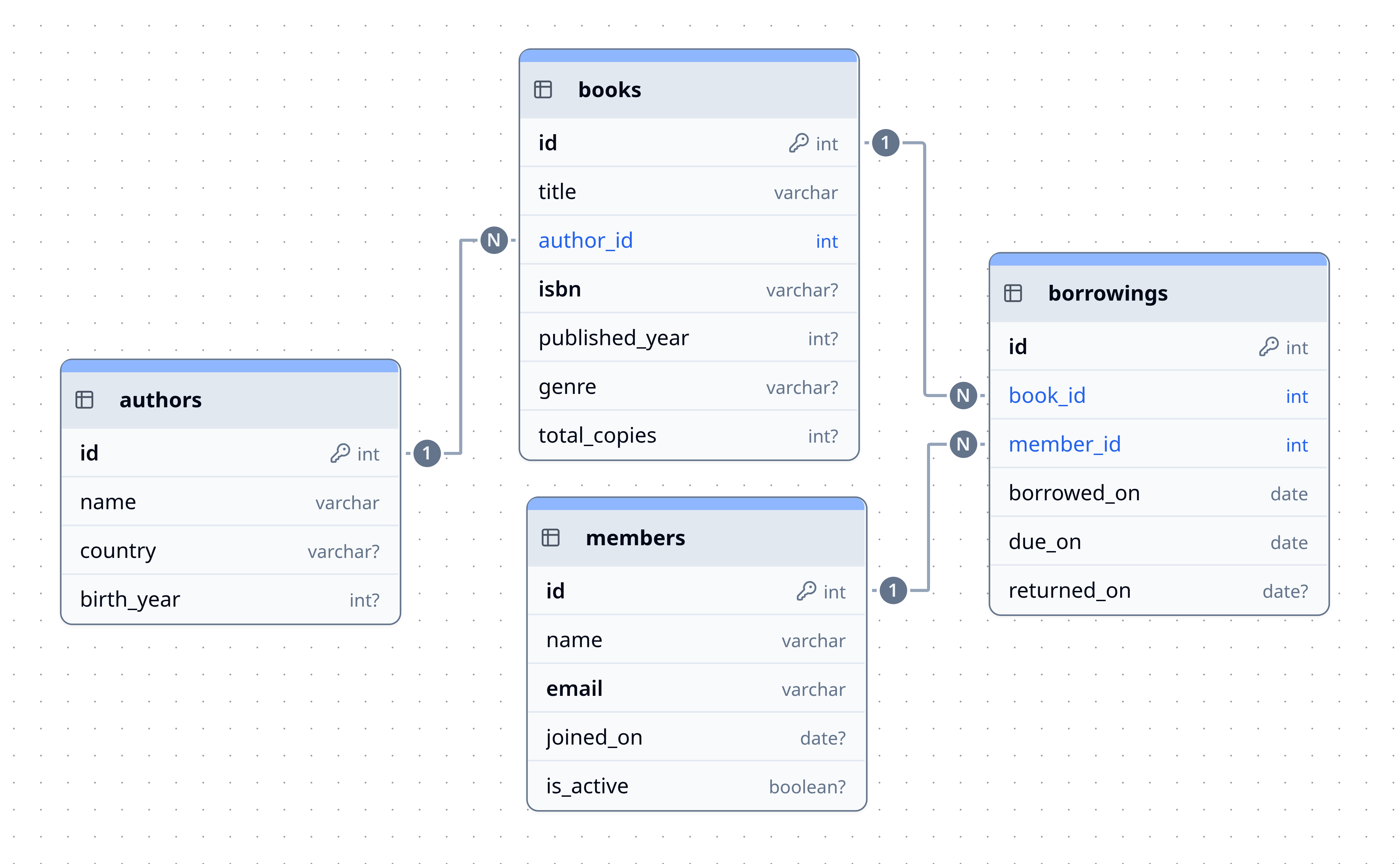
-- Authors
CREATE TABLE authors (
    id         SERIAL PRIMARY KEY,
    name       VARCHAR(150) NOT NULL,
    country    VARCHAR(100),
    birth_year INT CHECK (birth_year > 1000)
);

-- Books
CREATE TABLE books (
    id            SERIAL PRIMARY KEY,
    title         VARCHAR(255) NOT NULL,
    author_id     INT NOT NULL REFERENCES authors(id),
    isbn          VARCHAR(20) UNIQUE,
    published_year INT,
    genre         VARCHAR(100),
    total_copies  INT DEFAULT 1 CHECK (total_copies >= 0)
);

-- Members
CREATE TABLE members (
    id           SERIAL PRIMARY KEY,
    name         VARCHAR(150) NOT NULL,
    email        VARCHAR(255) NOT NULL UNIQUE,
    joined_on    DATE DEFAULT CURRENT_DATE,
    is_active    BOOLEAN DEFAULT TRUE
);

-- Borrowing records
CREATE TABLE borrowings (
    id            SERIAL PRIMARY KEY,
    book_id       INT NOT NULL REFERENCES books(id),
    member_id     INT NOT NULL REFERENCES members(id),
    borrowed_on   DATE NOT NULL DEFAULT CURRENT_DATE,
    due_on        DATE NOT NULL,
    returned_on   DATE
);
Step 2: Insert Sample Data
INSERT INTO authors (name, country, birth_year) VALUES
    ('George Orwell', 'United Kingdom', 1903),
    ('Yuval Noah Harari', 'Israel', 1976),
    ('Robert C. Martin', 'United States', 1952);

INSERT INTO books (title, author_id, isbn, published_year, genre, total_copies) VALUES
    ('1984',                1, '978-0451524935', 1949, 'Dystopian', 5),
    ('Animal Farm',         1, '978-0451526342', 1945, 'Satire',    3),
    ('Sapiens',             2, '978-0062316097', 2011, 'Non-Fiction', 4),
    ('Clean Code',          3, '978-0132350884', 2008, 'Technology', 2);

INSERT INTO members (name, email) VALUES
    ('Priya Sharma', 'priya@example.com'),
    ('Rahul Das',    'rahul@example.com'),
    ('Aisha Khan',   'aisha@example.com');

INSERT INTO borrowings (book_id, member_id, borrowed_on, due_on, returned_on) VALUES
    (1, 1, '2024-01-10', '2024-01-24', '2024-01-20'),  -- returned
    (3, 2, '2024-01-15', '2024-01-29', NULL),           -- still out
    (1, 3, '2024-01-18', '2024-02-01', NULL);            -- still out
Step 3: Useful Queries
-- Q1: All books with their author names
SELECT b.title, a.name AS author, b.genre, b.published_year
FROM books b
JOIN authors a ON b.author_id = a.id
ORDER BY b.published_year DESC;

-- Q2: Which books are currently borrowed (not yet returned)?
SELECT
    m.name     AS member,
    b.title    AS book,
    br.borrowed_on,
    br.due_on,
    CURRENT_DATE - br.due_on AS days_overdue
FROM borrowings br
JOIN members m ON br.member_id = m.id
JOIN books   b ON br.book_id   = b.id
WHERE br.returned_on IS NULL;

-- Q3: Members who have never borrowed a book
SELECT m.name, m.email
FROM members m
LEFT JOIN borrowings br ON m.id = br.member_id
WHERE br.id IS NULL;

-- Q4: Most popular book (borrowed most times)
SELECT b.title, COUNT(*) AS borrow_count
FROM borrowings br
JOIN books b ON br.book_id = b.id
GROUP BY b.title
ORDER BY borrow_count DESC
LIMIT 3;

-- Q5: Create a view for the library dashboard
CREATE VIEW library_dashboard AS
SELECT
    b.id,
    b.title,
    a.name AS author,
    b.total_copies,
    b.total_copies - COUNT(br.id) FILTER (WHERE br.returned_on IS NULL) AS available_copies
FROM books b
JOIN authors a ON b.author_id = a.id
LEFT JOIN borrowings br ON b.id = br.book_id
GROUP BY b.id, b.title, a.name, b.total_copies;

SELECT * FROM library_dashboard;
11. Common Beginner Mistakes
These are the most frequent errors seen when students first learn SQL from scratch — avoid them and you'll be ahead of the curve.
| Mistake | Why It's Wrong | How to Fix It |
|---|---|---|
UPDATE table SET col = val without WHERE | Updates every row in the table | Always include WHERE unless intentional |
DELETE FROM table without WHERE | Deletes all rows | Always include WHERE |
Comparing NULL with = | NULL = NULL is always UNKNOWN, not TRUE | Use IS NULL / IS NOT NULL |
SELECT * in production code | Fetches unnecessary data, breaks if schema changes | Explicitly list only needed columns |
| Not using transactions for multi-step operations | Partial failure leaves data in inconsistent state | Wrap related operations in BEGIN...COMMIT |
| Forgetting to index foreign keys | Joins and lookups become full table scans | Add index on every FK column |
| Putting business logic only in app code, not DB | App bugs can corrupt data | Use constraints, foreign keys, and CHECK |
Using FLOAT for money | Floating-point is imprecise: 0.1 + 0.2 ≠ 0.3 | Use DECIMAL(10,2) for monetary values |
12. Summary & What to Learn Next
What You've Learned
| Concept | Key Takeaway |
|---|---|
| RDBMS | Software engine that stores and manages relational data |
| Tables | Data is stored in rows and columns, like a strict spreadsheet |
| Keys | Primary keys identify rows; foreign keys link tables |
| Relationships | 1:1, 1:N, M:N modeled with tables and foreign keys |
| SQL sublanguages | DDL (structure), DML (change data), DQL (query data) |
| Joins | INNER, LEFT, RIGHT, FULL — combine rows from multiple tables |
| Aggregation | GROUP BY + COUNT/SUM/AVG/MIN/MAX for summarizing data |
| Constraints | Enforce data integrity at the database level |
| Normalization | Design tables to eliminate redundancy (1NF → 2NF → 3NF) |
| Indexes | Speed up SELECT queries; come at a cost to writes |
| Transactions | ACID properties guarantee correctness in multi-step operations |
| Views | Virtual tables from saved queries for simplicity and security |
Recommended Next Topics
- Window Functions:
RANK(),ROW_NUMBER(),LAG(),LEAD()— the most powerful SQL feature most beginners never learn. - Query Optimization:
EXPLAIN ANALYZE, reading query plans, index strategies. - Stored Procedures & Functions: reusable logic inside the database.
- Triggers: automatic actions that fire on INSERT/UPDATE/DELETE.
- CTEs (Common Table Expressions): cleaner alternative to subqueries
using
WITH. - PostgreSQL-specific features: JSONB, arrays, full-text search, partitioning.
- Database Security: roles, row-level security, encryption at rest.
Practice Resources
- SQLite: Zero-install. Download DB Browser for SQLite and start immediately.
- pgAdmin / DBeaver: GUI tools for exploring and running queries.
- LeetCode Database Problems: SQL problems ranked by difficulty.
- SQLZoo SQL Tutorial: Interactive SQL practice in the browser.
"Bad programmers worry about the code. Good programmers worry about data structures and their relationships." — Linus Torvalds
The database is the foundation your entire application sits on. Get this foundation right, and everything built on top of it becomes simpler, faster, and more reliable.
Thanks for reading!