

Almost every React interview spends its first few minutes on the same ground: what React actually is, what JSX compiles down to, why the virtual DOM exists at all. Get that part fluent and the conversation moves to hooks, because that is where most React interviews actually live.
This guide covers 50 of the most asked React JS interview questions and answers, from React fundamentals and JSX through React Hooks, state management, performance optimization, Redux, React Router, reconciliation and the Fiber architecture, all the way to the React 19 features like Server Components and Actions.
The same interview round usually tests plain JavaScript and the browser too, and the Top 100 Frontend Interview Questions article covers that half.
React Basics Interview Questions
1. What is React, and what problem does it solve?
React is a JavaScript library for building user interfaces out of components. You describe what the screen should look like for a given set of data, and React works out which parts of the real DOM need to change when that data changes.
Without React, you write code that finds elements, reads their current contents, and patches them by hand after every event. That works for a small page. On a large one it falls apart, because every new feature adds another path through which the DOM can drift out of sync with the data behind it.
React removes that whole class of bug by making rendering a function of state. The second thing it gives you is a component model: a component is a function that takes data and returns markup, so a complicated screen becomes a tree of small, reusable pieces.
2. Is React a library or a framework?
React is a library, not a framework. It handles the view layer, rendering components and updating the DOM, and leaves routing, data fetching, form handling, and global state to other packages you choose yourself.
A Vue or Angular project gets an official router and an official store. A React project picks React Router or TanStack Router, Redux Toolkit or Zustand, TanStack Query or SWR. The flexibility is real, and so is the cost: two React codebases can look nothing alike.
Next.js and Remix sit on top of React and make those decisions for you. That is why people call them full-stack React frameworks rather than calling React itself a framework.
Vue and Angular make that choice for you instead, bundling an official router and store by default.
3. What is JSX, and what does the browser actually run?
JSX is a syntax extension that lets you write markup inside JavaScript. Browsers cannot read it, so a compiler such as Babel or SWC converts every JSX tag into a plain function call before the code ships.
// What you write
const greeting = <h1 className="title">Hello, {name}</h1>

// What the compiler produces (modern JSX transform)
import { jsxs as _jsxs } from 'react/jsx-runtime'
const greeting = _jsxs('h1', { className: 'title', children: ['Hello, ', name] })
Seeing the output explains rules that otherwise look arbitrary:
classNameinstead ofclass,htmlForinstead offor, because the second argument is a JavaScript object and those words are reserved.- Curly braces hold an expression, not a statement, because the value has to fit inside a function call.
- A component name must start with a capital letter, since lowercase names compile to the string
'h1'while capitalised ones compile to a reference to your function.
4. What is the virtual DOM, and why is it faster than updating the DOM directly?
The virtual DOM is a lightweight JavaScript object tree that describes what the UI should look like. When state changes, React builds a fresh tree, compares it with the previous one, and applies only the differences to the real DOM.
Hand-written DOM code that touches exactly the one node that changed will always beat React, because React does extra work to find out what changed first. The virtual DOM wins against the realistic alternative: re-rendering a large chunk of HTML on every update, or maintaining manual update paths nobody keeps correct.
The real benefit is DOM updates that are nearly as fast as hand-written ones, while you write code as if redrawing everything from scratch. Performance is the side effect. The declarative model is the point.
5. What is the difference between a React element and a React component?
A component is a function that returns markup. An element is the plain object a component call produces, describing one node in the tree.
function Avatar({ src }) {           // component: a function
    return <img src={src} alt="" />
}

const element = <Avatar src="/me.png" />  // element: an object React will render
// roughly: { type: Avatar, props: { src: '/me.png' }, key: null }
Elements are immutable and cheap. Creating one does not render anything, it only records what should appear, which is why thousands of them in a render pass cost almost nothing. React reads the description, compares it with the previous one, and decides what the DOM needs. The distinction comes back in reconciliation, where React compares elements by their type field to decide whether to update a DOM node or throw it away.
6. What is the difference between props and state?
Props are the data a component receives from its parent. State is the data a component owns and can change. Props stay read-only inside the component that receives them; state updates through a setter that tells React to re-render.
| Props | State | |
|---|---|---|
| Who owns it | The parent component | The component itself |
| Can it be changed | No, read-only inside the child | Yes, through useState or useReducer |
| Triggers a re-render | When the parent re-renders with a new value | When you call the setter |
| Typical use | Configuration passed down a tree | Values that change over time in one place |
A useful test in an interview: does the value need to survive on its own? If two components need the same value, it belongs in state in their closest shared parent and reaches them as props. That pattern has a name, lifting state up, and it comes back below.
7. Why do list items need a key, and why is the array index usually a bad key?
A key tells React which item in a list is which across renders. Without one, React falls back to comparing items by position, so it cannot tell a reordered list from a list whose contents all changed.
The array index fails exactly when the list is not static. Insert an item at the top and every index shifts by one, so React believes the first item changed, the second changed too, and so on down the list. State that lives on those DOM nodes, text typed into an input, for example, stays with the position rather than with the data.
// Breaks on reorder, insert, or delete
{todos.map((todo, i) => <TodoItem key={i} todo={todo} />)}

// Correct: a stable id that belongs to the data
{todos.map((todo) => <TodoItem key={todo.id} todo={todo} />)}
An index is acceptable only when the list never reorders, never gets items inserted or removed, and holds no state of its own. Reach for a stable id from your data instead. Keys only need to be unique among siblings, never across the whole application.
8. What is the difference between class components and function components?
A class component extends React.Component, stores state in this.state, and runs side effects in lifecycle methods such as componentDidMount. A function component is a plain function that takes props and returns markup, using hooks for state and side effects.
Function components are the default for new React code, and not for reasons of syntax length. In a class, one piece of related logic gets split across three lifecycle methods, while unrelated logic sits together inside each of them. Extracting that logic for reuse used to mean higher-order components or render props.
Hooks group code by what it does instead, and let you move it into a custom hook with no change to the component tree. Classes still appear for one thing in React 19: error boundaries have no hook equivalent.
9. How do you render content conditionally in React?
JSX has no if statement inside the markup, because the braces hold expressions, not statements. You either branch before the return or use an expression that evaluates to the element you want.
function Status({ user, messages }) {
    if (!user) return <LoginPrompt />          // early return for a whole-component branch

    return (
        <div>
            {/* renders the badge, or nothing at all */}
            {messages.length > 0 && <Badge count={messages.length} />}
            {/* one branch or the other */}
            {user.isAdmin ? <AdminPanel /> : <UserPanel />}
        </div>
    )
}
The && operator returns its left side when that side is falsy, and React renders the number 0 rather than skipping it, so {messages.length && <Badge />} prints a bare zero on an empty list. Write a real boolean test such as messages.length > 0 instead.
10. What is a Fragment, and why can a component return only one element?
A component compiles down to a function, and a function returns one value, so a component returns one element. A Fragment lets you satisfy that rule without adding a wrapper <div> to the DOM.
function Row({ item }) {
    return (
        <>
            <td>{item.name}</td>
            <td>{item.price}</td>
        </>
    )
}
The shorthand <>...</> is what you see most often. The long form, <React.Fragment key={id}>, is needed when you render a list of fragments, because the shorthand accepts no props and a list needs a key. An extra wrapper element can also break a CSS layout that depends on a direct parent-child relationship, a grid or a flex row.
Props, State, and Component Communication
11. Why must you update state immutably instead of mutating it?
React decides whether to re-render by comparing the new state value with the previous one using Object.is. Push into the same array, or assign to a property of the same object, and the reference never changes. The comparison says nothing happened, and the screen stays stale.
// Wrong: same array, same reference, no re-render
const addTodo = (text) => {
    todos.push({ id: nextId(), text })
    setTodos(todos)
}

// Right: a new array, a new reference
const addTodo = (text) => {
    setTodos([...todos, { id: nextId(), text }])
}
React treats props and state as immutable snapshots of a moment in time, and memoisation with React.memo, useMemo, and useCallback all rest on that same comparison. For nested state, spread each level you change, or reach for Immer, which Redux Toolkit bundles, to write mutating-looking syntax that produces a new object underneath.
12. Why are state updates batched, and when do you need the updater function?
React batches several state updates that happen in the same tick into one re-render. Three setState calls inside one click handler produce a single render, not three. Since React 18 this is automatic everywhere, including promises, setTimeout, and native event handlers; React 17 only batched inside its own event handlers.
Batching is why reading state right after setting it gives you the old value. The variable is a constant captured by that render.
const [count, setCount] = useState(0)

// Both calls read the same snapshot: count is 0, so this ends at 1
setCount(count + 1)
setCount(count + 1)

// The updater form queues functions, so this ends at 2
setCount((c) => c + 1)
setCount((c) => c + 1)
Use the updater function whenever the next value depends on the previous one, and inside setInterval, event listeners, or async callbacks, anywhere the captured value may be several renders out of date.
13. What is lifting state up, and what is prop drilling?
Lifting state up means moving a piece of state out of a component and into the closest common ancestor of every component that needs it. Two siblings cannot see each other's state, so the shared value lives in the parent and travels down as props.
Prop drilling is what happens when that goes too far: a value defined at the top of the tree passed through five components that never touch it, just to reach the one that does.
Three fixes handle this, the most common one first:
- Component composition. Pass the rendered element down as
childreninstead of passing the raw data, so the middle layers no longer need to know about it. - The Context API. Good for values that genuinely belong to the whole tree, such as the theme, the locale, or the signed-in user.
- A store such as Redux Toolkit or Zustand, for state that is large, updated from many places, or needs middleware and time-travel debugging.
14. What is the difference between controlled and uncontrolled components?
In a controlled component, React state holds the current value of an input, and the input shows that state. In an uncontrolled component, the DOM node keeps the value itself, and you read it when you need it, usually through a ref.
// Controlled: state is the single source of truth
const [email, setEmail] = useState('')
<input value={email} onChange={(e) => setEmail(e.target.value)} />

// Uncontrolled: the DOM holds the value, React reads it on submit
const emailRef = useRef(null)
<input defaultValue="" ref={emailRef} />
Controlled inputs are the default choice. Validating on every keystroke, disabling the submit button, or syncing two fields all need the value in React. Uncontrolled inputs cost less per keystroke and fit file inputs, which are always uncontrolled, and large forms handed to React Hook Form.
Passing value without onChange gives a read-only field and a console warning. Use defaultValue when the DOM should own the value, value only when state does.
15. What are synthetic events, and how is React's event system different from the DOM's?
A synthetic event is React's wrapper around the native browser event. It exposes the same interface, including preventDefault and stopPropagation, but normalises the differences between browsers.
React does not attach a listener to each DOM node. It attaches one listener per event type at the root container of your app, which keeps memory use flat whether the page has ten buttons or ten thousand. React 16 attached those listeners to document; React 17 moved them to the root container so two React versions can run on one page without fighting.
Two consequences follow:
stopPropagationin a React handler stops propagation inside React's tree, but a native listener attached yourself on an outer element may still fire.- Returning
falsefrom a handler does nothing, unlike inline HTML handlers, so callevent.preventDefault()explicitly.
16. What are the component lifecycle phases, and how do class lifecycle methods map to hooks?
Every component goes through three phases:
- Mounting. Added to the DOM for the first time.
- Updating. New props or state cause a re-render.
- Unmounting. Removed from the DOM.
Class components exposed each phase as a named method. Hooks express the same moments through useEffect and its cleanup function.
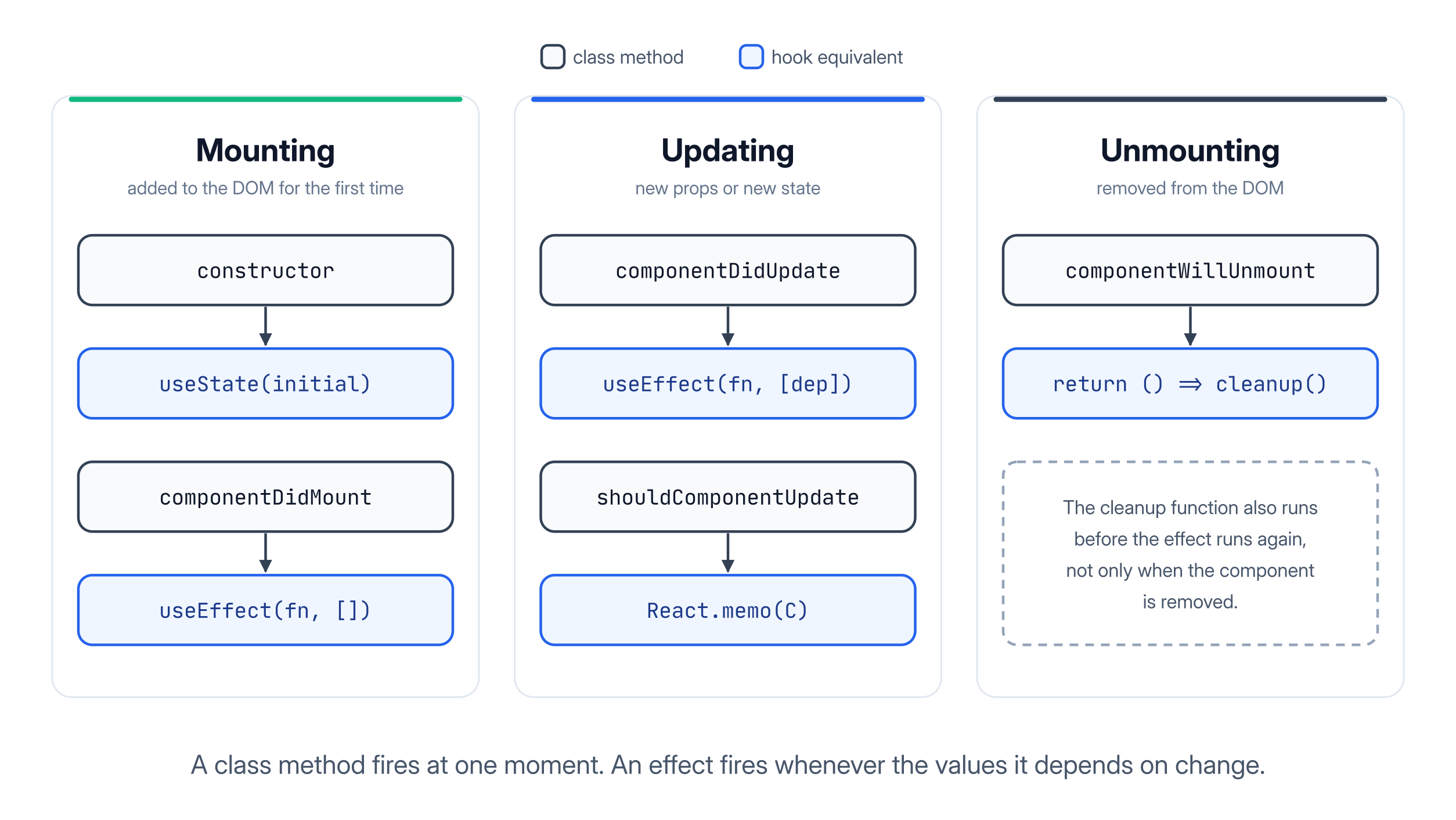
| Class lifecycle method | Hook equivalent |
|---|---|
constructor | useState initial value, or lazy init useState(() => ...) |
componentDidMount | useEffect(() => { ... }, []) |
componentDidUpdate | useEffect(() => { ... }, [dep]) |
componentWillUnmount | the cleanup function returned from useEffect |
getDerivedStateFromProps | calculate the value during render instead |
shouldComponentUpdate | React.memo around the component |
getSnapshotBeforeUpdate | useLayoutEffect |
componentDidCatch | no hook equivalent, still needs a class |
The mapping is close but not exact. A class lifecycle method is tied to a moment in the component's life. An effect is tied to a dependency, running after render whenever something it depends on changed. componentDidUpdate runs before the browser paints; useEffect runs after.
17. What is an error boundary, and what does it not catch?
An error boundary is a component that catches JavaScript errors thrown while rendering anywhere below it, and shows a fallback UI instead of letting the whole app unmount.
class ErrorBoundary extends React.Component {
    state = { hasError: false }

    static getDerivedStateFromError() {
        return { hasError: true }      // render the fallback on the next render
    }

    componentDidCatch(error, info) {
        logToService(error, info.componentStack)   // report it
    }

    render() {
        return this.state.hasError ? this.props.fallback : this.props.children
    }
}
It catches errors in:
- Rendering, lifecycle methods, and constructors of the tree below it.
It does not catch errors in:
- Event handlers.
- Asynchronous code, such as a
setTimeoutcallback or a rejected promise. - The boundary component itself, since none of that happens during that subtree's render.
Handle those with a normal try/catch and your own error state. React 19 added onCaughtError and onUncaughtError options on the root, but the boundary itself is still a class.
React Hooks Interview Questions
18. What are React hooks, and why were they introduced?
Hooks are functions that let a function component use React features such as state, side effects, and context. They arrived in React 16.8 and are now the standard way to write every component.
Before hooks, only classes could hold state, so a simple function had to be rewritten the moment it needed to remember anything. Sharing stateful logic was worse: wiring it up between components meant higher-order components or render props, both wrapping the component in extra layers.
Hooks fix both problems at once. Related logic sits together, and any group of hook calls can be moved into a custom hook and shared without touching the component tree at all.
19. What are the rules of hooks, and why do they exist?
There are two rules:
- Call hooks only at the top level of a component or another hook, never inside a condition, a loop, or a nested function.
- Call them only from React function components or custom hooks, never from a plain function or a class.
React stores hook state as an ordered list per component, matching each call to a slot by the order it runs in, not by name. Skip a hook on some render because of a condition, and every later hook shifts up a slot and starts reading another hook's data.
// Breaks: on renders where isOpen is false, the hooks below shift by one slot
if (isOpen) {
    const [height, setHeight] = useState(0)
}

// Correct: the hook always runs, the condition moves inside it
const [height, setHeight] = useState(0)
useEffect(() => {
    if (!isOpen) return
    setHeight(measure())
}, [isOpen])
eslint-plugin-react-hooks enforces both rules while you type, which is why they rarely bite in practice.
20. How does useState work, and what is lazy initial state?
useState returns a pair: the current value for this render, and a setter that schedules a re-render with a new value. React uses the argument you pass only on the first render of that component instance.
React still evaluates the expression you pass on every render, even though it only uses the result once, on the first render. An expensive call then runs again and again for nothing.
// Reads localStorage on every single render
const [draft, setDraft] = useState(JSON.parse(localStorage.getItem('draft')))

// Lazy initial state: the function runs once, on mount
const [draft, setDraft] = useState(() => JSON.parse(localStorage.getItem('draft')))
This is lazy initial state: pass a function instead of a value, and React only ever calls it once. The state value is also a constant within one render, which is why a setter call followed immediately by a read gives you the old value.
21. What is useEffect, and when does it run?
useEffect runs code that reaches outside React after the component has rendered and the browser has painted. That covers:
- Subscribing to an event.
- Starting a timer.
- Syncing with a non-React widget.
- Firing analytics.
React renders the component, commits the changes to the DOM, lets the browser paint, and only then runs your effect. That ordering keeps the screen responsive.
useEffect(() => {
    const id = setInterval(() => setSeconds((s) => s + 1), 1000)
    return () => clearInterval(id)        // cleanup runs before the next effect and on unmount
}, [])                                    // empty array: set up once, tear down on unmount
React 19 pushes a narrower view of what effects are for: synchronising a component with an external system. Transforming data for rendering belongs in the render body, not in an effect.
22. What does the dependency array do, and what is a stale closure?
The dependency array tells React which values an effect reads. After each render, React compares every entry with its value from the previous render, and runs the effect again only if something changed.
Leave a value out, and the effect keeps the version of that value from the render where it last ran. That is a stale closure: a function holding on to variables from a moment that has passed.
// roomId is missing, so the effect connects to the first room forever
useEffect(() => {
    const conn = createConnection(roomId)
    conn.connect()
    return () => conn.disconnect()
}, [])

// Correct: the effect reconnects whenever the room changes
useEffect(() => {
    const conn = createConnection(roomId)
    conn.connect()
    return () => conn.disconnect()
}, [roomId])
When the lint rule demands a dependency you do not want, the fix is almost never to delete it. Move the function inside the effect, wrap it in useCallback, or switch to the updater form of a setter.
23. How do you clean up an effect, and why do effects run twice in development?
An effect can return a function, and React calls it before running the effect again, and once more when the component unmounts. Timers cleared, listeners removed, sockets closed, in-flight requests aborted, all of it belongs in that cleanup function.
Skip it, and you get the two bugs every React codebase meets eventually. Listeners pile up because each render adds another one. A response that arrives after the component is gone tries to set state on something that no longer exists.
In development, StrictMode mounts each component, unmounts it, and mounts it again, so every effect runs, cleans up, and runs a second time. This is not a bug, and it does not happen in production. It surfaces effects that cannot survive being run twice, exactly the set that breaks under a feature that remounts a component.
24. What is the difference between useEffect and useLayoutEffect?
Both run after React has updated the DOM. useEffect runs asynchronously, after the browser has painted. useLayoutEffect runs synchronously, before the paint, so the browser never shows the frame in between.
Measure a DOM node and move something based on it, and useEffect lets the user see the first position for one frame before the correction, a flicker. useLayoutEffect blocks painting until your code finishes, so the user only ever sees the corrected layout.
useLayoutEffect(() => {
    const { height } = tooltipRef.current.getBoundingClientRect()
    setPosition(height > spaceBelow ? 'above' : 'below')   // decided before the paint
}, [spaceBelow])
Because it blocks painting, slow work inside useLayoutEffect delays the frame, so keep it to measurement and positioning.
25. What is useRef used for?
useRef returns a mutable object with a single current property that survives across renders. Changing current does not trigger a re-render, which is the whole point of it.
It covers two needs:
- Reaching a DOM node directly: focusing an input, measuring an element, playing a video.
- Remembering a value between renders without rendering it: a timer id, the previous value of a prop, a first-render flag.
const inputRef = useRef(null)
const renderCount = useRef(0)

renderCount.current += 1                 // changes without causing a render
useEffect(() => inputRef.current.focus(), [])

return <input ref={inputRef} />
Anything the UI displays belongs in state. Anything only your code reads belongs in a ref. React 19 also made refs easier to pass around, letting ref be an ordinary prop on function components.
26. When should you use useReducer instead of useState?
useReducer holds state in one object and updates it by dispatching actions to a reducer function that returns the next state. Reach for it when the updates get complicated, not when the state gets large. Three signals point there:
- Several pieces of state always change together, so separate setters mean several calls that must stay in step.
- The next value depends on the current one in a way that takes real logic, not just an increment.
- The same transition fires from many places, and you want it written once instead of copied.
function reducer(state, action) {
    switch (action.type) {
        case 'submit':  return { ...state, status: 'loading', error: null }
        case 'success': return { ...state, status: 'done', data: action.data }
        case 'failure': return { ...state, status: 'error', error: action.error }
        default: return state
    }
}

const [state, dispatch] = useReducer(reducer, { status: 'idle', data: null, error: null })
The reducer is a pure function outside the component, so you can unit test every transition without rendering anything. dispatch also has a stable identity, so passing it through context causes no extra renders.
27. What is the Context API, and when does it cause extra re-renders?
Context lets a provider publish a value to every component below it, and any descendant reads that value with useContext without it being passed through the components in between.
Every component that calls useContext re-renders whenever the provider's value changes by reference, and React.memo cannot stop it. Write value={{ user, setUser }} inline, and that creates a new object on every render of the provider, so every consumer re-renders even when user is identical.
// New object identity on every render: every consumer re-renders
<AuthContext.Provider value={{ user, setUser }}>

// Stable until user actually changes
const value = useMemo(() => ({ user, setUser }), [user])
<AuthContext.Provider value={value}>
The other fix is splitting one context into several. When data changes many times a second, context is the wrong tool entirely, and an external store with selector-based subscriptions is the right one.
28. What is a custom hook, and when should you write one?
A custom hook is a function whose name starts with use and which calls other hooks. It is just a function, no React magic beyond the naming convention.
function useLocalStorage(key, initialValue) {
    const [value, setValue] = useState(() => {
        const stored = localStorage.getItem(key)
        return stored ? JSON.parse(stored) : initialValue
    })

    useEffect(() => {
        localStorage.setItem(key, JSON.stringify(value))
    }, [key, value])

    return [value, setValue]
}
Custom hooks share logic, not state. Two components calling useLocalStorage('draft', '') each get their own independent state, exactly as two components calling useState do.
Write one when the same sequence of hooks appears in more than one component. The browser storage options behind a hook like this one are compared in the localStorage, sessionStorage, and cookies article.
React Performance Optimization Questions
29. What actually makes a React component re-render?
Three things cause a re-render:
- Its own state changed.
- Its parent rendered.
- A context it consumes published a new value.
When a parent re-renders, React re-renders its entire subtree by default, whether or not the props those children receive have changed.
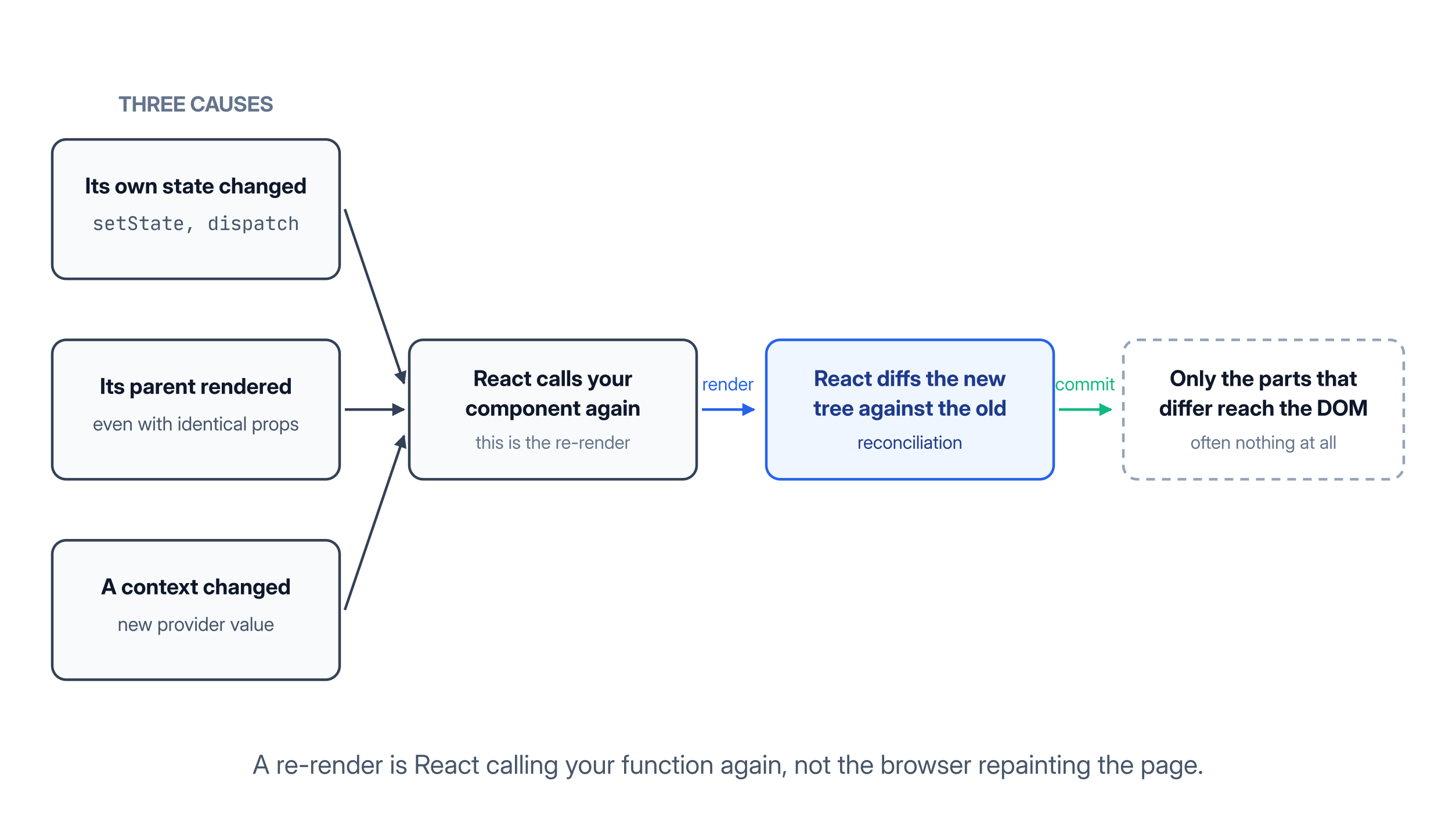
"My props did not change but the component rendered" is normal, then, not a bug. Moving state down into the small component that owns it removes the work instead of caching it.
30. What does React.memo do, and when does it not help?
React.memo wraps a component and skips its re-render when the new props are shallowly equal to the previous ones. Primitives match by value; objects, arrays, and functions match only when they are the same reference.
That comparison is where most attempts fail. A parent that builds a prop inline creates a new reference on every render, so the memoised child renders anyway.
const Row = React.memo(function Row({ item, onSelect }) { /* ... */ })

// memo never helps here: both props are new objects on every parent render
<Row item={{ ...item }} onSelect={() => select(item.id)} />

// memo works here: both references are stable across renders
const handleSelect = useCallback((id) => select(id), [])
<Row item={item} onSelect={handleSelect} />
React.memo earns its place on a component that renders often with the same props and is genuinely expensive, a row in a long list, a chart. It does nothing against a context update.
31. What is useMemo, and when is it worth using?
useMemo caches the result of a calculation between renders and recomputes it only when a dependency changes. It exists for two situations: a genuinely expensive computation, and a value whose reference identity must stay stable.
// Expensive work, skipped when the inputs are unchanged
const sorted = useMemo(() => rows.slice().sort(compare), [rows, compare])

// Stable identity, so a memoised child or an effect does not re-run
const config = useMemo(() => ({ locale, currency }), [locale, currency])
useMemo is not free. It stores the value, keeps the dependency array, and runs a comparison on every render, so wrapping a simple multiplication costs more than it saves. Measure in the React Profiler before adding it.
32. What is useCallback, and how is it different from useMemo?
useCallback returns the same function instance across renders until its dependencies change. useMemo returns the same value. Same mechanism, different payload.
// New function identity on every render
const handleSearch = (term) => fetchResults(term, filters)

// Stable until filters change
const handleSearch = useCallback((term) => fetchResults(term, filters), [filters])
Wrapping every handler in useCallback is a common habit that does not hold up. It only pays off when the consumer actually compares identities, so a plain <button onClick={...}> gains nothing from it.
33. What does the React Compiler change about memoisation?
The React Compiler is a build-time tool that adds memoisation for you. It analyses each component and emits the caching you would otherwise write by hand with useMemo, useCallback, and React.memo. It reached version 1.0 in October 2025.
Manual memoisation becomes the exception rather than the habit. You write the straightforward version of a component, and the compiler decides what is worth caching.
It is not magic. The compiler only optimises code that follows the Rules of React: pure components and hooks, no mutated props or state, hooks called unconditionally. Where it cannot prove that, it skips the component.
Setup and the full list of what it handles are in the React Compiler documentation.
34. How do you code split a React app with lazy and Suspense?
React.lazy takes a function that dynamically imports a component, and the bundler turns that import into a separate chunk fetched only when the component first renders. Suspense supplies the fallback to show while that chunk is loading.
const Dashboard = lazy(() => import('./Dashboard'))

function App() {
    return (
        <Suspense fallback={<Spinner />}>
            <Dashboard />
        </Suspense>
    )
}
Route boundaries are the natural place to split, since a user who lands on the login page should not download the admin dashboard. Heavy, rarely opened widgets are the other good candidate.
Splitting too finely backfires. Each chunk is a separate request, and a fallback that appears for fifty milliseconds looks like a glitch rather than progress.
35. How do you render a list of ten thousand rows without freezing the page?
You stop rendering rows the user cannot see. List virtualisation, also called windowing, renders only the handful of items inside the viewport plus a small buffer, so the DOM holds twenty nodes instead of ten thousand.
Libraries such as TanStack Virtual and react-window measure the container, calculate which indexes fall inside it from the scroll offset, and position the rendered rows inside a spacer element that keeps the scrollbar the right size.
Pagination or infinite scroll solve the same problem from the data side, and are often the simpler answer. Where the list must stay whole, a spreadsheet, a log viewer, virtualisation is the standard fix.
36. What are useTransition and useDeferredValue?
Both mark rendering work as low priority so urgent updates, above all typing, stay responsive. They are the everyday face of concurrent rendering in React 18 and 19.
useTransition gives you a startTransition function and an isPending flag. State updates made inside startTransition are interruptible.
const [isPending, startTransition] = useTransition()

function onChange(e) {
    setQuery(e.target.value)                        // urgent: the input updates now
    startTransition(() => setResults(search(e.target.value)))   // can be interrupted
}
useDeferredValue does the same job from the other end. Hand it a value, and it returns a copy that lags behind during heavy renders.
37. How do you find out why a component re-renders?
You profile it rather than guess. The React DevTools Profiler records a session, shows every commit, and lists the components that rendered with the time they took and the reason, once "Record why each component rendered" is turned on.
"Highlight updates when components render" draws a border around every component as it re-renders. Typing in a search box and watching half the page flash is usually enough to find the problem.
From there the fix follows the cause:
- A component rendering because of its parent points at state that should move down the tree.
- A memoised component rendering anyway points at an unstable prop reference.
- A whole screen rendering on every keystroke usually points at a context value rebuilt on every render.
State Management and Data Fetching Questions
38. When do you actually need a state management library?
You need one when state is shared widely, changes from many places, and has to stay consistent across the app. A good answer climbs the ladder in order:
- Local state covers anything one component owns.
- Lifting state up covers two or three siblings.
- Context covers values the whole tree reads but that rarely change, theme, session.
- A store such as Redux Toolkit or Zustand covers state with many writers or complex update logic.
The trap is reaching for a store first. Most of what teams historically put in Redux was server data, and once that moves to a data fetching library, the remaining global client state is often small.
39. What is Redux, and what are the pieces of Redux Toolkit?
Redux keeps application state in a single immutable store. Components read from it with selectors and change it by dispatching actions, which a reducer turns into the next state.
Redux Toolkit is the official way to write Redux today, and it exists because classic Redux required a lot of boilerplate. The pieces that come up in interviews:
configureStoresets up the store with sensible defaults, including the thunk middleware and the DevTools connection.createSlicegenerates the action types, the action creators, and the reducer from one object of reducer functions.- Immer runs inside
createSlice, so you writestate.items.push(item)and it produces a new immutable state behind the scenes. useSelectorsubscribes a component to one slice of the store, anduseDispatchreturns the dispatch function.createAsyncThunkhandles async work by dispatching pending, fulfilled, and rejected actions around a promise.- RTK Query sits on top and handles server data with caching, deduplication, and invalidation built in.
40. What is the difference between server state and client state?
Client state is data your app owns: which tab is open, what the user typed. Server state is a copy of data that lives in a database somewhere else, and your copy can go out of date without anything in your app touching it.
That property drags in a set of problems useState has no answer for:
- Caching, so two components do not fetch the same thing twice.
- Revalidation, so it refreshes after going stale.
- Deduplication of simultaneous requests, and retries on failure.
Libraries such as TanStack Query and SWR exist because every team was re-implementing that list badly. Think of server data as a cache, and the question becomes "when does this copy stop being true", the same problem the cache invalidation strategies article works through.
41. How do you fetch data in React without the usual useEffect bugs?
Fetching inside useEffect works, but doing it correctly takes more care than the three-line version people write first. The naive version has a race condition: the slower of two responses can arrive last and overwrite the correct one.
useEffect(() => {
    const controller = new AbortController()
    let ignore = false

    fetch(`/api/users/${userId}`, { signal: controller.signal })
        .then((res) => res.json())
        .then((data) => { if (!ignore) setUser(data) })      // drop a stale response
        .catch((err) => { if (err.name !== 'AbortError') setError(err) })

    return () => { ignore = true; controller.abort() }       // cleanup on change and unmount
}, [userId])
Even fixed, you still have no cache, no retry, and a request waterfall whenever a child fetches only after its parent has rendered. The current recommendation is to let a framework or a data library own fetching: a route loader, TanStack Query, or a Server Component that awaits the data before any of it reaches the browser.
42. Why is derived state in useState usually a bug?
Derived state is a value you store in state even though it can be calculated from other state or props. It is a bug because two sources of truth can disagree.
// Two states that must be kept in sync by hand
const [items, setItems] = useState([])
const [total, setTotal] = useState(0)

// One source of truth, calculated during render
const [items, setItems] = useState([])
const total = items.reduce((sum, item) => sum + item.price, 0)
Calculate during render instead, and wrap it in useMemo only if profiling shows it is expensive. For resetting state when a prop changes, give the component a key that changes with the prop, so React discards the old instance and mounts a fresh one.
React Router Interview Questions
43. How does client-side routing work in React Router?
Client-side routing swaps which components render based on the URL, without the browser making a full page request. React Router listens to the History API and matches the current path against your route definitions.
const router = createBrowserRouter([
    {
        path: '/',
        element: <Layout />,
        children: [
            { index: true, element: <Home /> },
            { path: 'posts/:slug', element: <Post /> },
            { path: '*', element: <NotFound /> },
        ],
    },
])
Why <Link to="/posts"> instead of <a href="/posts">? The anchor triggers a full navigation, discarding the JavaScript context and losing all client state. Link intercepts the click and lets React Router render the next route in place instead.
44. How do you read route params and build nested routes?
A path segment that starts with a colon is a dynamic segment, and useParams returns an object of those values. Query strings are separate and come from useSearchParams.
function Post() {
    const { slug } = useParams()                    // /posts/react-hooks -> "react-hooks"
    const [searchParams] = useSearchParams()        // ?page=2 -> searchParams.get('page')
    // ...
}
Nested routes let a parent route render shared chrome while its children render inside it. The parent places an <Outlet /> where the child should appear, so a dashboard layout renders once while only the panel inside it changes.
45. How do you protect a route behind authentication?
You wrap the protected routes in a component that checks the session and redirects when there is none.
function RequireAuth() {
    const { user, isLoading } = useAuth()
    const location = useLocation()

    if (isLoading) return <Spinner />
    if (!user) return <Navigate to="/login" state={{ from: location }} replace />
    return <Outlet />
}
Two details matter here:
- Passing the current location in
statelets the login page send the user back to where they were heading. - Using
replacekeeps the protected URL out of the history stack, so the back button does not bounce the user between it and the login page.
None of this is security. Every protected request still has to be authorised on the server, usually against a session cookie or a token like the ones described in the JSON Web Tokens article.
Reconciliation, Fiber, and Rendering Internals
46. What is reconciliation, and how does React's diffing algorithm work?
Reconciliation is the process React runs to work out the smallest set of DOM operations that will turn the previous rendered tree into the new one. React uses two assumptions to turn an O(n³) problem into an O(n) one.
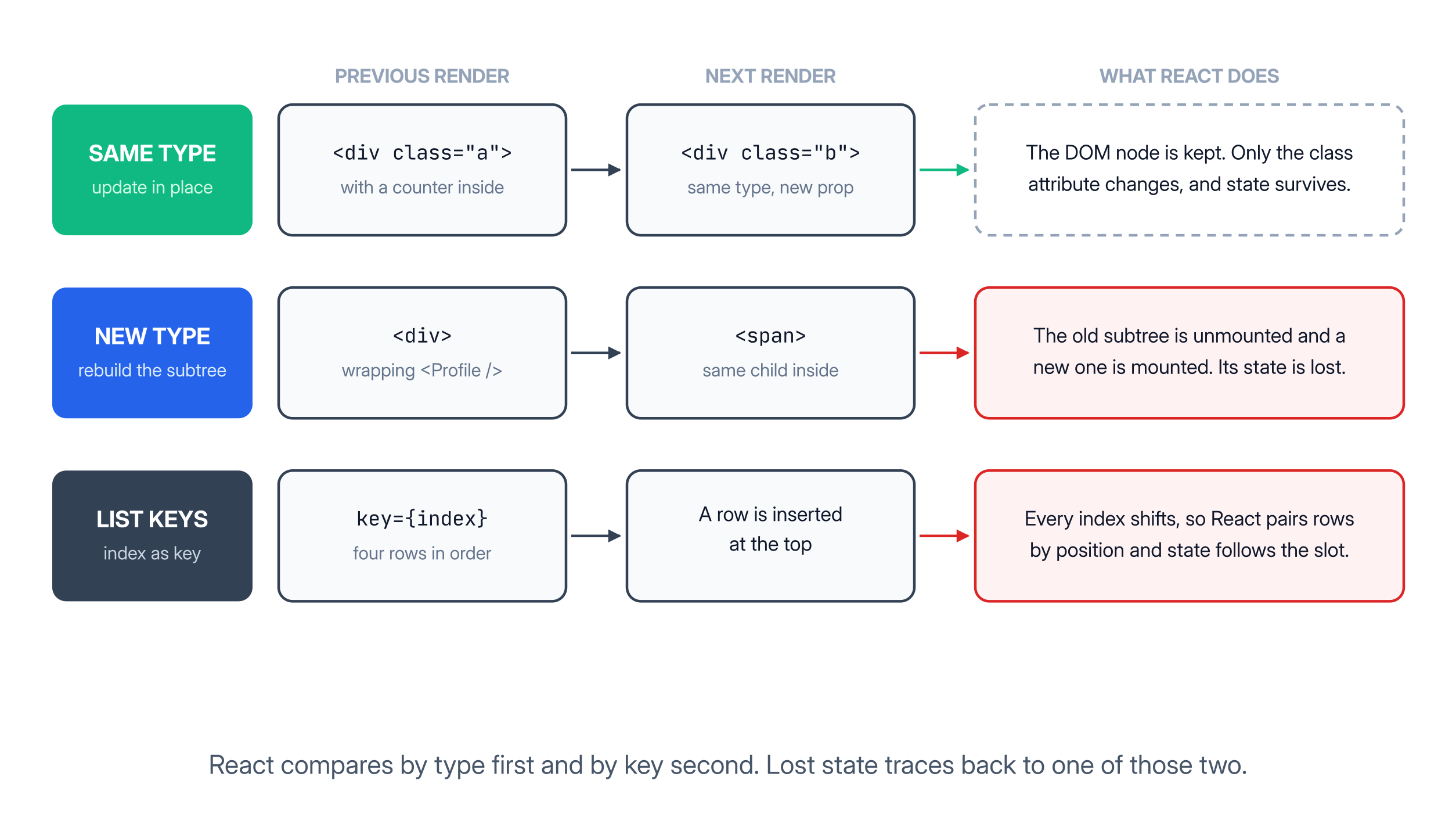
The first assumption is about element type. A changed type means React unmounts the old node and everything under it, losing any state those components held. A matching type means React keeps the DOM node and updates only what differs.
The second assumption is about lists, and it is where key comes in. Without keys, React pairs children by index, so inserting at the front looks like every item changed. With stable keys, React matches children by key and reorders the existing nodes instead of rebuilding them.
47. What is Fiber, and what happens in the render and commit phases?
Fiber is the reconciliation engine introduced in React 16. It replaced a recursive algorithm that walked the whole tree in one uninterruptible pass with units of work React can pause, resume, reorder, and throw away.
Work splits into two phases.
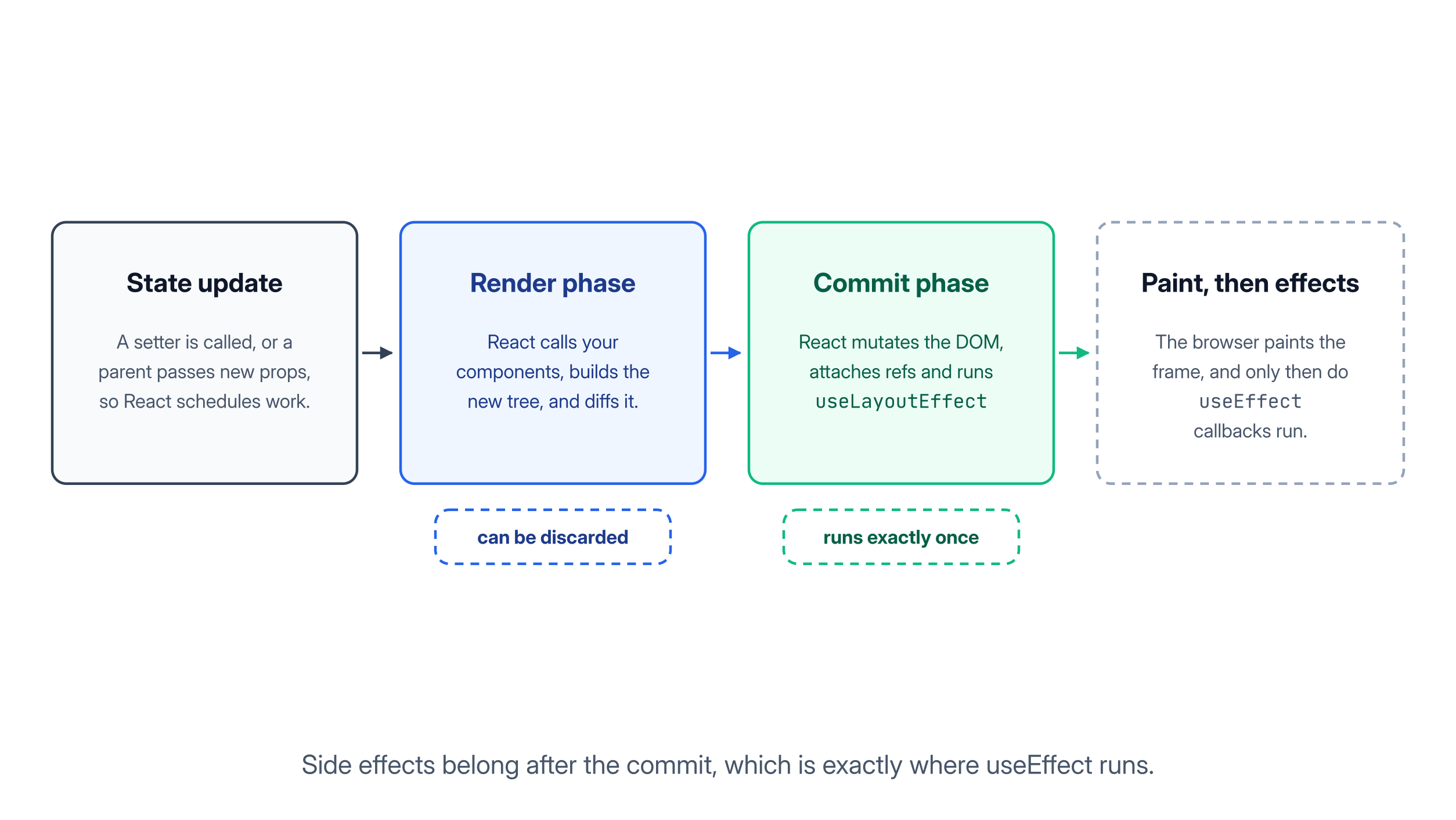
The render phase calls your components and diffs the result. It is asynchronous and interruptible, which is exactly why your components must be pure: React may run one twice, abandon the result, or run it at a lower priority.
The commit phase applies the result to the DOM in one synchronous pass, then runs layout effects and refs, lets the browser paint, and finally runs useEffect. React keeps two trees to make this work, swapping them at commit time.
48. What does StrictMode do, and what is concurrent rendering?
StrictMode is a development-only wrapper that stresses your components to surface unsafe patterns early. It double-invokes component bodies, state updaters, and effects. None of it runs in production.
Those checks exist because of concurrent rendering, which React 18 unlocked: React can start rendering an update, pause it for something more urgent, and resume or discard the work. Transitions, Suspense, and streaming server rendering all sit on top of that.
That ability has one requirement: rendering must be repeatable and free of side effects. StrictMode makes failures that break that rule appear on your machine instead of in production.
React 19 Questions: Server Components and Actions
49. What are React Server Components, and how do they differ from server-side rendering?
A Server Component runs only on the server. It can read a database or the file system directly, and its code is never included in the JavaScript bundle the browser downloads.
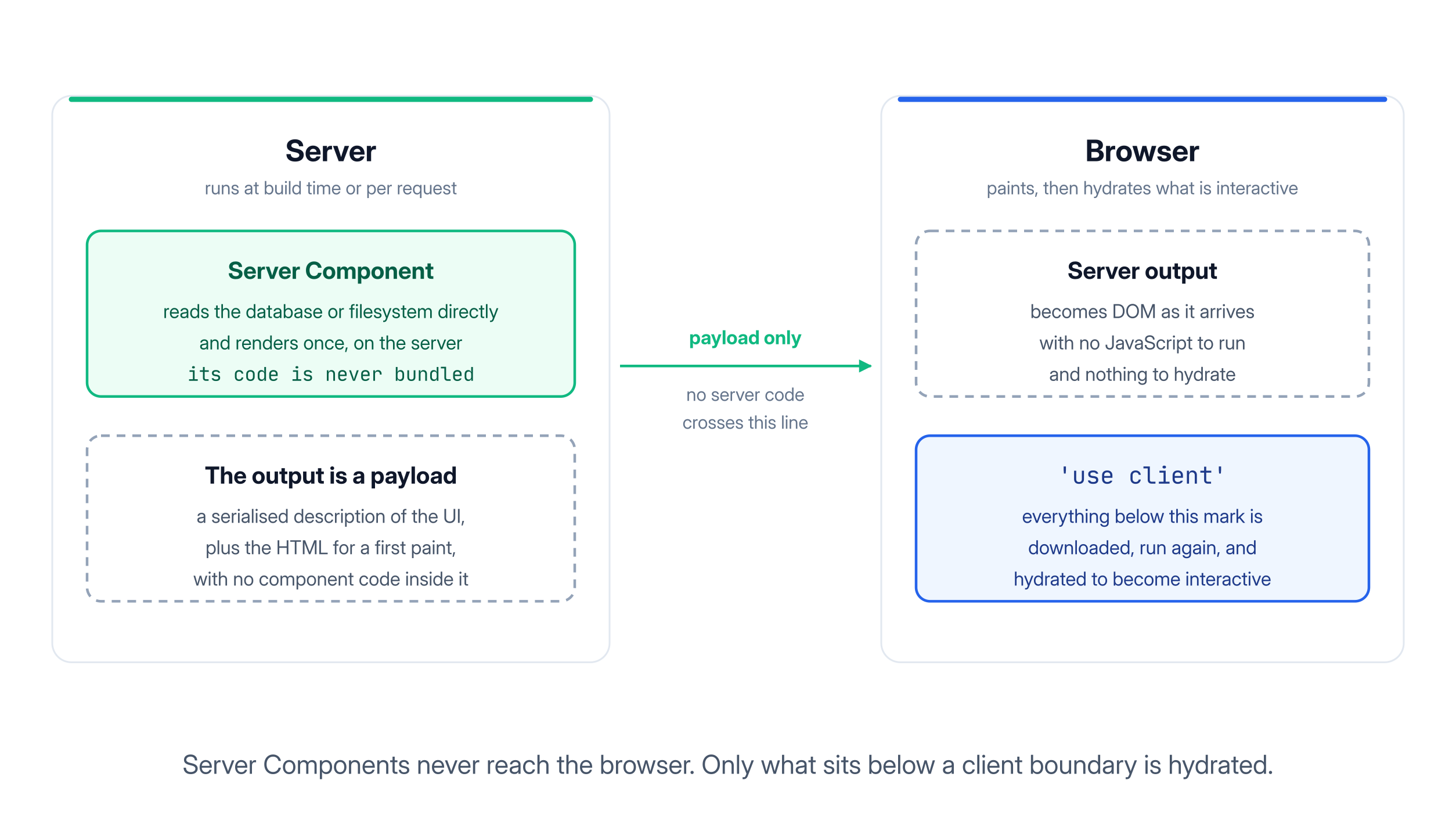
Server-side rendering ships client components to the browser, which runs them again to attach event handlers. That second pass is hydration, and the hydration in frontend frameworks article covers what it costs. Server Components skip that round trip entirely, because there is nothing to hydrate.
In a framework that supports them, such as Next.js with the App Router, every component is a server component by default, and 'use client' marks the boundary where interactivity begins. A server component can render a client component, but it cannot pass it a function or a class instance. Props crossing that boundary must be plain data: strings, numbers, arrays, objects.
50. What is the use hook, and what are Actions in React 19?
use reads the value of a promise or a context during render. While the promise is pending, the component suspends and the nearest Suspense boundary shows its fallback. Unlike every other hook, use may be called inside conditions and loops.
Actions are the other half of React 19. An async function passed to startTransition, or to a form's action prop, becomes an Action, and React tracks its pending state, errors, and optimistic updates for you.
function CommentForm({ postId }) {
    const [state, submitAction, isPending] = useActionState(
        async (prev, formData) => {
            const res = await saveComment(postId, formData.get('text'))
            return res.ok ? { ok: true } : { error: 'Could not save that comment' }
        },
        { ok: false },
    )

    return (
        <form action={submitAction}>
            <textarea name="text" />
            <button disabled={isPending}>{isPending ? 'Saving...' : 'Post'}</button>
            {state.error && <p role="alert">{state.error}</p>}
        </form>
    )
}
Three hooks come with this model:
useActionStateruns the action and returns its latest result along with a pending flag.useFormStatuslets a nested submit button read the status of the form above it without prop drilling.useOptimisticshows an expected result immediately and rolls it back if the action fails.
The full list of React 19 changes ships in the React 19 release post.
Final Thoughts
These 50 React JS interview questions cover what React interviews actually spend their time on: the fundamentals in plain language, React Hooks like useState and useEffect and the bugs around them, why components re-render, Redux and state management, React Router, and the reconciliation and Fiber internals underneath all of it.
Do not memorise the answers word for word. Build the mental model instead. State changes, React renders, React diffs, React commits, effects run after the paint. Once that sequence is solid, you can reason through a question you have never seen before.
For the authoritative detail, react.dev is worth reading end to end. If your interviews also cover Vue or the backend, Top 150 Vue.js Interview Questions and Top 111 Backend Interview Questions follow the same format.
Good luck with your interviews.