Running PHP on AWS Lambda gives you no servers to patch and a bill that scales to zero. It also gives you a read-only disk, no queue daemon, and a 29-second request limit. This guide shows how to deploy Laravel serverless on AWS Lambda with Bref, the open-source tool that runs PHP on Lambda. It is a complete Laravel serverless deployment: you take a fresh app to production, wiring up the web, queue, scheduler, uploads, a custom domain, and CI, and hitting the real problems, not just the happy path.
Names used throughout: app acme-app, domain example.com, region ap-south-1.
What you will build
A small Laravel app with placeholder code that exercises every moving part:
- a web endpoint behind API Gateway,
- a queued job draining from SQS,
- a scheduled command running every minute,
- a custom artisan command you run on demand,
- a file upload that stores to S3,
- session and cache backed by DynamoDB,
- a health-check route.
Before you start
You need:
- an AWS account,
- a domain with DNS on Cloudflare (or another external DNS provider),
- local tools: PHP 8.3, Composer, Docker (for Sail), Node.js and the AWS CLI.
How serverless changes a Laravel app
Bref packages PHP as Lambda layers (a layer is a zip of shared files Lambda mounts into your function) so a normal Laravel app boots on AWS Lambda (code that runs on demand, per request, with no server). Three rules follow, and they drive the whole guide:
- No server. The app wakes per request and freezes after. Nothing survives in memory between requests.
- Read-only disk. Only
/tmpis writable, and only per instance. File sessions, the file cache, and file logs all break. - No long processes. A web request must finish in 29 seconds. Long work moves to a queue.
The fix for all three is the same: move Laravel's file, session, cache, and queue drivers to managed AWS services. That is what makes a serverless Laravel app work, and it is most of the work below.
When does serverless Laravel fit? It suits spiky or low traffic, where Lambda scales to zero and you pay per request. It fits less well for steady high traffic or long-lived processes (WebSockets, Laravel Octane, Horizon), where an always-on server is simpler and cheaper, and the route for that is deploying on a VPS.
Bref or Laravel Vapor?
Both run Laravel on AWS Lambda. Laravel Vapor is a paid, managed service with a dashboard. Bref is open-source and free, and you own the AWS config directly. Pick Vapor for convenience, Bref for control and no per-project fee. This guide uses Bref.
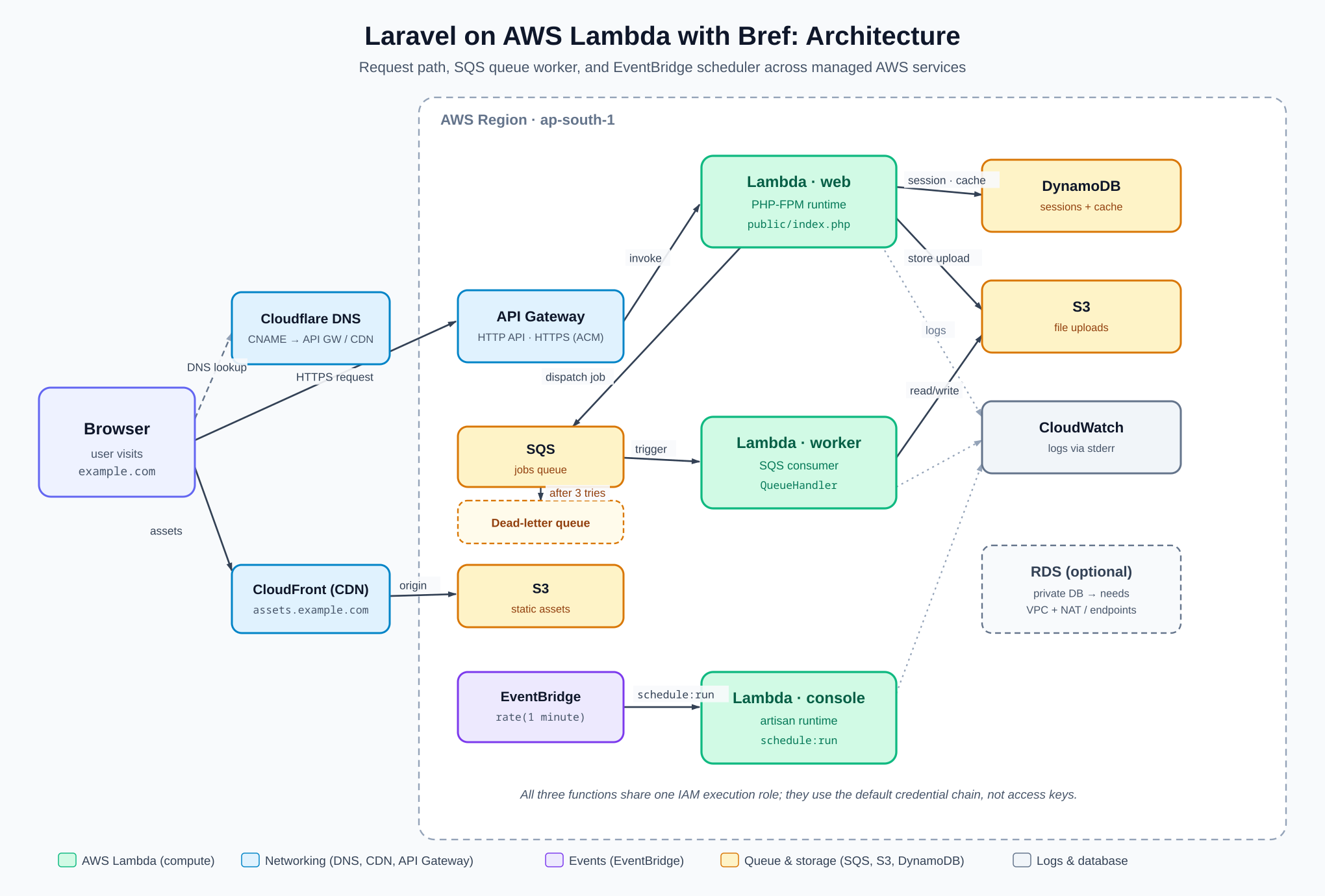
Architecture
Keep this picture open while you follow the steps. Three Lambda functions (web, worker, console) sit behind managed services that hold the state Lambda cannot.
Step 1: Create the Laravel app
Use Sail (Laravel's Docker environment) so you do not install PHP or MySQL locally.
curl -s "https://laravel.build/acme-app?with=mysql,redis" | bash
cd acme-app
./vendor/bin/sail up -d
Step 2: Add the demo pieces
Each piece is intentionally dumb. The goal is to test the plumbing. The file path is the first line of every block.
Add a queued job that only logs:
// app/Jobs/ProcessUpload.php
class ProcessUpload implements ShouldQueue
{
    use Queueable;

    public function __construct(public string $path) {}

    public function handle(): void
    {
        Log::info('Processing upload', ['path' => $this->path]);
    }
}
Add a custom artisan command:
// app/Console/Commands/Heartbeat.php
class Heartbeat extends Command
{
    protected $signature = 'acme:heartbeat';

    public function handle(): void
    {
        Log::info('heartbeat', ['at' => now()->toIso8601String()]);
    }
}
Schedule it every minute:
// routes/console.php
Schedule::command('acme:heartbeat')->everyMinute();
Add the routes: a health check, a cache-and-session counter, and an upload that stores to S3 and dispatches the job.
// routes/web.php
Route::get('/health', fn () => response()->json(['ok' => true, 'at' => now()]));

Route::get('/counter', function (Request $request) {
    $hits = Cache::increment('hits');
    $request->session()->put('last_seen', now()->toIso8601String());
    return response()->json(['hits' => $hits]);
});

Route::post('/uploads', function (Request $request) {
    $request->validate(['file' => 'required|file|max:10240']);
    $path = $request->file('file')->store('uploads', 's3');
    ProcessUpload::dispatch($path);
    return response()->json(['path' => $path], 201);
});
Locally this uses files, Redis, and local disk. None of those exist on Lambda, so the next steps replace them.
Step 3: Install Bref and the CLI
Install the PHP packages:
composer require bref/bref bref/laravel-bridge --update-with-dependencies
Install the deploy CLI globally (it needs Node.js):
npm i -g serverless # or: npm i -g osls
Which CLI? The Serverless Framework changed its license in v4 and now charges larger organizations. osls ("Open Serverless") is a free community fork of the last MIT version. Commands are identical; this guide uses
serverless.
Step 4: Write serverless.yml
serverless.yml is the one file that describes your whole deploy. The CLI compiles it into AWS resources. Create it in the project root with three functions, one per way your app runs.
# serverless.yml
service: acme-app

provider:
  name: aws
  region: ap-south-1
  runtime: provided.al2
  memorySize: ${param:memory} # per-stage, from params below
  environment:
    APP_ENV: production
    APP_DEBUG: 'false'
    LOG_CHANNEL: stderr

# Per-stage values. Deploy with: serverless deploy --stage prod
params:
  prod:
    memory: 1024
    domain: example.com
  staging:
    memory: 512
    domain: staging.example.com

plugins:
  - ./vendor/bref/bref

functions:
  web: # HTTP, behind API Gateway
    handler: public/index.php
    runtime: php-83-fpm
    timeout: 28
    environment:
      BREF_BINARY_RESPONSES: '1'
    events:
      - httpApi: '*'

  worker: # pulls jobs off SQS
    handler: Bref\LaravelBridge\Queue\QueueHandler
    runtime: php-83
    timeout: 60
    events:
      - sqs:
          arn: !GetAtt JobsQueue.Arn
          batchSize: 1
          maximumConcurrency: 5

  console: # runs artisan, including the scheduler
    handler: artisan
    runtime: php-83-console
    timeout: 120
    events:
      - schedule:
          rate: rate(1 minute)
          input: '"schedule:run"'
This is the most important file in the guide, so here is what each part does.
provider sets defaults for every function. runtime: provided.al2 is the base Amazon Linux runtime that Bref's layers sit on. memorySize reads from params, and everything under environment becomes an env variable in all three functions.
params holds per-stage values. serverless deploy --stage prod uses the prod block, --stage staging uses staging. Keeping every stage in one file is standard for a production app, so it is here from the start, not bolted on later.
web is your HTTP app.
handler: public/index.phppoints Lambda at Laravel's front controller.runtime: php-83-fpmis the PHP-FPM runtime, the same model your local Nginx talks to.httpApi: '*'tells API Gateway (the HTTP front door that invokes Lambda) to forward every path and method here.timeout: 28sits just under API Gateway's hard 29-second limit.BREF_BINARY_RESPONSES: '1'lets it return images and PDFs (Step 9 explains why).
worker processes queued jobs.
- It has no HTTP event. The
sqsevent subscribes it to the queue, so SQS (a managed message queue) invokes it when a job arrives. handler: ...QueueHandleris Bref's bridge that turns an SQS message into a normal Laravel job.batchSize: 1runs one job per invocation.maximumConcurrency: 5caps parallel workers so they do not overwhelm your database.
console runs artisan.
handler: artisantargets Laravel's console kernel.- The
scheduleevent is EventBridge (AWS's scheduler). Every minute it invokes the function withschedule:run, Laravel's scheduler entry point. This replaces the cron line you would add on a normal server.
The arn: !GetAtt JobsQueue.Arn reference points at a queue you create in the next step.
Step 5: Move drivers to managed services
Set drivers by environment, never in code, so the same app still runs locally. Each block below shows its file on the first line.
Sessions and cache → DynamoDB
DynamoDB is a managed NoSQL key-value store, a good fit for keyed data with an expiry.
# .env
SESSION_DRIVER=dynamodb
CACHE_STORE=dynamodb
DYNAMODB_CACHE_TABLE=acme-app-cache
Add the table to serverless.yml. It needs a key partition key and a TTL attribute expires_at, which is what Laravel's DynamoDB store reads:
# serverless.yml (add a top-level resources: block)
resources:
  Resources:
    CacheTable:
      Type: AWS::DynamoDB::Table
      Properties:
        TableName: acme-app-cache
        BillingMode: PAY_PER_REQUEST
        AttributeDefinitions:
          - { AttributeName: key, AttributeType: S }
        KeySchema:
          - { AttributeName: key, KeyType: HASH }
        TimeToLiveSpecification:
          AttributeName: expires_at
          Enabled: true
Queue → SQS
# .env
QUEUE_CONNECTION=sqs
SQS_PREFIX=https://sqs.ap-south-1.amazonaws.com/123456789012
SQS_QUEUE=acme-app-jobs
Add the queue and a dead-letter queue (a backup queue that catches jobs that fail repeatedly) under the same resources.Resources block, next to CacheTable:
# serverless.yml (inside resources: > Resources:)
    JobsQueue:
      Type: AWS::SQS::Queue
      Properties:
        QueueName: acme-app-jobs
        VisibilityTimeout: 360 # must exceed the worker timeout several times over
        RedrivePolicy:
          deadLetterTargetArn: !GetAtt JobsDLQ.Arn
          maxReceiveCount: 3
    JobsDLQ:
      Type: AWS::SQS::Queue
      Properties:
        QueueName: acme-app-jobs-dlq
Set the visibility timeout high. It is how long a job stays hidden after a worker picks it up. If it expires mid-run, SQS gives the same job to a second worker and it runs twice. Use several times the worker
timeout(here 60s, so 360).
Do not use Horizon. It needs a long-running process, which Lambda has no place for. The plain SQS driver plus Bref's worker gives you retries and the dead-letter queue instead.
Files → S3
S3 is AWS's managed file storage.
# .env
FILESYSTEM_DISK=s3
AWS_BUCKET=acme-app-uploads
AWS_DEFAULT_REGION=ap-south-1
Do not set AWS_ACCESS_KEY_ID or AWS_SECRET_ACCESS_KEY. The next callout explains why.
The credential trap. Lambda gives each function a temporary role credential (with a session token) through environment variables. Laravel's
config/filesystems.php,config/queue.php, andconfig/cache.phppasskeyandsecretto the AWS SDK but not the token, so calls fail with a signature error. Fix it: leavekeyandsecretempty on Lambda so the SDK reads the full role credential itself.// config/filesystems.php, the s3 disk 'key' => env('AWS_ACCESS_KEY_ID') ?: null, 'secret' => env('AWS_SECRET_ACCESS_KEY') ?: null,Do the same for the
sqsanddynamodbblocks.
Logs → CloudWatch
You already set LOG_CHANNEL=stderr in serverless.yml. Lambda ships anything on stderr to CloudWatch (AWS's log store). No log files, no extra config.
Give the functions permission
The functions run under one execution role. Grant it access to the bucket and table you just created, by adding an iam block inside the existing provider:
# serverless.yml (merge into the existing provider: block)
provider:
  iam:
    role:
      statements:
        - Effect: Allow
          Action: [s3:PutObject, s3:GetObject, s3:DeleteObject]
          Resource: arn:aws:s3:::acme-app-uploads/*
        - Effect: Allow
          Action: [dynamodb:GetItem, dynamodb:PutItem, dynamodb:DeleteItem, dynamodb:UpdateItem]
          Resource: !GetAtt CacheTable.Arn
The complete serverless.yml
You added several fragments above. Here is the whole file assembled, so you can check placement before deploying. You add the customDomain block (Step 10) and optional layers (Step 11) later.
# serverless.yml
service: acme-app

provider:
  name: aws
  region: ap-south-1
  runtime: provided.al2
  memorySize: ${param:memory}
  environment:
    APP_ENV: production
    APP_DEBUG: 'false'
    LOG_CHANNEL: stderr
  iam:
    role:
      statements:
        - Effect: Allow
          Action: [s3:PutObject, s3:GetObject, s3:DeleteObject]
          Resource: arn:aws:s3:::acme-app-uploads/*
        - Effect: Allow
          Action: [dynamodb:GetItem, dynamodb:PutItem, dynamodb:DeleteItem, dynamodb:UpdateItem]
          Resource: !GetAtt CacheTable.Arn

params:
  prod:
    memory: 1024
    domain: example.com
  staging:
    memory: 512
    domain: staging.example.com

plugins:
  - ./vendor/bref/bref

functions:
  web:
    handler: public/index.php
    runtime: php-83-fpm
    timeout: 28
    environment:
      BREF_BINARY_RESPONSES: '1'
    events:
      - httpApi: '*'

  worker:
    handler: Bref\LaravelBridge\Queue\QueueHandler
    runtime: php-83
    timeout: 60
    events:
      - sqs:
          arn: !GetAtt JobsQueue.Arn
          batchSize: 1
          maximumConcurrency: 5

  console:
    handler: artisan
    runtime: php-83-console
    timeout: 120
    events:
      - schedule:
          rate: rate(1 minute)
          input: '"schedule:run"'

resources:
  Resources:
    CacheTable:
      Type: AWS::DynamoDB::Table
      Properties:
        TableName: acme-app-cache
        BillingMode: PAY_PER_REQUEST
        AttributeDefinitions:
          - { AttributeName: key, AttributeType: S }
        KeySchema:
          - { AttributeName: key, KeyType: HASH }
        TimeToLiveSpecification:
          AttributeName: expires_at
          Enabled: true
    JobsQueue:
      Type: AWS::SQS::Queue
      Properties:
        QueueName: acme-app-jobs
        VisibilityTimeout: 360
        RedrivePolicy:
          deadLetterTargetArn: !GetAtt JobsDLQ.Arn
          maxReceiveCount: 3
    JobsDLQ:
      Type: AWS::SQS::Queue
      Properties:
        QueueName: acme-app-jobs-dlq
Step 6: Set environment variables and secrets
On a normal server, Laravel reads config from a .env file. There is no .env on Lambda, so each function reads real environment variables that you set in serverless.yml, and env() reads them exactly as before. Non-secret values can sit inline; secrets like APP_KEY and the database password must not live in Git, so store them in SSM Parameter Store (AWS's config and secret store) and reference them.
- Put each secret in SSM once per stage, as a
SecureString:
aws ssm put-parameter --name /acme-app/prod/APP_KEY --type SecureString --value 'base64:your-app-key'
aws ssm put-parameter --name /acme-app/prod/DB_PASSWORD --type SecureString --value 'your-db-password'
(Single-quote the value so the shell does not expand a $.)
- Reference them in
serverless.yml, next to the non-secret values already inprovider.environment.${sls:stage}picks the parameter for the stage you deploy:
# serverless.yml (expand provider.environment)
provider:
  environment:
    APP_ENV: production
    APP_DEBUG: 'false'
    LOG_CHANNEL: stderr
    APP_KEY: ${ssm:/acme-app/${sls:stage}/APP_KEY}
    DB_CONNECTION: mysql
    DB_HOST: your-db-host.example.com
    DB_DATABASE: acme
    DB_USERNAME: acme
    DB_PASSWORD: ${ssm:/acme-app/${sls:stage}/DB_PASSWORD}
Serverless resolves ${ssm:...} at deploy time and bakes the values into the function's environment. The running function reads plain env variables, so it never needs SSM access itself; only the deploy identity does (Step 7 grants that).
Why this matters: Miss this and the app boots on Lambda with no
APP_KEYor database config and returns a 500. The.envyou use locally does not travel to Lambda; these variables replace it.
Simpler alternative. To keep secrets in GitHub instead, reference
${env:APP_KEY}inserverless.ymland pass the values to the deploy step in CI (Step 12) with anenv:block. SSM keeps secrets inside AWS and out of your CI provider, which is why it is the default here.
Step 7: Create the AWS deploy user
serverless deploy needs AWS credentials of its own. These are separate from the function execution role above.
- In the AWS IAM console, create a user
acme-deploywith programmatic access (or an IAM Identity Center permission set for SSO). - Attach the policy below. Paste it as an inline policy on that user in the IAM console; it is not a file in your project. Start broad, then tighten to
acme-app-*once your first deploy works.
{
  "Version": "2012-10-17",
  "Statement": [{
    "Effect": "Allow",
    "Action": [
      "cloudformation:*", "lambda:*", "apigateway:*", "iam:*",
      "s3:*", "sqs:*", "dynamodb:*", "events:*", "logs:*",
      "ssm:GetParameter", "ssm:GetParameters",
      "acm:DescribeCertificate", "acm:ListCertificates"
    ],
    "Resource": "*"
  }]
}
- Save the credentials as a local profile so the CLI can read them:
aws configure --profile acme-deploy # paste the access key and secret
export AWS_PROFILE=acme-deploy
Deploy keys never go in the app. They live only on your machine or in CI. Lambda uses its own role at runtime, so keep these out of
.env.iam:*is in the policy because the deploy creates that execution role for you, andssm:GetParameterlets it resolve the secrets from Step 6.
Step 8: Deploy and verify
serverless deploy --stage prod
The output prints the API Gateway URL, like https://abc123.execute-api.ap-south-1.amazonaws.com. Verify every part:
| Check | Command | Expected |
|---|---|---|
| Web | curl <url>/health | {"ok":true,...} |
| Cache + session | curl <url>/counter twice | hits increases (DynamoDB works) |
| Queue | curl -F file=@photo.jpg <url>/uploads | file in S3, "Processing upload" in CloudWatch |
| Schedule | wait 1 min, check console logs | heartbeat line appears |
Keep the package under 250 MB. Lambda's unzipped limit is 250 MB, and
aws/aws-sdk-phpalone can use over 100 MB. A Laravel app needs only S3, SQS, and DynamoDB, so prune the unused SDK services in a Composer step to stay small and cut cold starts.
Step 9: Serve static assets from S3, not Lambda
Lambda can serve your CSS and JS, but every request wakes a function and burns runtime. For production, serve assets from S3 through CloudFront (AWS's CDN). This is one-time infrastructure; the CI pipeline in Step 12 does the actual build and upload on every deploy.
Set it up once:
- Create an S3 bucket for assets, for example
acme-app-assets. - Create a CloudFront distribution with that bucket as its origin, on a subdomain like
assets.example.com. - Point Laravel at the CDN:
# .env
ASSET_URL=https://assets.example.com
Now asset() and Vite URLs resolve to CloudFront, so browsers never hit Lambda for a stylesheet. On each deploy, CI uploads the built files with aws s3 sync public/build s3://acme-app-assets/build (see Step 12).
Images or PDFs return a 500? Add
BREF_BINARY_RESPONSES: '1'to the web function (already in the config above). API Gateway needs binary responses base64-encoded, and Bref only does that with this flag.
On updates, never use
--delete. Old browser tabs still request the previous hashed files during a rollout. Leave old assets in place and clean up later.
Step 10: Add a custom domain (Cloudflare + ACM)
You want example.com instead of the API Gateway hostname. You need admin access to the domain in Cloudflare, because you add DNS records there by hand. New to DNS records? See how DNS works.
- In ACM (AWS Certificate Manager, free TLS certificates), request a certificate for
example.com.
Region matters. For a regional HTTP API, the certificate must be in the API's region (
ap-south-1), notus-east-1. Theus-east-1rule is only for CloudFront.
- ACM gives you a CNAME to prove ownership. Add it in Cloudflare and wait for the certificate to validate.
- Add the domain plugin and a
customblock toserverless.yml. The domain reads from the per-stageparamsyou set in Step 4:
# serverless.yml (add the plugin and a top-level custom: block)
plugins:
  - ./vendor/bref/bref
  - serverless-domain-manager

custom:
  customDomain:
    domainName: ${param:domain} # example.com for prod, from params
    certificateArn: arn:aws:acm:ap-south-1:123456789012:certificate/abcd-1234
    endpointType: regional
    apiType: http
    createRoute53Record: false # you use Cloudflare, not Route 53
- Run
serverless create_domainonce. It prints a target liked-xxxx.execute-api.ap-south-1.amazonaws.com. - In Cloudflare, add a CNAME from
example.comto that target. If you proxy through Cloudflare, set SSL mode to Full.
Migrating an existing app? Flip DNS last. Deploy and test on the API Gateway URL first, lower your Cloudflare record's TTL a day ahead, then switch the CNAME.
Step 11: Add PHP extensions and raise upload limits (if needed)
Bref's base layer is lean. It has no GD (image library) or intl, and small upload limits. Add extra layers and a php.ini only if your app needs them.
# serverless.yml (add to the web function)
functions:
  web:
    layers:
      - ${bref-extra:gd-php-83}
      - ${bref-extra:intl-php-83}
; php/conf.d/php.ini  (its own file; Bref loads it automatically)
upload_max_filesize = 20M
post_max_size = 21M
memory_limit = 512M
Step 12: Automate deploys with CI/CD
Deploy from a Linux runner, because PHP extension binaries are platform-specific. This GitHub Actions job builds, uploads assets, deploys, and runs migrations.
# .github/workflows/deploy.yml
name: deploy
on:
  push:
    branches: [main]
jobs:
  deploy:
    runs-on: ubuntu-latest
    permissions:
      id-token: write # OIDC, no stored keys
      contents: read
    steps:
      - uses: actions/checkout@v4
      - uses: shivammathur/setup-php@v2
        with: { php-version: '8.3' }
      - run: composer install --no-dev --optimize-autoloader
      - run: npm ci && npm run build
      - run: aws s3 sync public/build s3://acme-app-assets/build # assets first, no --delete
      - uses: aws-actions/configure-aws-credentials@v4
        with:
          role-to-assume: arn:aws:iam::123456789012:role/acme-deploy
          aws-region: ap-south-1
      - run: npm i -g osls
      - run: serverless deploy --stage prod
      - run: serverless bref:cli --stage prod --args="migrate --force"
Because the app's secrets live in SSM (Step 6), the deploy resolves them with the OIDC role at deploy time. No application secrets are stored in GitHub; only the deploy role is trusted. The migrate --force step runs on Lambda, where the database env variables are already in place from the deploy.
Run a command or read logs on demand:
serverless bref:cli --stage prod --args="acme:heartbeat"
serverless logs -f web --stage prod --tail
Single-quote secrets in the shell. A password like
p@ss$wordhas a$; double quotes make the shell expand$wordand truncate it. WriteDB_PASSWORD='${{ secrets.DB_PASSWORD }}'.
Prefer OIDC over stored keys.
configure-aws-credentialswithrole-to-assumegets short-lived credentials, so nothing leaks from the repo.
Production checklist
- Cold starts: a cold start is the delay when Lambda boots a fresh instance. For latency-sensitive traffic, add provisioned concurrency (pre-warmed instances).
- Memory: more memory means more CPU. Bumping the web function to 1024 MB often lowers cost by finishing faster.
- Database connections: Lambda scales wide and each instance opens a connection. Cap the worker (
maximumConcurrency) and consider RDS Proxy. - Log retention: set a retention period on CloudWatch log groups; the default is forever.
- Dead-letter alarm: alert on the dead-letter queue depth so failed jobs do not go unnoticed.
- VPC only if the database is private. A public managed database needs no VPC (a private AWS network). A private RDS instance needs one, and then Lambda loses internet, so it needs a NAT gateway or VPC endpoints to reach S3, SQS, and DynamoDB. A VPC also adds cold-start latency and cost.
- Managed-DB quirks: if a database rejects a connection init command that another accepts, apply it conditionally (keyed on an env flag), not globally.
On cost: Lambda, API Gateway, SQS, DynamoDB, and S3 all scale to near-zero when idle. The two things that do not are provisioned concurrency and a NAT gateway, both billed around the clock.
Bref and Laravel on Lambda: FAQ
Can you run Laravel on AWS Lambda? Yes. Laravel is not serverless by default, but Bref packages PHP as Lambda layers and runs your app almost unchanged, once you move sessions, cache, files, and the queue to managed services. This guide walks through the whole process.
Is Bref free? Yes. Bref is open-source. You pay only AWS for what you use. Laravel Vapor adds a subscription on top.
Does Laravel Horizon work on AWS Lambda? No. Horizon needs a long-running process. Use the SQS queue driver with Bref's worker; SQS gives you retries and a dead-letter queue.
How much does it cost to run Laravel on Lambda? For low or spiky traffic, very little. The AWS free tier covers about 1 million requests and 400,000 GB-seconds a month. Avoid a VPC unless a private database forces one.
Can I use MySQL or RDS? Yes. A public managed database needs no VPC. A private RDS instance needs a VPC plus a NAT gateway or VPC endpoints.
Which PHP versions does Bref support?
Current versions, roughly 8.1 to 8.4. Match the runtime to your app, for example php-83-fpm.
Recap
You deployed a Laravel app to AWS Lambda with Bref, moved every stateful driver to a managed service (DynamoDB, SQS, S3, CloudWatch), replaced cron with EventBridge, added a custom HTTPS domain through Cloudflare and ACM, and automated it with CI. The recurring theme: a read-only disk, no long processes, and a 29-second limit, so state lives in managed services and long work goes to the queue.
What to try next
- Add provisioned concurrency to the web function and measure the cold-start drop.
- Alarm on the dead-letter queue, then force a job to fail and watch it fire.
- Deploy a staging copy on
staging.example.comwithserverless deploy --stage staging. - Move a slow endpoint onto the queue so it never risks the 29-second limit.
To sharpen the Laravel and PHP fundamentals behind this, see the Top 111 Laravel interview questions and the PHP syntax recap.