
Imagine a world where everything you see is a high resolution photograph. It looks perfect, the colors are vibrant and the details are sharp. But when you try to touch it, nothing happens. It’s just static ink on paper.
In the digital realm, we call this static state Server-Side Rendering. It is the process of sending a pre-baked HTML document to your browser. It’s fast to look at, but functionally dead. How do we bring it to life?
We bring it to life through a process called hydration. Have you ever wondered why a website appears instantly but takes a few seconds before the buttons actually work? That brief, uncanny valley of time is hydration in action.
The question 99 of frontend interview questions guide covers SSR, CSR, SSG, and ISR in a way that pairs well with this article.
What Hydration Actually Does
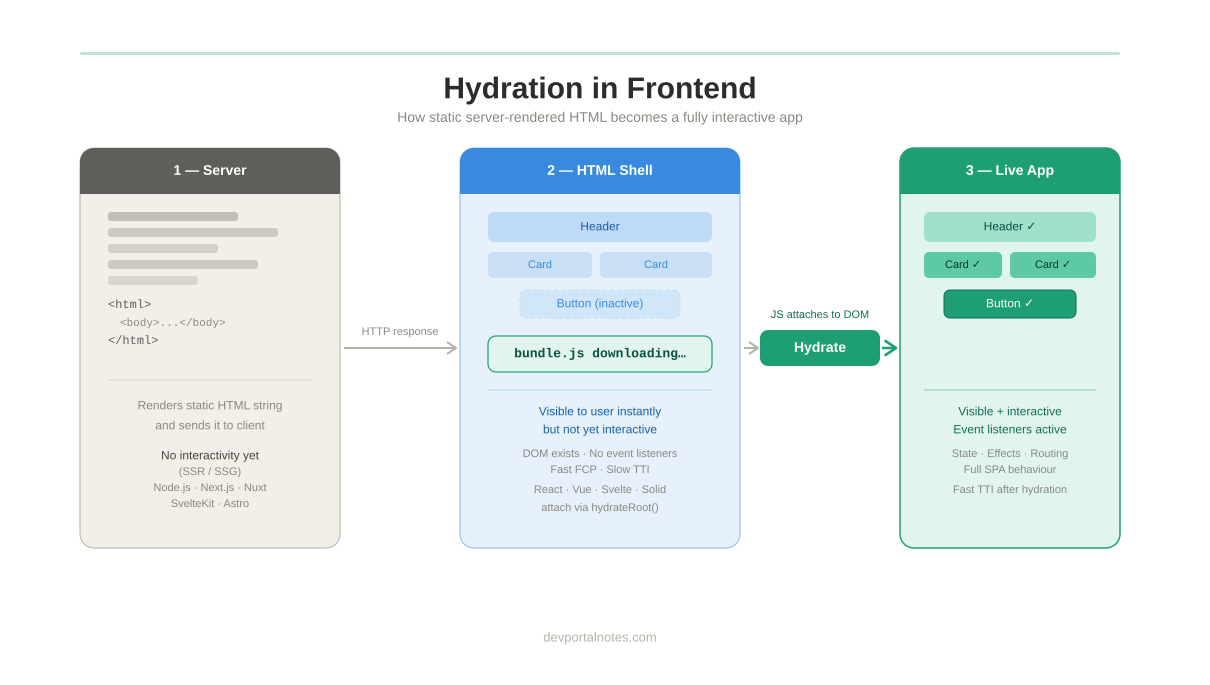
Think of hydration as the "soul" entering the body. The server sends the "body" (the HTML) and the client sends the "soul" (the JavaScript). Once they merge, the page becomes an interactive, living organism. This is the core idea behind hydration in react or vue and, more broadly, javascript hydration across modern frontend stacks. But why do we bother?
Why not just send the JavaScript and let the browser build the whole thing from scratch? That would be Client-Side Rendering. It sounds simpler, doesn't it? Well, it is, but it comes with a massive cost to user experience.
If we relied solely on the client, the user would stare at a blank white screen while the JavaScript downloaded. Have you ever closed a tab because it didn't load within three seconds? Most people have.
By sending HTML first, we give the user something to read immediately. This First Contentful Paint is psychological gold. It reassures the user that the site is working, even if the engines are still warming up under the hood.
Hydration exists to bridge the gap between "seeing" and "doing." It is the compromise we make to ensure the web is both fast to display and rich to use. It is a delicate handoff between server and client.
Let’s look at a real world example: an e-commerce product page. When you click a link from Google, you want to see the price and the image instantly. The server delivers those as static HTML right away.
But what about the "Add to Cart" button? That requires logic. It needs to know who you are and what is in your bag. This is where hydration steps in, attaching event listeners to those static buttons.
What happens if the hydration fails? You might click that "Add to Cart" button ten times and see nothing happen. This is the rage click, a symptom of a mismatch between the HTML structure and the JavaScript logic.
Is hydration a perfect solution? Not quite. It can be heavy. You are essentially sending the data twice: once as HTML and once as a JSON payload for the JavaScript to consume. It’s like buying two tickets for one seat.
Despite this overhead, hydration remains the backbone of modern frameworks like Nuxt, Next.js, and Remix. In hydration in next/nuxt js workflows, for example, the server renders the first pass and the client attaches behavior afterward. It allows developers to build complex, app-like experiences that still feel like traditional, fast-loading websites (more on React Server Components, which change this, in React interview questions).
Consider a social media feed like Twitter or X. As you scroll, the initial posts are often pre-rendered. This ensures that even on a slow 3G connection, you have something to consume while the heavy app logic initializes.
Could we avoid this double-loading? Some new patterns are emerging, like Partial Hydration or Resumability. These techniques try to only hydrate the parts of the page that actually need to be interactive.
Imagine a blog post like this one. Does the text itself need JavaScript? No. Only the comment section or the search bar might need it. Why hydrate the whole page when only 10% is interactive?
This is the frontier of web performance. We are moving toward a world where we water only the plants that are thirsty, rather than flooding the entire garden. This saves bandwidth and CPU cycles on your phone.
But for now, standard hydration is our best tool for SEO. Search engines love HTML. They can crawl it easily. If your site is just a pile of JavaScript, search bots might struggle to understand your content.
Do you care about your ranking on Google? If so, you care about hydration. It ensures that your content is indexed properly while still providing a smooth, single page app feel once the user arrives.
Let's understand the mechanics. When your app starts, the server executes your components and produces a string of HTML. This string is what flies across the internet to the user's device.
Inside that HTML is a special script tag. It contains the state of your application. It’s like a save-game file. The browser reads this and says, "yess! I know exactly where the server left off."
The browser then runs the same Vue components. But instead of creating new HTML, it dry-runs them. It compares its virtual map to the existing HTML already on the screen.
Hydration Mismatches and Errors
If the maps match, the browser just attaches the event listeners. It’s like a glove sliding onto a hand. Perfect fit. This is the moment of successful hydration. The page is now fully interactive.
But what if they don't match? This is the dreaded Hydration Mismatch Error. It usually happens when you use something like new Date() or Math.random() in your components.
Why does a date cause an error? Because the server might be in a different timezone than the user. If the server says "10:00 AM" and the browser says "10:01 AM," the glove doesn't fit the hand anymore.
The browser gets confused. It might throw away the server's HTML and start over, causing a visible flicker. This defeats the whole purpose of server-side rendering. It’s a waste of resources.
To fix this, developers must ensure their code is "isomorphic" or "universal." This means the code must produce the exact same result regardless of where it is running. Consistency is the key to hydration.
Think of a weather app. If the server fetches data for London, but the client thinks it's in New York, the UI will clash. We solve this by passing the server's data down to the client as a "payload."
This payload ensures the client doesn't have to fetch the data again. It just trusts what the server told it. "The temperature is 15 degrees," says the server. "Okay," says the client, "I'll start with that."
Is hydration only for big frameworks? Theoretically, no. You could write manual hydration logic in vanilla JavaScript. You’d find elements by ID and attach listeners. But that would be a nightmare to maintain.
Frontend frameworks automate this. They handle the complex diffing and event delegation so you can focus on building features. They make the "soul-to-body" transition seamless for the developer.
Let’s look at another example: a live dashboard. The static HTML shows the last known stock prices. Once hydrated, a WebSocket connection kicks in and starts updating those prices in real-time.
Without hydration, the user would see the initial prices but they would never change. They’d have to refresh the page like it was 1995. Hydration is what makes the "real-time" web possible.
Have you ever noticed how some sites feel "janky" for a second? That's usually because the main thread is busy hydrating. The CPU is working hard to turn that static text into interactive components.
On low-end mobile devices, this is a major bottleneck. The Time to Interactive (TTI) metric measures this. A site might look ready in 1 second, but if it takes 5 seconds to hydrate, the user is frustrated.
The Lazy Hydration
This is why we talk about Lazy Hydration. We can tell the browser: "Don't worry about the footer yet. Only hydrate the header and the main content because that's what the user sees." You must have experienced this in websites.
By prioritizing what the user can see, we make the app feel faster than it actually is. It’s a form of digital sleight of hand. We manage the user's perception of speed through clever scheduling.
What does the future hold? We are seeing the rise of Server Components. In this model, some parts of your UI stay on the server forever. They never send JavaScript to the client.
Imagine a complex data table that only displays information. In the old way, we'd hydrate the whole table. In the new way, we send the HTML and zero JavaScript. The hydration cost becomes zero.
This is a massive shift. It acknowledges that not everything on a webpage needs to be smart. Sometimes, a button is just a link, and a table is just a list of rows. Less is more.
If you are a Frontend developer, you are already standing on the shoulders of giants. The framework handles the "Why" and "How" of hydration for you, but understanding it makes you a better architect. This applies whether you are studying hydration in react, vue or building with hydration in next, nuxt js.
You start to see your components as two-sided coins. One side is the HTML representation for the server; the other side is the interactive logic for the client. Both must exist in harmony.
Hydration in Action
Do you want to see hydration in action? Open your browser's developer tools and disable JavaScript. Refresh the page. What you see is the "pre-hydrated" state. It’s the skeleton of your site.
Now, re-enable JavaScript. Watch the console. See how the page suddenly gains its capabilities. That transition is the magic of the modern web. It is the reason our digital world feels so responsive.
Final Thoughts
So, why does hydration exist? It exists because we refuse to choose between speed and power. We want the instant gratification of a static document and the infinite potential of a software application.
It is the bridge across the performance chasm. It is the technique that allows a simple browser to feel like a high-end operating system. It is, quite literally, what makes the web "fluid."
Next time you build a component, ask yourself: "What does this look like before the soul enters the body?" If the answer is "nothing," you might want to rethink your server side rendering strategy.
Hydration is more than a technical term; it's a philosophy of balance. It's about respecting the user's time by showing them content early, and respecting their needs by giving them interaction later.
We are the curators of this experience. Every kilobyte of JavaScript we add is a tax on the hydration process. Our job is to keep the water flowing smoothly without drowning the user's device.
So you ready to optimize your hydration? Start by looking at your bundles. Use tools like the Nuxt Bundle Analyzer to see what's being sent to the client. Every small win counts for your users.
The web is a living thing. Hydration is its heartbeat. By mastering this concept, whether through hydration in react, hydration in next js, or plain javascript hydration, you aren't just writing code; you are bringing digital experiences to life.