
If you already know how to program and have written PHP before, you do not need a tutorial; you need the specific shapes PHP gives to ideas you already understand, plus the behaviors that differ from Java, Python, or JavaScript and quietly cost you points under interview pressure. Modern PHP (8.0 and up) is also a very different language from the one most people half-remember: it has real type declarations, enums, match, named arguments, and a null-safe operator, and an interviewer will notice if you write it like it is 2014.
This recap is deliberately thorough rather than minimal, because "I forgot that function existed" is exactly what trips people up in a live round. It is organized by theme so you can skim to what you have gone rusty on, every concept comes with runnable code, and the constructs that people tend to only half-remember (constructor promotion, abstract classes, traits, generators) get a real explanation rather than a one-liner. If you are using this to prepare for a PHP backend role, pair it with the Top 111 Laravel Interview Questions for the framework layer and the Top 111 Backend Interview Questions for the framework-agnostic side (HTTP, databases, and system design). If you also work in Go, the Go Syntax Recap is the sibling article in this series.
How to Read and Run PHP
PHP code lives inside <?php ?> tags because the language was built to be embedded in HTML, but a modern .php file that contains only code opens with <?php and omits the closing tag entirely, which avoids accidentally emitting trailing whitespace. Every statement ends with a semicolon, and you print with echo (which takes one or more values) or print (which takes one and returns 1). You run a script with php file.php, evaluate a snippet with php -r 'code', or open an interactive shell with php -a.
<?php

declare(strict_types=1);   // opt into strict type checking; must be the first statement

// This is a single-line comment.
# So is this.
/* And this is a block comment. */

echo "Hello, world\n";          // echo prints; \n works inside double quotes
echo 'a', 'b', 'c', PHP_EOL;    // echo accepts multiple arguments; PHP_EOL is the newline
print "print returns 1\n";
That runs PHP on your own machine. When you are ready to run it in production without managing a server, walk through how to deploy a Laravel app on AWS Lambda with Bref.
Variables and Types
Declaring variables
Every variable name starts with $, needs no declaration keyword, and holds whatever type you last assigned; the type belongs to the value, not the name. Variable names are case-sensitive, and the convention is $camelCase. There is no block scoping: a variable exists from its first assignment to the end of the function (or the end of the script at the top level).
$name   = 'Ada';
$count  = 42;
$active = true;
$count  = 'now a string';   // legal; the variable simply rebinds to a new type

$a = $b = 0;                // chained assignment: both become 0
[$x, $y] = [1, 2];          // destructuring: $x is 1, $y is 2
The type system
PHP has four scalar types (int, float, string, bool), two compound types (array, object), plus null, callable, and iterable. There is no separate character type, int is 64-bit on modern platforms, and float is a IEEE 754 double. The one naming trap is that gettype() reports a float as "double", a historical quirk you should recognize even though you will rarely call gettype() in real code.
gettype(42);        // "integer"
gettype(3.14);      // "double"  (not "float"; a legacy name)
gettype('hi');      // "string"
gettype(true);      // "boolean"
gettype([1, 2]);    // "array"
gettype(null);      // "NULL"
Checking and casting types
Instead of gettype(), test a type with the is_* family, which returns a clean boolean and reads well in conditions. To convert between types, put the target type in parentheses before the value (a "cast"), or use the intval/floatval/strval/boolval functions when you want a callable you can pass around. Casting follows PHP's coercion rules, so (int) "12abc" reads the leading digits and gives 12, while (int) "abc" gives 0.
is_int(42);          // true
is_float(3.14);      // true
is_string('hi');     // true
is_bool(true);       // true
is_array([1]);       // true
is_null($x);         // true if $x is null
is_numeric('1.5e3'); // true: a numeric string counts
is_callable('strlen'); // true

(int) '12abc';       // 12  (reads leading digits)
(int) '3.9';         // 3   (truncates, does not round)
(float) '2.5kg';     // 2.5
(bool) '0';          // false  (see the falsy-values gotcha)
(string) true;       // '1';  (string) false is '' (empty)
(array) 'x';         // ['x']  (wraps a scalar in a one-element array)

intval('0x1A', 16);  // 26  (parse as base 16)
Constants and predefined values
A constant is a name bound to a value that cannot change after definition, and unlike variables it carries no $. Use the const keyword for compile-time constants (including inside classes) and the define() function when you need to compute the name or value at runtime. PHP also ships useful predefined constants such as PHP_INT_MAX, PHP_EOL, and M_PI, plus "magic constants" like __LINE__ and __DIR__ that resolve to where they appear in the source.
const MAX_RETRIES = 3;          // preferred for a fixed value
define('APP_ENV', 'prod');      // runtime definition
echo defined('APP_ENV') ? 'yes' : 'no';

echo PHP_INT_MAX;   // 9223372036854775807 on 64-bit
echo PHP_EOL;       // "\n" on Unix, "\r\n" on Windows
echo __LINE__;      // the current line number
echo __DIR__;       // the directory of the current file
isset, empty, and unset
Because a variable or array key can be missing entirely, PHP gives you three language constructs to probe existence. isset() is true when a variable is set and not null; empty() is true when a variable is missing or holds any falsy value; and unset() destroys a variable or removes an array element. The subtle part is that empty("0") is true, so use empty() only when you genuinely mean "missing or falsy," and reach for array_key_exists() when a key might legitimately hold null.
$user = ['name' => 'Ada', 'nickname' => null];

isset($user['name']);              // true
isset($user['nickname']);          // false: the value is null
isset($user['missing']);           // false
array_key_exists('nickname', $user); // true: the key exists, value is null
empty($user['name']);              // false
empty($user['missing']);           // true

unset($user['name']);              // removes the key
The type system rarely drives the problem in a coding round, but adding declare(strict_types=1) at the top of the file turns silent coercion into a loud TypeError, which surfaces the class of bug where a stray string slides into an integer parameter and hides a logic error until much later.
Operators
Arithmetic and assignment
The arithmetic operators are conventional, with two things worth flagging: ** is exponentiation and is right-associative, and / returns a float unless both operands are integers that divide evenly, so use intdiv() and % when you want strict integer math. Every arithmetic operator has a compound-assignment form (+=, -=, *=, and so on), and string concatenation has its own operator, ., with the matching .=.
7 + 3;      // 10
7 / 2;      // 3.5  (float, because 7 and 2 do not divide evenly)
6 / 2;      // 3    (int, because they divide evenly)
intdiv(7, 2); // 3  (forced integer division)
7 % 3;      // 1    (modulo; operands are cast to int)
2 ** 10;    // 1024 (exponentiation)

$total = 10;
$total += 5;   // 15
$total .= '!'; // '15!'  (.= concatenates onto a string)
Comparison
Comparison is where PHP diverges most from other languages, so keep two operators sharp: == compares after type juggling (so "1" == 1 is true), while === requires the same type and value with no conversion. The inverses are != (or <>) and !==. The spaceship operator <=> returns -1, 0, or 1 depending on ordering, which is exactly what a custom sort comparator needs to return.
1 == '1';    // true:  loose, string juggled to number
1 === '1';   // false: different types
1 != 2;      // true
1 !== '1';   // true:  strict inequality

3 <=> 5;     // -1  (left is less)
5 <=> 5;     //  0  (equal)
7 <=> 5;     //  1  (left is greater)
Logical operators
The logical operators come in two spellings, and mixing them up causes a genuinely surprising bug. Prefer &&, ||, and !, which bind tightly. The word forms and and or exist but have lower precedence than =, so $x = true and false assigns true to $x (the assignment happens before the and), which is almost never what you intend.
true && false;   // false
true || false;   // true
!true;           // false

$ok = isset($a) && $a > 0;   // correct: && binds tighter than =
$bad = true and false;       // $bad is TRUE, a classic precedence trap
Null handling and the ternary
PHP has a dense set of operators for "use this value unless it is missing," and the distinction between them matters. The full ternary cond ? a : b chooses between two values; the short ternary a ?: b falls back on any falsy a; the null coalescing operator a ?? b falls back only when a is null or undefined (and never raises a warning for a missing key); and the null-safe operator ?-> short-circuits a method or property chain to null instead of erroring on a null object.
$status = $age >= 18 ? 'adult' : 'minor';   // full ternary
$name = $input ?: 'guest';        // short ternary: falls back on any falsy value
$name = $input ?? 'guest';        // null coalescing: falls back only on null/undefined
$config['timeout'] ??= 30;        // assign only if unset or null
$city = $user?->address?->city;   // null-safe: null if any link is null, no error
Array, bitwise, and type operators
The + operator on two arrays is a union that keeps the left side's value for any duplicate key, which behaves very differently from array_merge() (see the gotchas). The bitwise operators (&, |, ^, ~, <<, >>) work on integers, instanceof tests an object's class or interface, and @ suppresses errors on a single expression (an anti-pattern you should recognize but avoid).
['a' => 1, 'b' => 2] + ['b' => 9, 'c' => 3];  // ['a'=>1, 'b'=>2, 'c'=>3]; left wins on 'b'

6 & 3;    // 2   (bitwise AND)
6 | 1;    // 7   (bitwise OR)
1 << 4;   // 16  (left shift, i.e. 1 * 2**4)

$e instanceof RuntimeException;   // true if $e is that class or a subclass
Operator precedence follows the usual mathematical ordering (** before * and / before + and -, comparison before && before ||), but PHP 8 made one rule strict: a nested ternary must be parenthesized, because the old left-associative behavior was a frequent source of bugs.
Strings
Quotes, interpolation, and heredoc
Single quotes produce a literal string, while double quotes interpolate variables and process escape sequences like \n and \t; this is a real semantic difference, not a style choice. Wrap a variable in {} inside a double-quoted string when the surrounding characters would otherwise be read as part of the name, and use -> interpolation for object properties. For multi-line blocks, heredoc (<<<TAG) behaves like a double-quoted string and nowdoc (<<<'TAG') behaves like a single-quoted one.
$name = 'Ada';
echo 'Hello $name';        // literal:      Hello $name
echo "Hello $name\n";      // interpolated: Hello Ada + newline
echo "Hi {$name}s";        // braces disambiguate: Hi Adas
echo "City: {$user->city}"; // property interpolation

$greeting = 'Hello, ' . $name . '!';   // concatenate with '.', never '+'

$html = <<<HTML
    <p>Hello, $name</p>
    HTML;                  // heredoc interpolates like double quotes

$raw = <<<'TXT'
    Literal $name, no interpolation here.
    TXT;                   // nowdoc is literal
Accessing characters
A string is indexable like an array of single-byte characters, and PHP supports negative indices that count from the end, which is handy for grabbing the last character. Keep in mind that this indexes bytes, not Unicode code points, so it is only safe for ASCII; use the mb_* functions for multibyte text.
$s = 'hello';
$s[0];    // 'h'
$s[-1];   // 'o'  (negative index counts from the end)
$s[1] = 'a';  // strings are mutable by index: $s is now 'hallo'
Common string functions
Strings are a scalar type, not an object, so their operations are global functions rather than methods. The set below covers the vast majority of what a coding exercise needs: measuring, changing case, trimming, searching, replacing, splitting, joining, and formatting. Note that strlen() counts bytes (use mb_strlen() for characters) and that the search functions return a byte index or false.
strlen('hello'); // 5 (bytes; use mb_strlen for UTF-8)
strtoupper('hi'); // 'HI'
strtolower('HI'); // 'hi'
ucfirst('hello'); // 'Hello'
ucwords('hello world'); // 'Hello World'
trim(' hi '); // 'hi' (also ltrim, rtrim)
trim('__hi__', '_'); // 'hi' (trim custom characters)
substr('hello', 1, 3); // 'ell' (start index, length)
strpos('hello', 'l'); // 2 (index, or false if absent)
strrpos('hello', 'l'); // 3 (last occurrence)
str_contains('hello', 'ell'); // true (PHP 8.0+)
str_starts_with('hello', 'he'); // true (PHP 8.0+)
str_ends_with('hello', 'lo'); // true (PHP 8.0+)
str_replace('l', 'L', 'hello'); // 'heLLo'
substr_count('hello', 'l'); // 2
str_repeat('ab', 3); // 'ababab'
str_pad('5', 3, '0', STR_PAD_LEFT); // '005'
strrev('abc'); // 'cba'
str_split('abcd', 2); // ['ab', 'cd']
explode(',', 'a,b,c'); // ['a', 'b', 'c']
implode('-', ['a', 'b', 'c']); // 'a-b-c' (join is an alias)
sprintf('%s is %d (%.1f%%)', 'x', 3, 42.5); // 'x is 3 (42.5%)'
number_format(1234567.891, 2); // '1,234,567.89'
htmlspecialchars('<a href="x">'); // '<a href="x">'
Validating string content
For quick input validation without regex, the ctype_* functions test whether every character in a string belongs to a class, which is cleaner than writing a pattern for simple checks. Be aware that they behave oddly when passed an integer (they treat it as an ASCII code), so pass strings.
ctype_digit('12345');   // true:  all digits
ctype_alpha('abcDEF');  // true:  all letters
ctype_alnum('abc123');  // true:  letters and digits
ctype_space("  \t\n");  // true:  all whitespace
String parsing shows up constantly in coding rounds, and the trap worth memorizing is that strpos() returns 0 for a match at the very start, which is falsy, so if (strpos(...)) wrongly reports "not found" for position 0; test with !== false, or use str_contains() when you only need a yes/no answer.
Arrays
One type, many roles
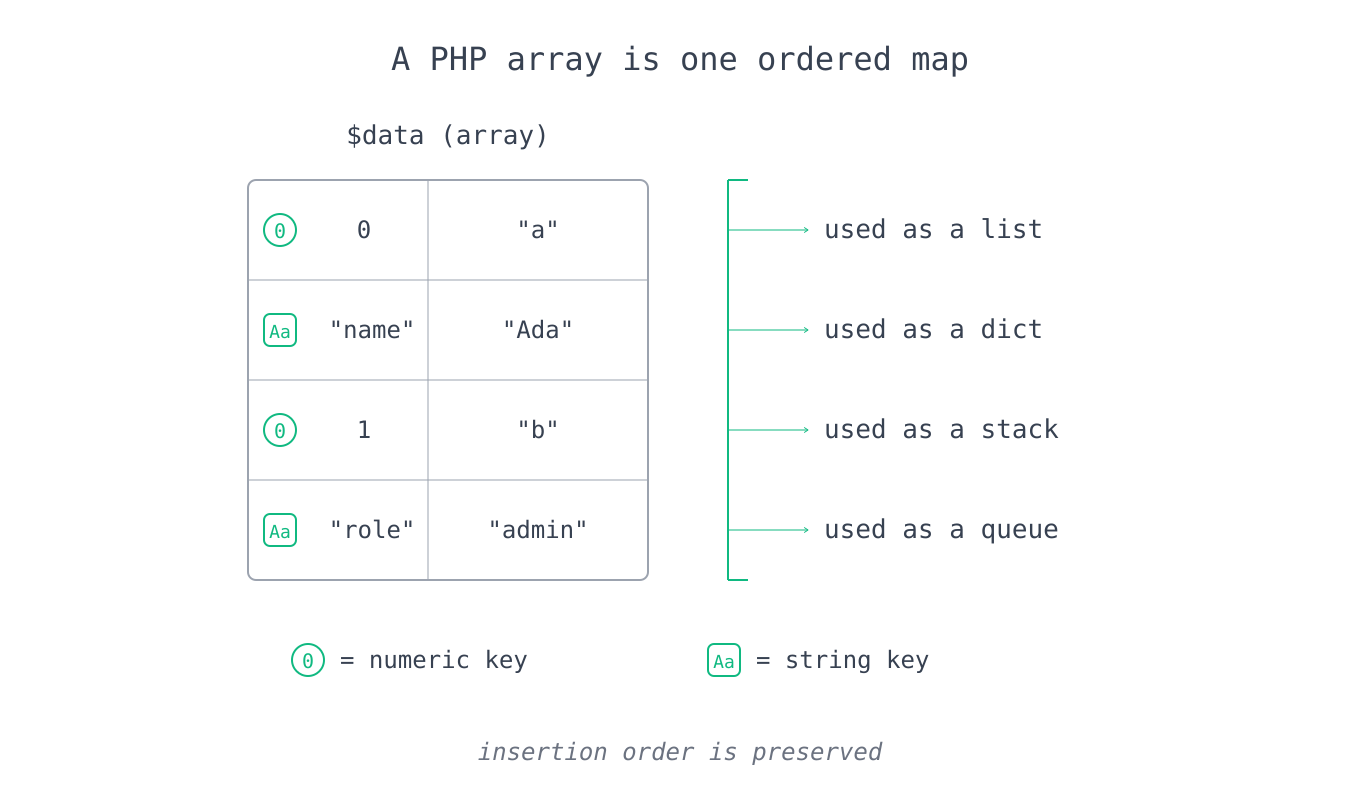
PHP has a single built-in collection type, the array, and it is an ordered map (a hash table with a remembered insertion order) rather than a fixed-size list. The same type serves as list, dictionary, stack, and queue: keys are either integers or strings, values are anything, and the order you insert is the order you iterate. This is the biggest adjustment coming from languages that separate List from Map, because in PHP a "list" is simply an array whose keys happen to be 0, 1, 2 and up.
$list  = [1, 2, 3];                       // integer keys 0, 1, 2
$assoc = ['name' => 'Ada', 'age' => 36];  // string keys
$mixed = [0 => 'a', 'k' => 'b', 5 => 'c'];// keys can mix types; order is preserved
$nested = [
    ['name' => 'Ada',   'age' => 36],     // an array of arrays (rows)
    ['name' => 'Linus', 'age' => 54],
];
$nested[1]['name'];   // 'Linus'
Adding, removing, and inspecting elements
You append with the empty-bracket shorthand $arr[], which is idiomatic, or with array_push() when you want to add several at once. The four stack/queue functions matter for interview problems: array_pop() and array_push() work the fast end (the tail), while array_shift() and array_unshift() work the front and are O(n) because they renumber every integer key.
$a = [1, 2, 3];
$a[] = 4;                 // append: [1, 2, 3, 4]
array_push($a, 5, 6);     // append several: [1, 2, 3, 4, 5, 6]
array_pop($a);            // remove and return the last (6); O(1)
array_shift($a);          // remove and return the first (1); O(n), reindexes
array_unshift($a, 0);     // prepend 0; O(n)

count($a);                // number of elements (sizeof is an alias)
in_array(3, $a);          // true: value membership
in_array('3', $a, true);  // strict membership (type must match too)
array_search(3, $a);      // the key of the first match, or false
array_key_exists('k', $assoc); // true if the key exists (even if value is null)
Keys, values, and transformation
The workhorses for reshaping data are array_map (transform every element), array_filter (keep elements that pass a test), and array_reduce (fold to a single value), all of which return a new array and leave the original untouched. Two behaviors to internalize: array_filter keeps the original keys (so wrap it in array_values() when you want a clean list), and array_map with a null callback zips arrays together.
$nums = [5, 3, 8, 1];

array_keys($assoc);                        // ['name', 'age']
array_values($assoc);                      // ['Ada', 36]
array_flip(['a' => 1, 'b' => 2]);          // [1 => 'a', 2 => 'b'] (swap keys/values)
array_key_first($assoc);                   // 'name'
array_key_last($assoc);                    // 'age'

array_map(fn($n) => $n * 2, $nums);        // [10, 6, 16, 2]
array_filter($nums, fn($n) => $n > 3);     // [0 => 5, 2 => 8]  (keeps original keys)
array_values(array_filter($nums, fn($n) => $n > 3)); // [5, 8]  (reindexed)
array_reduce($nums, fn($carry, $n) => $carry + $n, 0); // 17  (0 is the seed)
array_walk($nums, function (&$v) { $v *= 10; }); // mutate in place: [50, 30, 80, 10]
Combining, slicing, and set operations
Beyond transformation, a handful of functions cover merging, extracting sub-ranges, and set math. The one to be careful with is array_merge versus the + operator: array_merge renumbers integer keys and lets the later array win on string keys, while + keeps the first array's values and never renumbers.
array_merge([1, 2], [3, 4]);               // [1, 2, 3, 4] (integer keys renumbered)
array_merge(['a' => 1], ['a' => 2]);       // ['a' => 2]   (later wins on string keys)
array_combine(['a', 'b'], [1, 2]);         // ['a' => 1, 'b' => 2] (keys + values)

array_slice([1, 2, 3, 4, 5], 1, 2);        // [2, 3]  (offset, length)
array_splice($nums, 1, 2, ['x']);          // removes 2 from index 1, inserts 'x' (in place)
array_chunk([1, 2, 3, 4, 5], 2);           // [[1, 2], [3, 4], [5]]
array_column($nested, 'name');             // ['Ada', 'Linus'] (pluck one field from rows)
array_column($nested, 'age', 'name');      // ['Ada' => 36, 'Linus' => 54] (key by field)

array_unique([1, 1, 2, 3, 3]);             // [0 => 1, 2 => 2, 3 => 3]
array_diff([1, 2, 3, 4], [2, 4]);          // [0 => 1, 2 => 3]  (in first, not second)
array_intersect([1, 2, 3], [2, 3, 4]);     // [1 => 2, 2 => 3]  (in both)
array_reverse([1, 2, 3]);                  // [3, 2, 1]
range(1, 5);                               // [1, 2, 3, 4, 5]
range('a', 'e');                           // ['a', 'b', 'c', 'd', 'e']
array_fill(0, 3, 0);                       // [0, 0, 0]
array_sum($nums);                          // sum of all values
array_product([2, 3, 4]);                  // 24
max($nums); min($nums);                    // largest / smallest value
Sorting
PHP has a family of sort functions rather than one, and they differ along three axes: sort by value or by key, ascending or descending, and whether they preserve the key-to-value association. Every one of them sorts the array in place and returns a boolean (see the gotchas), so you keep using the same variable afterward. Use the u* variants when you need a custom comparator, which should return the result of <=> (or any negative, zero, positive integer).
| Function | Sorts by | Direction | Keeps key association |
|---|---|---|---|
sort / rsort | value | asc / desc | no (reindexes to 0,1,2) |
asort / arsort | value | asc / desc | yes |
ksort / krsort | key | asc / desc | yes |
usort | value (custom) | custom | no |
uasort | value (custom) | custom | yes |
uksort | key (custom) | custom | yes |
natsort | value (natural order) | asc | yes |
$n = [5, 3, 8, 1];
sort($n);                                  // [1, 3, 5, 8]; returns true, sorts in place
rsort($n);                                 // [8, 5, 3, 1]

$scores = ['ada' => 90, 'lin' => 70, 'joy' => 85];
asort($scores);                            // by value, keys kept: ['lin'=>70, 'joy'=>85, 'ada'=>90]
ksort($scores);                            // by key:               ['ada'=>90, 'joy'=>85, 'lin'=>70]

// Sort an array of rows by a field with a custom comparator:
usort($nested, fn($a, $b) => $a['age'] <=> $b['age']);  // youngest first
usort($nested, fn($a, $b) => $b['age'] <=> $a['age']);  // oldest first (operands flipped)
Destructuring and iteration
You can pull an array apart by position or by key with the [...] destructuring syntax, and skip elements by leaving a hole. Iteration is almost always foreach, which can hand you just the value, or the key and value together, or a reference to each element (with &) when you want to modify the array as you loop.
[$first, $second] = [10, 20];              // by position
['name' => $name] = $assoc;                // by key
[, $onlySecond] = [1, 2];                  // skip the first element
[$a, $b] = [$b, $a];                       // swap without a temp variable

foreach ($nums as $value) { /* value only */ }
foreach ($assoc as $key => $value) { /* key and value */ }
foreach ($nums as &$value) { $value *= 2; } // modify in place via reference
unset($value);                              // ALWAYS unset after a reference loop (see gotchas)
In practice, associative arrays are your hash map and your set in almost every coding round: use isset($map[$key]) for O(1) membership and use the array keys themselves as a set of unique values. The one performance caveat is that array_shift is O(n) because it renumbers keys, so if you build a BFS queue on a large input, reach for SplQueue (covered later) instead.
Control Flow
Conditionals
if / elseif / else work as expected, and PHP also offers an alternative colon syntax (if (...): ... endif;) that is common inside HTML templates. For choosing among many discrete values, switch has been around forever but uses loose comparison and requires an explicit break in every case to avoid fall-through, both of which cause bugs. The modern replacement is match (PHP 8.0), which compares with strict equality, returns a value, needs no break, and throws UnhandledMatchError if nothing matches and there is no default.
if ($n > 0) {
    $sign = 'positive';
} elseif ($n < 0) {
    $sign = 'negative';
} else {
    $sign = 'zero';
}

// match: strict comparison, returns a value, no fall-through
$label = match ($status) {
    200, 201, 204 => 'success',   // several values can share one arm
    404           => 'not found',
    500           => 'server error',
    default       => 'unknown',
};

// switch: loose comparison, needs break, falls through without it
switch ($status) {
    case 200:
    case 201:
        $label = 'success';
        break;
    default:
        $label = 'unknown';
}
Loops and loop control
PHP has the standard four loops, and foreach is the one you use for anything array-shaped. break exits the loop and continue skips to the next iteration, and both accept an integer level so break 2 escapes two nested loops at once, which is genuinely useful in grid and matrix problems.
for ($i = 0; $i < 5; $i++) { /* ... */ }
foreach ($items as $item)   { /* ... */ }

$i = 0;
while ($i < 5) { $i++; }
do { $i--; } while ($i > 0);   // body runs at least once

foreach ($grid as $row) {
    foreach ($row as $cell) {
        if ($cell === null) {
            continue 2;   // skip to the next ROW, not the next cell
        }
        if ($cell === 'X') {
            break 2;      // exit both loops entirely
        }
    }
}
Default to match in new code and fall back to switch only when you actually want fall-through, because reintroducing loose comparison is exactly how a match ($n) against a string sneaks a bug past you.
Functions
Definitions, parameters, and return types
A function declares typed parameters and a return type, and a parameter becomes optional by giving it a default value, which must be a constant expression. Named arguments (PHP 8.0) let a caller pass values by parameter name and skip earlier optional ones, which makes long signatures readable. Return types include the usual scalars plus void (returns nothing), never (never returns, always throws or exits), self, static, and mixed.
function greet(string $name, string $greeting = 'Hello'): string {
    return "$greeting, $name";
}

greet('Ada');                          // 'Hello, Ada'
greet('Ada', 'Hi');                    // 'Hi, Ada'      (positional)
greet(greeting: 'Hey', name: 'Ada');   // 'Hey, Ada'     (named, any order)

function log(string $msg): void {      // void: returns nothing
    echo $msg, PHP_EOL;
}
Variadics and the spread operator
A variadic parameter, written with ..., collects any number of trailing arguments into an array, and the same ... "spreads" an array back into individual arguments at a call site. This replaces the old func_get_args() approach and works with type hints.
function sum(int ...$nums): int {      // collect all args into $nums
    return array_sum($nums);
}
sum(1, 2, 3);          // 6
sum(...[4, 5, 6]);     // 15  (spread an array into the argument list)

$parts = ['2026', '08', '25'];
sprintf('%s-%s-%s', ...$parts);        // '2026-08-25'
Pass by value versus reference
Arguments pass by value by default, so a function receives a copy and cannot change the caller's variable. To let a function modify the original, declare the parameter with &, which passes it by reference. This is the mechanism behind functions like sort() and array_push() that mutate their argument in place.
function addOne(int $x): void   { $x++; }        // by value: no outside effect
function bumpUp(int &$x): void  { $x++; }        // by reference: mutates the caller

$n = 5;
addOne($n);   // $n is still 5
bumpUp($n);   // $n is now 6
Anonymous functions, closures, and arrow functions
An anonymous function (a closure) is a function value you can store and pass around. Unlike JavaScript, a classic closure does not automatically capture the surrounding scope; you list the variables you want in a use clause, and they are captured by value at creation time unless you write use (&$x) to capture by reference. Arrow functions (PHP 7.4), written with fn, capture the enclosing scope automatically by value and are ideal for short callbacks.
$factor = 3;

// Classic closure: name captured variables explicitly in `use`.
$scaleByValue = function (int $n) use ($factor): int {
    return $n * $factor;   // sees $factor as it was when the closure was created
};

// Capture by reference to see later changes to $factor:
$scaleByRef = function (int $n) use (&$factor): int {
    return $n * $factor;
};

// Arrow function: captures $factor automatically, by value.
$scale = fn(int $n): int => $n * $factor;

$factor = 10;
$scaleByValue(2);  // 6   (captured 3 by value)
$scaleByRef(2);    // 20  (sees the updated 10)
Callables and first-class references
Many standard functions take a "callable," which PHP accepts in several forms: a function name as a string, an [$object, 'method'] pair, an anonymous function, or an object with an __invoke method. PHP 8.1 added first-class callable syntax, strlen(...), which turns any function or method into a Closure you can pass around cleanly.
array_map('strtoupper', ['a', 'b']);   // ['A', 'B'] (function name as a string)
array_map(strtoupper(...), ['a', 'b']); // same, using first-class callable syntax (8.1)
usort($rows, [$sorter, 'compare']);    // [object, method] pair
Generators
A generator is a function that uses yield to produce a sequence one value at a time instead of building and returning a whole array. Calling it does no work upfront; each yield pauses execution and hands back a value, resuming where it left off on the next iteration. This keeps memory flat when you process large or infinite sequences, which is why frameworks use generators for streaming database rows.
function countTo(int $limit): Generator {
    for ($i = 1; $i <= $limit; $i++) {
        yield $i;              // pause here, resume on the next loop step
    }
}
foreach (countTo(3) as $x) { echo $x; }   // prints 123, never holds an array

function pairs(): Generator {
    yield 'a' => 1;            // generators can yield key => value too
    yield 'b' => 2;
}
The use-by-value rule is the closure detail that trips up JavaScript developers, who expect a closure to see later mutations of an outer variable; when you actually need that live link, capture by reference with use (&$x) and change it deliberately rather than by accident.
Object-Oriented Programming
Classes, objects, and $this
A class is a blueprint that bundles data (properties) and behavior (methods); an object is an instance created from it with new. Inside a method, $this refers to the current instance, and you access members with the -> operator. Properties should be typed and can have default values, and methods declare visibility just like properties.
class Rectangle {
    public float $width;        // typed property
    public float $height;

    public function __construct(float $width, float $height) {
        $this->width = $width;  // $this is the current instance
        $this->height = $height;
    }

    public function area(): float {
        return $this->width * $this->height;
    }
}

$r = new Rectangle(3.0, 4.0);
$r->area();      // 12.0  (-> accesses instance members)
$r->width;       // 3.0
Visibility
Each property and method has a visibility that controls where it can be accessed: public is reachable from anywhere, protected is reachable from the class and its subclasses, and private is reachable only from the declaring class. Defaulting to private or protected and exposing behavior through public methods is the encapsulation idea PHP shares with Java and C#.
class BankAccount {
    private float $balance = 0.0;      // hidden from outside code

    public function deposit(float $amount): void {
        $this->balance += $amount;     // internal code can touch it
    }
    public function getBalance(): float {
        return $this->balance;         // exposed through a public method
    }
}
Constructors and constructor promotion
__construct is the constructor, called automatically by new, and __destruct runs when the object is destroyed. Because assigning constructor arguments to properties was so repetitive, PHP 8.0 added constructor property promotion: adding a visibility keyword to a constructor parameter declares the property and assigns it in one step, so you no longer write the property, the parameter, and the assignment separately. The two versions below are equivalent.
// Without promotion (the old, verbose way):
class PointOld {
    public int $x;
    public int $y;
    public function __construct(int $x, int $y) {
        $this->x = $x;
        $this->y = $y;
    }
}

// With constructor promotion (PHP 8.0): declare + assign in the signature.
class Point {
    public function __construct(
        public int $x = 0,
        public int $y = 0,
    ) {}
}

$p = new Point(2, 5);
$p->x;   // 2
readonly properties
A readonly property (PHP 8.1) can be assigned exactly once, normally inside the constructor, and any later write throws an error. This gives you immutable value objects without writing a private property plus a getter, and it pairs naturally with constructor promotion.
class Money {
    public function __construct(
        public readonly int $amount,
        public readonly string $currency = 'USD',
    ) {}
}

$m = new Money(1500);
$m->amount;          // 1500
$m->amount = 2000;   // Error: cannot modify a readonly property
Static members and class constants
A static property or method belongs to the class itself rather than to any instance, so you call it with :: and it shares one value across all objects. A class constant, declared with const, is a fixed value namespaced under the class. Inside the class, self:: refers to the class where the code is written and static:: refers to the class that was actually called (this difference is "late static binding," which matters with inheritance).
class Counter {
    public const START = 0;            // class constant, accessed with ::
    private static int $count = 0;     // shared across all instances

    public static function next(): int {
        return ++self::$count;         // :: reaches static members
    }
}

Counter::next();        // 1
Counter::next();        // 2
echo Counter::START;    // 0
echo Counter::class;    // 'Counter'  (the ::class constant gives the full name)
Inheritance
A class extends one parent, inheriting its properties and methods, and can override any method by redeclaring it; call the parent's version with parent::. Mark a class or method final to forbid extension or overriding. PHP allows only single inheritance, which is why interfaces and traits (below) exist to share behavior more flexibly.
class Animal {
    public function __construct(protected string $name) {}
    public function speak(): string {
        return "$this->name makes a sound";
    }
}

class Dog extends Animal {
    public function speak(): string {          // override
        return parent::speak() . ' (a bark)';  // call the parent version too
    }
}

(new Dog('Rex'))->speak();   // 'Rex makes a sound (a bark)'
Abstract classes
An abstract class is a class you cannot instantiate on its own; it exists to be extended, and it can mix fully-written methods with abstract methods that have a signature but no body. Every concrete subclass must implement each abstract method, so an abstract class is the tool for "these types share this common code, but each must fill in this one piece." You reach for it (rather than an interface) when subclasses genuinely share implementation and state.
abstract class Shape {
    abstract public function area(): float;    // no body; subclasses must implement it

    public function describe(): string {       // shared, concrete method
        return 'Area is ' . round($this->area(), 2);
    }
}

class Circle extends Shape {
    public function __construct(private float $r) {}
    public function area(): float {
        return M_PI * $this->r ** 2;           // ** binds tighter than *
    }
}

// new Shape();  would be a fatal error: cannot instantiate an abstract class
(new Circle(2))->describe();   // 'Area is 12.57'
Interfaces
An interface is a pure contract: a list of public method signatures (and optionally constants) with no implementation and no state. A class promises to provide every listed method by declaring implements, and because a class can implement many interfaces while extending only one class, interfaces are how PHP gets the flexibility of multiple inheritance for behavior without its problems. Use an interface when unrelated classes must be interchangeable through a shared set of methods.
interface Comparable {
    public function compareTo(self $other): int;   // signature only
}

interface JsonSerializable {
    public function jsonSerialize(): mixed;
}

// A class can implement several interfaces at once:
class Version implements Comparable, JsonSerializable {
    public function __construct(private int $number) {}

    public function compareTo(self $other): int {
        return $this->number <=> $other->number;
    }
    public function jsonSerialize(): mixed {
        return ['version' => $this->number];
    }
}
The rule of thumb: an interface says what a class can do, an abstract class provides how for the parts that are shared. If you find yourself putting real method bodies or properties in an "interface," you actually want an abstract class.
Traits
A trait is a bundle of methods (and properties) that you inject into a class with use, letting you share implementation across classes that do not share an ancestor. It exists specifically to work around single inheritance: instead of forcing every class that needs timestamp behavior into one base class, you drop the behavior in with a trait. When two traits collide on a method name, you resolve it explicitly with insteadof and as.
trait Timestamps {
    public ?int $updatedAt = null;
    public function touch(): void {
        $this->updatedAt = time();
    }
}

trait Identifiable {
    public string $id;
    public function assignId(): void {
        $this->id = uniqid();
    }
}

class Article {
    use Timestamps, Identifiable;   // mix in both sets of methods
    public function __construct(public string $title) {}
}

$a = new Article('Hello');
$a->assignId();
$a->touch();   // both trait methods are now part of Article
Enums
An enum (PHP 8.1) defines a type with a fixed set of named values, replacing the old habit of using loose class constants. A pure enum just names its cases, while a backed enum gives each case a scalar value (string or int), which is what you store in a database or send over an API. Enums can hold methods and constants and implement interfaces, and backed enums add from() (throws on an unknown value) and tryFrom() (returns null instead).
// Pure enum: just named cases.
enum Direction {
    case North;
    case South;
}
Direction::North;                      // an enum instance

// Backed enum: each case has a scalar value, plus methods.
enum Status: string {
    case Active   = 'active';
    case Archived = 'archived';

    public function label(): string {  // enums can have methods
        return ucfirst($this->value);
    }
}

Status::Active->value;      // 'active'
Status::Active->label();    // 'Active'
Status::from('archived');   // Status::Archived (throws if the value is unknown)
Status::tryFrom('nope');    // null (safe lookup)
Status::cases();            // [Status::Active, Status::Archived] (all cases)
Magic methods
Magic methods are hooks named with a leading __ that PHP calls automatically in specific situations. The ones you meet most are __construct/__destruct (lifecycle), __toString (used when an object is treated as a string), __get/__set (intercept access to undefined properties), __call/__callStatic (intercept calls to undefined methods), __invoke (lets you call an object like a function), and __clone (customize copying). They are powerful for building expressive APIs but obscure control flow, so use them deliberately.
class Money {
    public function __construct(private int $cents) {}

    public function __toString(): string {          // echo/concatenation triggers this
        return '$' . number_format($this->cents / 100, 2);
    }
}
echo new Money(1599);   // '$15.99'

class Multiplier {
    public function __construct(private int $factor) {}
    public function __invoke(int $n): int {          // makes the object callable
        return $n * $this->factor;
    }
}
$double = new Multiplier(2);
$double(5);                       // 10  (the object is called like a function)
array_map($double, [1, 2, 3]);   // [2, 4, 6]
Object comparison and cloning
Objects are compared two ways: == is true when two objects are the same class with equal properties, while === is true only when both variables point to the exact same instance. Assigning an object copies a handle, not the object, so two variables share one instance; use the clone keyword to make a separate (shallow) copy, and define __clone to deep-copy any nested objects.
$a = new Point(1, 2);
$b = $a;             // $b is the SAME object as $a (a shared handle)
$c = clone $a;       // $c is an independent copy

$a === $b;           // true:  identical instance
$a === $c;           // false: different instance
$a == $c;            // true:  same class, equal property values

$a->x = 99;
$b->x;               // 99  (shared), but $c->x is still 1
Namespaces
A namespace groups classes to prevent name collisions across a large codebase or between packages, declared with namespace at the top of a file. You pull a class in by its full name with use, optionally aliasing it with as, and Composer's autoloader maps namespaces to file paths so you never write manual require statements. A leading \ means the global namespace, which is why you occasionally see \DateTime or \strlen.
namespace App\Models;

use App\Support\Str;
use App\Services\Mailer as Mail;   // alias to avoid a clash

class User {
    public function greeting(): string {
        return Str::title('hello');   // resolved via the `use` above
    }
}
Error and Exception Handling
try, catch, finally
PHP handles runtime problems with exceptions: code that might fail goes in a try block, catch handles a thrown exception by type, and an optional finally block runs no matter what (success, caught exception, or even an uncaught one), which is where you release resources. You can catch several unrelated types in one block with the | union syntax, and each exception carries a message, a code, and a link to whatever caused it.
try {
    $data = json_decode($raw, true, flags: JSON_THROW_ON_ERROR);
    process($data);
} catch (JsonException | ValidationException $e) {   // catch multiple types
    echo $e->getMessage();       // the human-readable message
    echo $e->getCode();          // an optional numeric code
    throw new RuntimeException('processing failed', previous: $e);  // wrap and rethrow
} finally {
    releaseLock();               // always runs
}
Throwing exceptions
You raise an exception with throw, passing a message and optionally a code and a previous exception for chaining. Since PHP 8.0, throw is an expression, so it works inline on the right of ?? or ?:, which is a clean way to fail fast on a missing value.
function findUser(int $id): User {
    return $userRepository->get($id)
        ?? throw new NotFoundException("no user with id $id");   // throw as an expression
}
The exception hierarchy
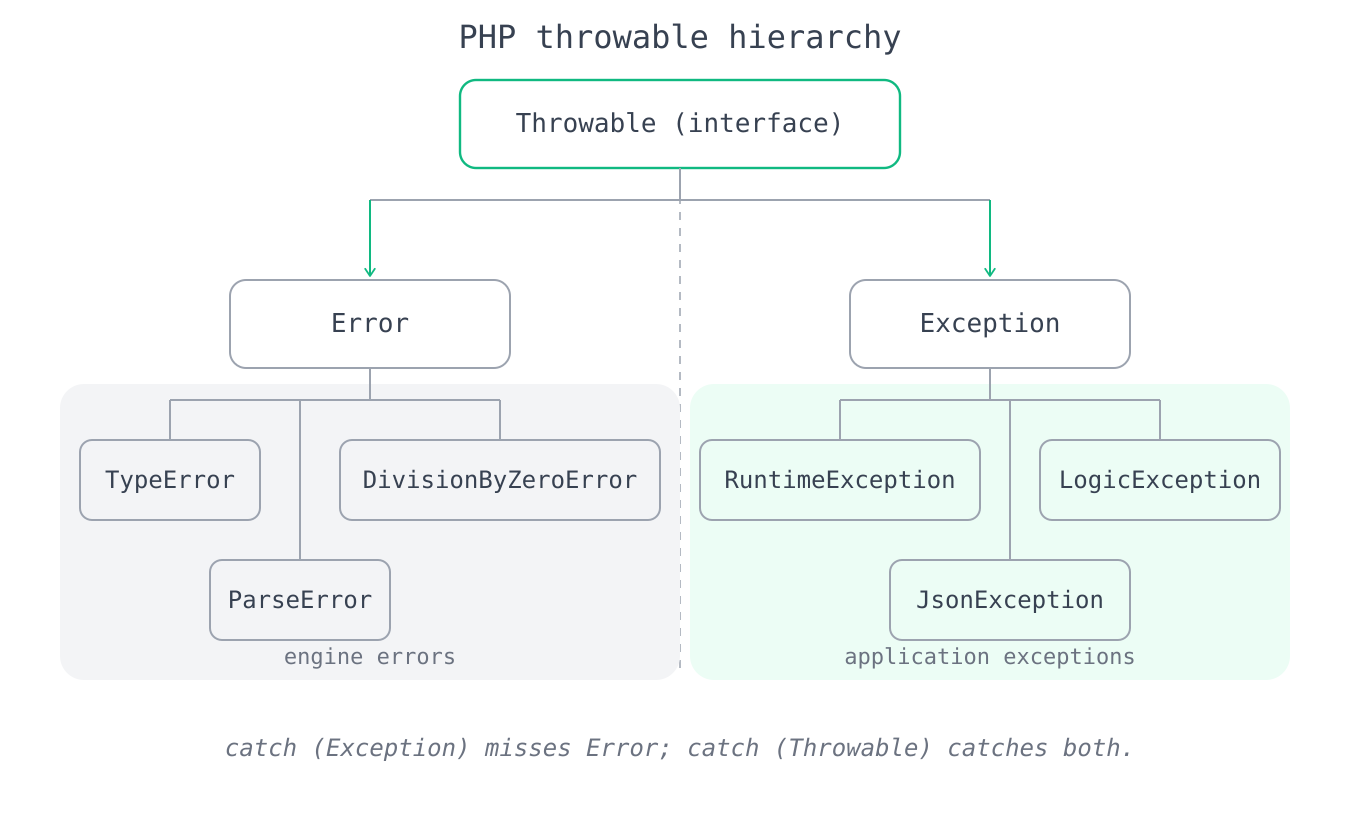
Every throwable in PHP implements the Throwable interface, which has two branches: Exception is the base for application-level problems you throw and catch, while Error is for engine-level failures such as TypeError (a bad argument type), DivisionByZeroError (from intdiv, %, or / by zero in PHP 8), and ParseError. The practical consequence is that catch (Exception $e) will not catch a TypeError, because a TypeError is an Error, not an Exception; catch Throwable only when you truly want to trap everything, including engine errors.
Custom exceptions
You create a domain-specific exception by extending Exception (or a more specific SPL exception like InvalidArgumentException or RuntimeException), which lets callers catch exactly the failure they care about. The SPL exceptions already model common cases: LogicException for bugs that should be fixed in code, and RuntimeException for problems that only appear at runtime.
class InsufficientFundsException extends RuntimeException {}

function withdraw(Account $a, int $amount): void {
    if ($amount > $a->balance) {
        throw new InsufficientFundsException("short by " . ($amount - $a->balance));
    }
    // ...
}

try {
    withdraw($account, 500);
} catch (InsufficientFundsException $e) {   // catch precisely this failure
    notifyUser($e->getMessage());
}
Catch the specific types you can actually handle rather than a blanket \Exception, remember that engine failures are Error and not Exception, and treat the @ error-suppression operator as a smell to remove rather than a tool to reach for.
Standard Library Essentials
Debugging output
When you need to see what a value actually holds, three functions do the job at different levels of detail. var_dump() prints the type and value (and recurses into arrays and objects), which is the one you reach for while debugging; print_r() prints a compact human-readable form; and var_export() prints valid PHP you could paste back into code. Pass true as the second argument to print_r or var_export to get a string back instead of printing.
$data = ['name' => 'Ada', 'roles' => ['admin', 'editor']];

var_dump($data);
// array(2) { ["name"]=> string(3) "Ada" ["roles"]=> array(2) { [0]=> string(5) "admin" ... } }

print_r($data);
// Array ( [name] => Ada [roles] => Array ( [0] => admin [1] => editor ) )

$asString = print_r($data, true);   // capture the output instead of printing it
Math
The math functions cover the usual ground, with intdiv for integer division, fmod for a floating-point remainder, and both max/min accepting either several arguments or a single array. For random numbers, prefer random_int() over rand() when the value must be unpredictable, since it is cryptographically secure.
abs(-5);              // 5
ceil(4.1);            // 5.0  (always rounds up)
floor(4.9);           // 4.0  (always rounds down)
round(3.14159, 2);    // 3.14 (round to 2 decimals)
sqrt(144);            // 12.0
2 ** 10;              // 1024 (or pow(2, 10))
intdiv(17, 5);        // 3
17 % 5;               // 2
fmod(7.5, 2);         // 1.5  (float remainder)
max(3, 7, 2);         // 7    (max([3, 7, 2]) also works)
min([3, 7, 2]);       // 2
random_int(1, 6);     // a secure random int in [1, 6]
number_format(1234.5, 2); // '1,234.50'
JSON
json_encode() turns a PHP value into a JSON string and json_decode() parses one back. The important argument is the second parameter of json_decode: pass true to get associative arrays, or omit it to get stdClass objects (accessed with ->). Add the JSON_THROW_ON_ERROR flag so malformed input raises a JsonException instead of quietly returning null.
$json = json_encode(['name' => 'Ada', 'tags' => ['a', 'b']]);
// '{"name":"Ada","tags":["a","b"]}'

$asArray  = json_decode($json, true);   // ['name' => 'Ada', 'tags' => ['a', 'b']]
$asObject = json_decode($json);         // stdClass; access with $asObject->name

echo json_encode($data, JSON_PRETTY_PRINT | JSON_THROW_ON_ERROR);  // formatted + safe
Dates and times
For simple formatting, date() turns the current (or a given) timestamp into a string, and time() gives the current Unix timestamp. For real date arithmetic, use the DateTime classes; prefer DateTimeImmutable, whose methods return a new object instead of mutating the original, which avoids a whole category of aliasing bugs.
date('Y-m-d');                     // e.g. '2026-08-25'
time();                            // current Unix timestamp (seconds)
strtotime('+1 week');              // a timestamp one week from now

$start = new DateTimeImmutable('2026-08-25');
$end   = $start->modify('+10 days');   // returns a NEW object; $start is unchanged
$end->format('Y-m-d');                 // '2026-09-04'
$start->diff($end)->days;              // 10
Regular expressions
PHP's regex functions are the preg_* family, using PCRE syntax with delimiters (usually /) around the pattern. preg_match fills an output array with the whole match and each captured group and returns 1, 0, or false; preg_match_all finds every match; preg_replace substitutes; and preg_replace_callback computes each replacement with a function.
preg_match('/(\d{4})-(\d{2})/', '2026-08', $m);   // returns 1; $m[1]='2026', $m[2]='08'
preg_match_all('/\d+/', 'a1b22c333', $all);       // $all[0] = ['1', '22', '333']
preg_replace('/\s+/', ' ', "too   many\tspaces"); // 'too many spaces'
preg_split('/[\s,]+/', 'a, b  c');                // ['a', 'b', 'c']
preg_replace_callback('/\d/', fn($m) => $m[0] * 2, 'a1b2'); // 'a2b4'
SPL data structures
When a plain array is the wrong shape, the Standard PHP Library (SPL) provides real data structures as classes. SplStack and SplQueue give O(1) pushes and pops from the right ends (unlike array_shift); SplPriorityQueue and the SplMinHeap/SplMaxHeap classes give you a heap for Dijkstra-style and top-k problems; and SplObjectStorage acts as a set or map keyed by object identity.
$stack = new SplStack();
$stack->push(1); $stack->push(2);
$stack->top();      // 2 (peek)
$stack->pop();      // 2

$queue = new SplQueue();
$queue->enqueue('a'); $queue->enqueue('b');
$queue->dequeue();  // 'a'  (O(1), unlike array_shift)

$heap = new SplMinHeap();
$heap->insert(5); $heap->insert(1); $heap->insert(3);
$heap->extract();   // 1  (always the smallest first)

$pq = new SplPriorityQueue();
$pq->insert('low task', 1);
$pq->insert('urgent', 10);
$pq->extract();     // 'urgent'  (highest priority first)
For interview problems, associative arrays cover the great majority of your hash-map and set needs, the debugging functions let you inspect state fast, and the SPL classes are the escape hatch when you need a genuine heap or an O(1) queue that array functions cannot provide.
Gotchas That Actually Bite
These are the PHP-specific traps that turn a working solution into a wrong one, especially when your instincts come from another language. Each fix is usually a one-token change once you know the rule.
Loose comparison juggles types, and PHP 8 changed the rules. The == operator converts operands to a common type before comparing, which is why "1" == 1 is true. In PHP 8, comparing a number to a non-numeric string finally does the sane thing, so 0 == "foo" is now false (it was true in PHP 7, a long-standing source of security bugs). Default to ===, which checks type and value with no conversion, and only use == when you deliberately want numeric-string equality.
The set of falsy values is wider than you expect. The values false, 0, 0.0, "", the string "0", null, and the empty array [] are all falsy, while the strings "0.0" and "false" are truthy. The "0"-is-falsy rule catches form and input handling constantly, so when you mean "is this an empty string," test === '', and when a key might legitimately hold null or 0, use array_key_exists() instead of isset() or empty(), both of which treat a null value as absent.
strpos and friends return a falsy index. Because a match at the start of a string returns integer 0, writing if (strpos($haystack, $needle)) misfires whenever the needle sits at position 0. Compare against false explicitly with !== false, or sidestep the whole issue with str_contains() when you only need a boolean.
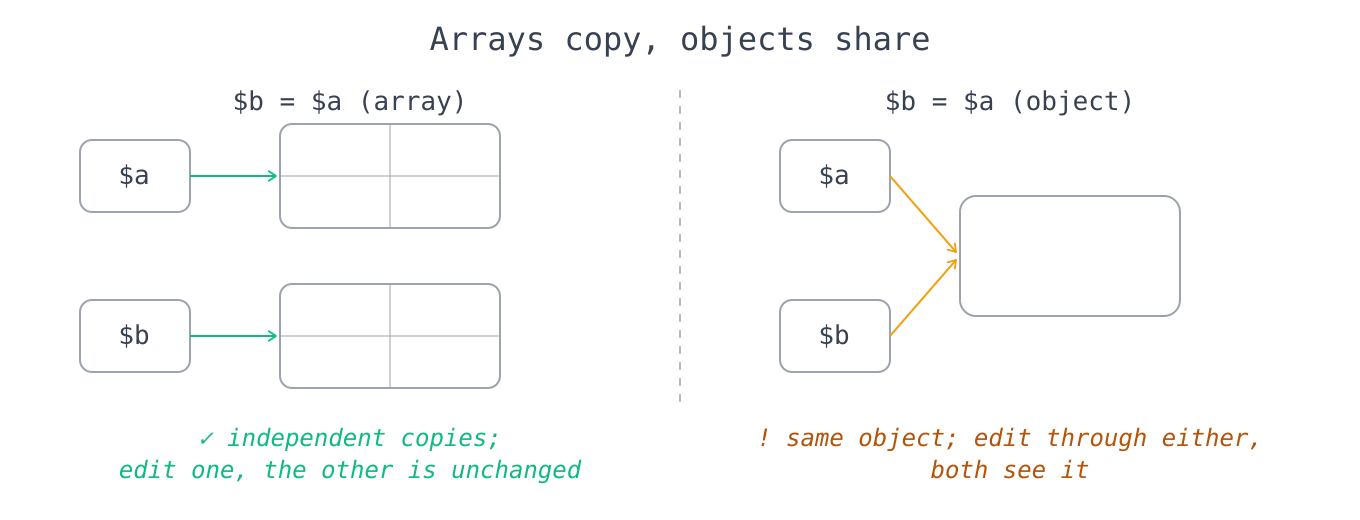
Arrays are value types, but objects are handles. Assigning or passing an array copies it (via copy-on-write), so changing the copy leaves the original untouched, which is the opposite of what Java, Python, and JavaScript developers expect from a "collection." Objects, by contrast, are assigned and passed by handle, so two variables point at one object and a mutation through either is visible through the other. Use clone when you need an independent object.
A foreach reference outlives the loop. After foreach ($arr as &$v) { ... }, the variable $v is still a reference bound to the last element, so a later foreach ($arr as $v) overwrites that last element instead of a fresh variable and silently corrupts the array. Always unset($v) immediately after any loop that takes its value by reference.
array_filter keeps the original keys. Filtering [10, 20, 30] down to the elements greater than 15 yields [1 => 20, 2 => 30], not a freshly indexed list, so $result[0] is undefined and a for ($i = 0; ...) loop breaks. Wrap the result in array_values() whenever you need a clean, zero-based list afterward.
array_merge and the + operator disagree on keys. array_merge([1, 2], [3, 4]) renumbers the integer keys and gives [1, 2, 3, 4], while [1, 2] + [3, 4] is a union that keeps the left side's keys and gives [1, 2]. For string keys it reverses: array_merge lets the later value win, while + keeps the earlier one. Pick array_merge to concatenate lists and + to supply defaults for missing keys.
Sorting functions return a boolean and sort in place. Because sort, usort, and their relatives mutate the array, $sorted = sort($arr) sets $sorted to true and leaves the sorted data in $arr. Sort the array, then keep using that same array; never assign the return value expecting the sorted result.
Integer-like string keys become integers. PHP normalizes array keys, so $a["1"] and $a[1] are the same slot, a float key like $a[1.9] truncates to 1, true becomes 1, and null becomes the empty string "". This matters when keys arrive from mixed sources such as JSON or form data and you assume a string key stayed a string.
Integer overflow silently becomes a float. PHP_INT_MAX + 1 does not wrap around like a fixed-width integer; it promotes to a float and loses exact integer precision beyond a point. For large-integer arithmetic (factorials, big accumulations), use the BCMath or GMP extensions rather than trusting native ints.
Floating-point equality is unreliable. Because floats are binary approximations, 0.1 + 0.2 === 0.3 is false. Never compare floats with == or ===; instead check that the absolute difference is below a small tolerance, for example abs($a - $b) < PHP_FLOAT_EPSILON, or work in integer cents for money.
&& and and have different precedence. The word forms and and or bind looser than =, so $result = doThing() or fallback() assigns only the result of doThing() to $result before the or runs. Use && and || in expressions, and reserve and/or for the rare control-flow idiom where you actually want that low precedence.
Division and modulo by zero throw in PHP 8. intdiv(1, 0), 1 % 0, and 1 / 0 all throw DivisionByZeroError now (PHP 7 returned false with a warning), and that error is an Error, not an Exception. Guard the divisor, or wrap the operation in catch (DivisionByZeroError $e) or catch (Throwable $e).
Nested ternaries must be parenthesized. PHP 8 made an unparenthesized nested ternary a fatal error, because the old left-associative grouping surprised almost everyone. Always write $a ? $b : ($c ? $d : $e) with explicit parentheses, or restructure it as a match expression, which reads far better for multi-way choices.