
A language model does one job. You give it text, and it guesses what comes next. Everything a user calls artificial intelligence is that guess, repeated, with your code around it.
AI engineering is the work of writing that code. The 20 concepts below are what it is built on, in the order they depend on each other. One example runs through all of them: an assistant inside a project tracker that holds 2.3 million comments. A user asks it to summarise what blocked the October release and open tickets for anything still broken.
The 20 AI Engineering Concepts at a Glance
Here is the whole list in one place. Read the section for the concept you need.
- Large language model guesses the next piece of text, and nothing more.
- Tokenization splits text into the pieces a model counts and charges for.
- Vectorization turns those pieces into numbers that carry meaning.
- Attention lets each word look at the words before it.
- Transformer is the block that does this over and over.
- Self-supervised learning trains a model on plain text, with no labels.
- Fine-tuning retrains a model on your examples to change how it writes.
- Few-shot prompting gets the same change from examples in the prompt.
- Retrieval-augmented generation searches your data and pastes the result into the prompt.
- Vector database makes that search fast enough to use.
- Model Context Protocol describes your tools once, for every client.
- Context engineering picks what goes in the prompt and what gets cut.
- Agents run the model in a loop so it can take several steps.
- Reinforcement learning teaches a model to follow instructions.
- Chain of thought makes the model write its steps before its answer.
- Reasoning models do that on their own, and charge for it.
- Multimodal models read pictures and sound as well as text.
- Small language models do narrow jobs for far less money.
- Distillation copies a big model's skill into a small one.
- Quantization shrinks a model so it fits on cheaper hardware.
How a Large Language Model Works
Your request never reaches the model as a sentence. It gets cut into pieces, turned into numbers, and pushed through a stack of maths. These six concepts are that trip, in order.
1. Large Language Models
A large language model (LLM) is a guessing machine for text. You hand it some text, and it returns a score for every word piece it knows, saying how likely each one is to come next.
Those scores come from its weights, which are just numbers: tens or hundreds of billions of them, frozen when training ended. The same numbers serve every user and every request.
One run through the weights gives you one set of scores, and that is the whole operation. To get a sentence, something has to run it again and again. A sampler picks a piece, your code adds it to the text, and the model runs once more on the longer text.
Two things follow, and they explain most of the surprises. The model forgets everything between calls, so your code resends the whole conversation every turn. It also cannot reach anything by itself: no database, no clock, no user record.
When an assistant greets someone by name, your code looked that name up and put it in the text. In the tracker, the same model writes release summaries, sorts comments and drafts tickets, and it never knows which of those jobs it is doing.
2. Tokenization
A token is a piece of text, and tokenization is the step that makes them. Before anything else happens, a tokenizer cuts your text into pieces it has seen before and swaps each piece for a number.
Why pieces, and not whole words or single letters? A fixed list of words would choke on every typo, product name and error code. Single letters would make the text far too long to process. Pieces sit in between.
The list of pieces is built by a method called byte pair encoding (BPE). It starts with single characters and keeps gluing together whichever pair appears most often, until it has 50,000 to 200,000 pieces. Common words survive whole, and rare strings get broken up.
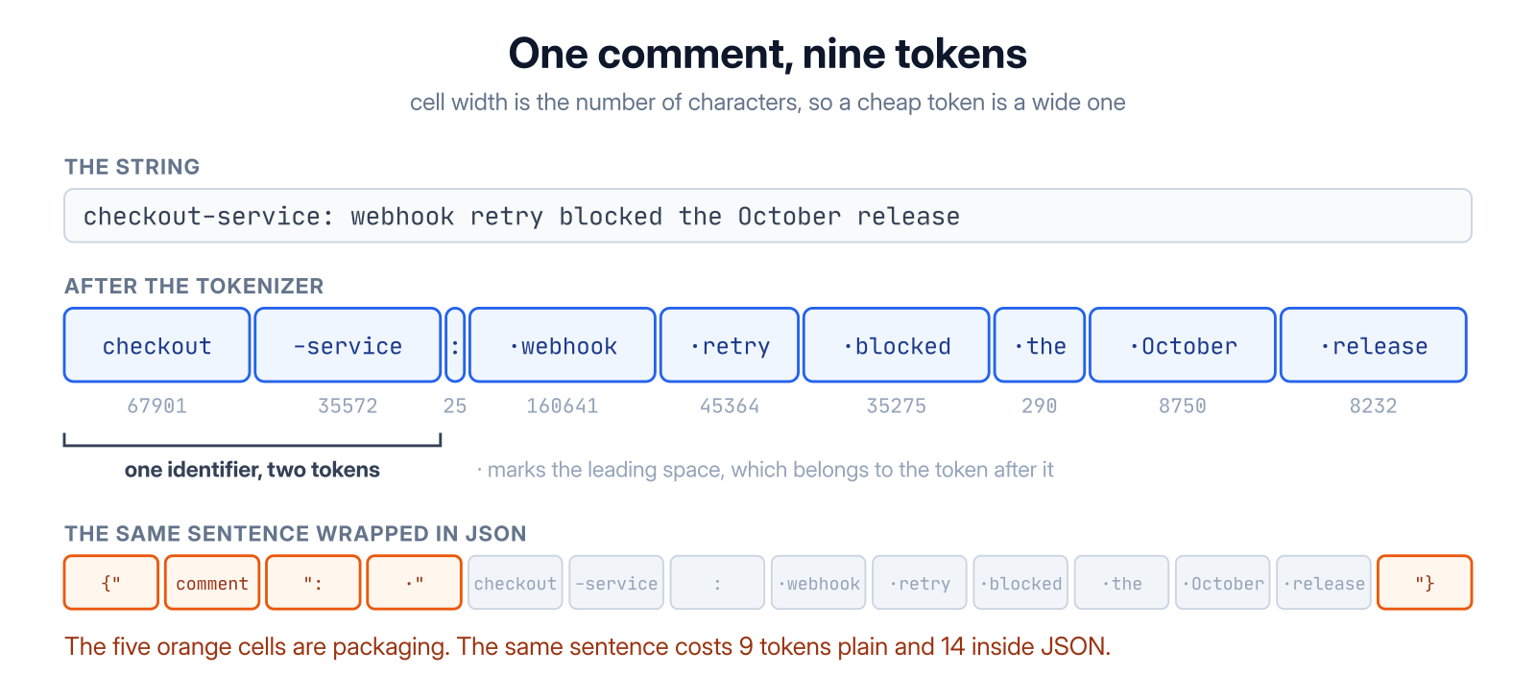
That sentence costs nine tokens. checkout and -service are each common enough to be one token, and the space in front of a word is carried by the word itself.
You care about this because two numbers in your product are counted in tokens rather than characters: the bill and the context limit.
Plain English runs about five characters per token, so one word is roughly one token. A UUID is on nobody's list, so it shatters into 32 tokens for 36 characters, four times the cost of normal text. Hindi costs about twice as many tokens per word as English, because the pieces were learned mostly from English.
You can count them before you send anything:
import { encodingForModel } from 'js-tiktoken'

const encoder = encodingForModel('gpt-4o')
const comment = 'checkout-service: webhook retry blocked the October release'

console.log(encoder.encode(comment).length) // 9
console.log(encoder.encode(JSON.stringify({ comment })).length) // 14
The second number is bigger because the braces, the quotes and the key name are tokens too. Wrapping 60 retrieved comments in JSON pays that tax 60 times, and the model does not read JSON any better than plain lines.
3. Vectorization and Embeddings
A token id is only a label. Token 290 has nothing to do with token 291, so the model cannot do any useful maths on the ids. It swaps them for vectors first.
A vector is a list of numbers, usually a few thousand of them. Every id points at one row in a big table, and that row is its vector. Training shifts these rows around until their positions mean something, so tokens used in similar places end up close together. Turning text into numbers this way is called vectorization.
The same trick works on a whole passage, and then it has a different name. You send a comment to an embedding model, and it returns one vector, usually 768 or 1,536 numbers, that stands for the whole comment.
This is what makes search by meaning possible. "Webhook retries double-fire" and "the retry job runs twice" share one word, but their vectors sit close together. A keyword index would never connect the two.
Closeness is measured as the angle between two vectors, which is called cosine distance. Angle is used instead of plain distance because a longer comment tends to produce a longer vector, and length says nothing about meaning.
One rule here has no exceptions. Two embedding models do not share a coordinate system, so changing models means re-embedding everything. Mix old and new vectors in one table and the search returns nonsense, with nothing in your logs to explain it.
4. Attention and the KV Cache
A token gets the same vector every time it appears, and that is a problem. The word lock in a comment about Postgres and the word lock on an office door start out identical.
Attention is the step that tells them apart. It lets every token look at the tokens before it and pull in some of their meaning.
Each token makes three things out of its own vector. A query says what it is looking for, a key says what it has to offer, and a value holds what it would pass on. The model compares one token's query against every earlier token's key. Those comparisons become weights that add up to 1, and the token's new vector is the values mixed in those proportions.
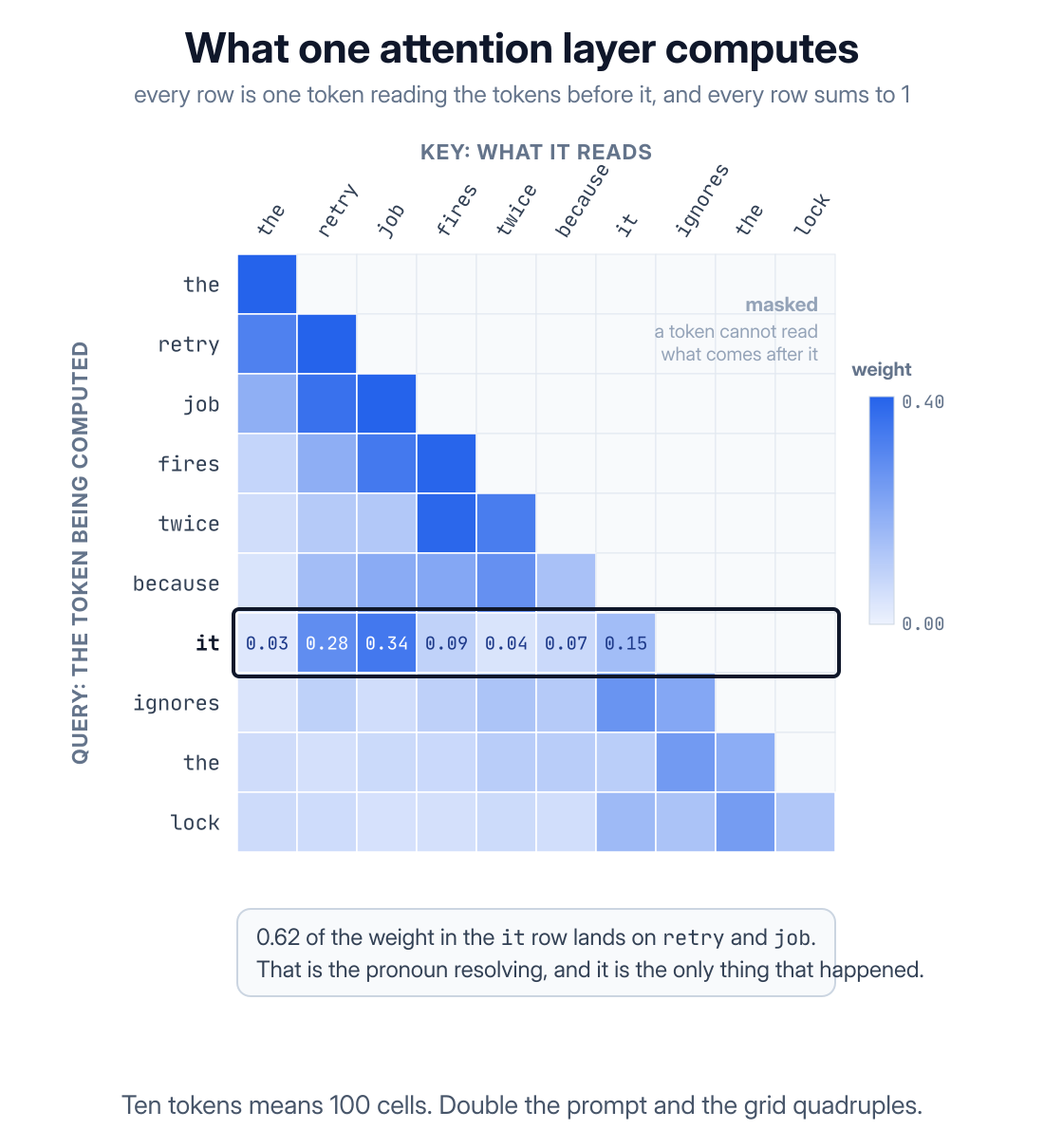
Read the row for it in that grid. Most of its weight sits on retry and job, which is how the model works out what it points at. The empty half is the mask: a token may not look at the words after it, because those are the words being guessed.
The grid also shows the cost. Every token looks at every token before it, so the work grows with the square of the length. Go from 8,000 tokens to 16,000 and the work goes up four times, not two.
Writing a reply would repeat all of it for every new token. To avoid that, servers keep the keys and values they have already worked out in a key-value cache (KV cache) and compute only the newest row.
You meet this cache in two places. The first word of a reply takes much longer than the rest, and providers charge less when a prompt starts the same way as the last one. That is why the tracker puts the system prompt and tool list first and the user's question last. Change something near the front and the saved work is thrown away.
5. Transformers
One round of attention mixes the tokens once. A transformer block does a little more: attention first, then a small network that works on each position on its own.
Both parts add their result to what came in instead of replacing it. That addition is the residual connection, and it is why blocks can be stacked at all. Each block leaves a small correction on top of the previous answer, so nothing from the bottom gets washed away on the way up.
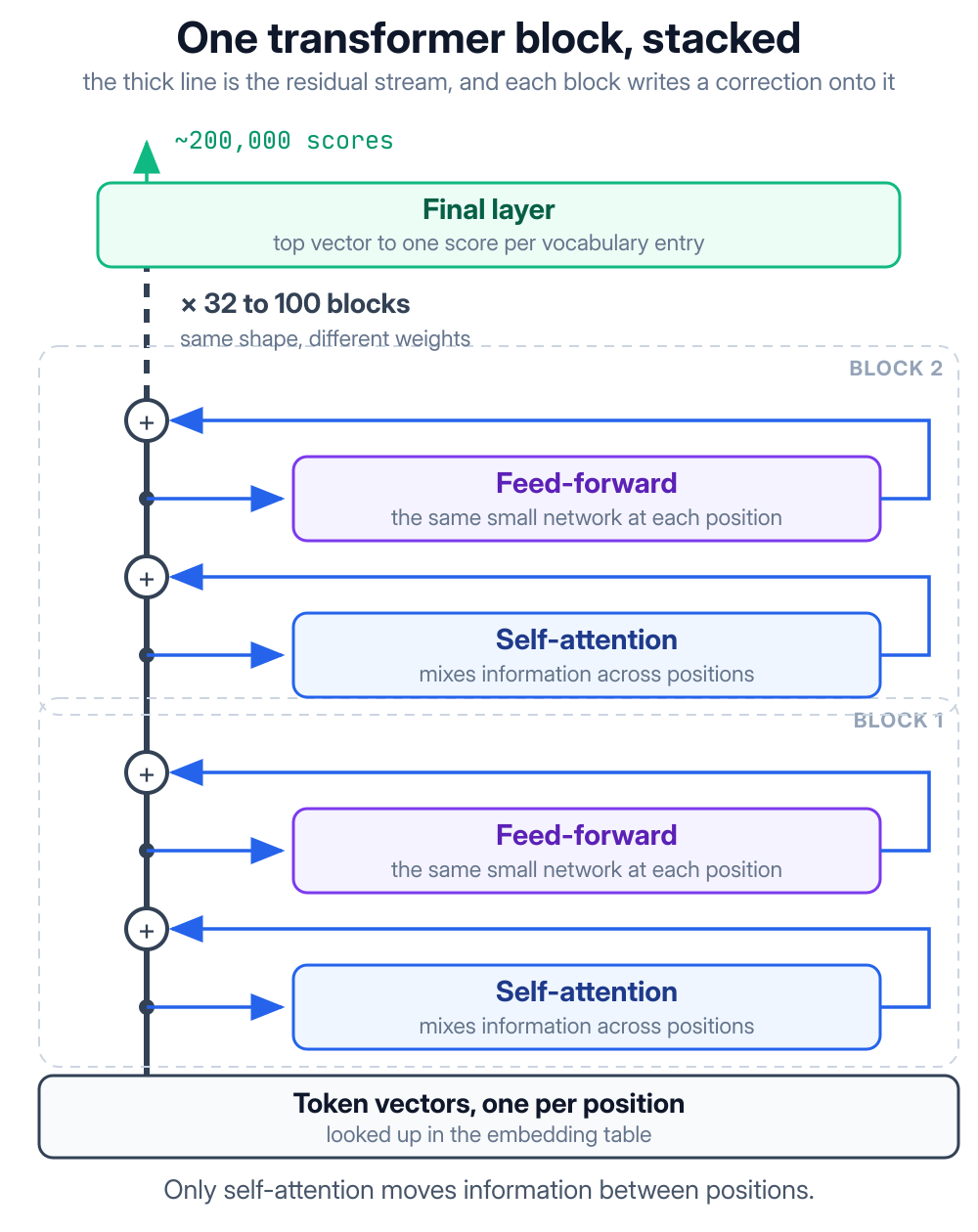
A model is that block repeated: 32 times in a mid-size model, more than 100 times in a big one. Token vectors go in at the bottom, each block adds a bit more context, and one last layer turns the top vector into a score for every piece in the vocabulary.
Transformers took over for a dull reason. They train fast. The older recurrent networks had to finish word 499 before they could start word 500. A transformer reads the whole sentence at once, which suits hardware that does thousands of multiplications side by side.
Big models now change one part of the block. In a mixture of experts (MoE) layout the small network is split into many copies, and a router sends each token to two or three of them. The model gains parameters without getting slower, because most of them stay idle on any given token.
6. Self-Supervised Learning
Every weight above started as a random number. Self-supervised learning is what turned them into a model.
It needs no labelled data, because the answer is already sitting in the text. Hide the next token, let the half-trained model guess it, compare the guess with the token that was really there, and nudge the weights. Repeat across trillions of tokens.
That stage is called pretraining, and it is where both the money and the ability come from. Grammar, code syntax and the shape of a REST API all arrive as side effects of getting better at the guess.
The same stage explains the limits. The model read public text up to a cutoff date. That is why it will happily describe a library version that never shipped, and why it has never seen your 2.3 million comments at all.
No prompt can change what is in the weights. Getting your own data into an answer is a different problem, and there are three ways to solve it.
Teaching a Model About Your Own Data
The three ways differ in where your data sits: inside the weights, inside the prompt, or inside a search that runs just before the prompt. The fourth concept in this group is the store that makes that search quick.
7. Fine-Tuning
Fine-tuning means training a model a little more, on your examples. You give it a few hundred to a few thousand pairs of an input and the output you wanted, and each pair pulls the weights slightly toward your version.
Changing every weight is expensive and leaves you a second full model to host. Most fine-tuning uses low-rank adaptation (LoRA) instead. The original weights stay frozen, and a small pair of extra matrices is trained beside them. What you get is a file of a few hundred megabytes that loads on top of the base model.
Fine-tuning changes how a model writes, not what it knows. A thousand examples of the tracker's release-note format will teach that format well. The same thousand examples will not reliably teach the facts inside them.
The reason is simple. A fact learned this way has no source to quote, no row to edit when it changes, and no owner to keep it away from another team.
So fine-tune for one of two reasons. The first is an output style that is easier to show than to describe. The second is a small job repeated so often that putting examples in every prompt costs more than training once.
8. Few-Shot Prompting
Few-shot prompting gets the same change in behaviour without touching the model. You put a few worked examples in the messages, just ahead of the real input, and let the model copy the pattern. Zero-shot is the same request with no examples at all.
It works because the model is still only guessing what comes next. If the last five messages were comments followed by one-word labels, then the next thing due is a one-word label.
Write the examples as a real exchange, not as a description of one:
const messages = [
    { role: 'system', content: 'Classify the comment as bug, question or noise. Reply with one word.' },
    { role: 'user', content: 'The retry job fires twice for every failed webhook.' },
    { role: 'assistant', content: 'bug' },
    { role: 'user', content: 'Is the October release still going out on Friday?' },
    { role: 'assistant', content: 'question' },
    { role: 'user', content: comment },
]
Each example is split across a user turn and an assistant turn, because the model is continuing a conversation and copies the shape it sees. One line in the system prompt saying "reply with one word" is weaker than two turns that do it.
Three to five examples are usually enough. Spend them on the awkward cases rather than the obvious ones, because an unusual comment that the examples skipped is where the model invents its own answer.
The only real difference from fine-tuning is where the cost lands. Few-shot pays on every call, and fine-tuning pays once. These five turns cost around 120 tokens, which is nothing for a summary that runs twice a day and a lot across 2.3 million comments. That is why the classifier is the one part of this product worth fine-tuning.
9. Retrieval-Augmented Generation (RAG)
Neither of the first two options gets a fact out of your database and into an answer. Retrieval-augmented generation (RAG) does, by putting the fact in the prompt.
The order is search first, model second. Your code turns the request into a vector with the embedding model from concept 3, then finds the comments whose vectors sit closest to it. Those comments go into the message with one instruction: answer from these and nothing else.
For the release summary, 60 comments out of 2.3 million arrive as plain text, and the model only has to turn them into sentences.
Two things come for free. The answer can quote a comment id, because your code knows which comments it sent, and fixing a wrong answer is a database edit rather than a training run.
RAG fails quietly, which is what makes it hard. If the model writes something the comments do not say, anyone can spot it. If the search picked the wrong 60 comments, you get a careful, well-written summary of the wrong thing and nothing looks broken.
Hybrid search and reranking are the usual fixes. The full RAG pipeline covers chunk sizes, prompt assembly and keeping the index up to date.
10. Vector Databases
Finding the closest vectors means comparing the question against every stored vector. With 2.3 million comments, that is far too slow to do while a user waits.
A vector database stores the vectors and adds an index that skips most of those comparisons. The common index is called hierarchical navigable small world (HNSW). It is a graph with long links at the top and short links at the bottom. A search makes one rough jump, then walks in small steps toward the closest point.
It checks a few thousand vectors instead of 2.3 million, misses the true closest match now and then, and answers in a few milliseconds. That trade is the whole product.
For most applications the right home for this is the database you already run, using the pgvector extension. One database means one backup, one set of migrations, and plain SQL joins between a vector and the comment it belongs to.
A separate vector database earns its place when the index grows bigger than the memory you want to give Postgres, or when it needs its own schedule for rebuilds.
Two details matter more than the index itself. Filter by workspace inside the query and never on the results, because 60 rows filtered afterwards can leave you with four.
And treat the index as the copy it is. It goes stale the moment someone edits a comment, so store a hash of each chunk and clear it on write, exactly as you would with any cache.
Connecting a Model to Tools and Context
So far the assistant can read. To open a ticket it has to write, and a model cannot write anything anywhere. All it can do is produce text that your code has agreed in advance to treat as an order.
11. Model Context Protocol (MCP)
That agreement is called tool calling. You send a list of functions along with the request. If the model wants one, it replies with a function name and a JSON object of arguments instead of a sentence. Your code runs the function and sends the result back. The model never runs anything itself.
The trouble starts with the second model or the second client. Each one wants that list in its own shape, so you write the same integration again and again.
The Model Context Protocol (MCP) is an open standard that ends the repetition. You describe your tools once in an MCP server, and any client that speaks MCP can find them and convert them into whatever its own model needs.
The tracker's server describes its ticket tool as a schema and a function:
server.registerTool(
    'create_ticket',
    {
        title: 'Create a ticket',
        inputSchema: {
            workspace: z.string().uuid(),
            summary: z.string().max(120),
            blocked_by: z.string().optional(),
        },
    },
    async ({ workspace, summary, blocked_by }, { authInfo }) => {
        if (!canWrite(authInfo, workspace)) {
            return { isError: true, content: [{ type: 'text', text: 'No access to that workspace' }] }
        }

        const ticket = await tracker.createTicket({ workspace, summary, blocked_by })
        return { content: [{ type: 'text', text: `Created ${ticket.key}` }] }
    },
)
The schema is the only part the model sees, so those field names and the 120-character limit do more for the output than any instruction in the prompt would.
The permission check sits inside the function, not in the description, because the model chose those arguments. A description is documentation. The canWrite call is the only thing keeping one workspace's data away from another.
Where the server runs decides the rest. On the same machine it talks over stdio. Across a network it talks HTTP and needs authentication like any other API, usually a bearer token your gateway checks before the function runs.
12. Context Engineering
Everything so far ends up in the same place: one block of text sent with the request, called the context window. The system prompt, the tool descriptions, the retrieved comments, the chat history and the room the answer needs all share it.
Context engineering is deciding who gets that room, in what order, and what goes first when it runs out.
For the tracker's request the split is roughly 400 tokens of system prompt, 600 of tool descriptions, 7,000 of comments and 500 for the reply. A 128,000-token window holds that many times over.
Having room is not the point. Attention spreads across everything you send, so adding 540 weak comments to the 60 good ones makes the good ones count for less. The answer gets worse while the context stays well under the limit.
So set a budget and stop:
function fitComments(comments, budget) {
    const kept = []
    let used = 0

    for (const comment of comments) {
        const cost = countTokens(comment.body) + 12
        if (used + cost > budget) break

        kept.push(comment)
        used += cost
    }

    return kept
}
The comments are already sorted best first, so stopping at the first one that does not fit keeps the good ones and drops the weak ones. The extra 12 tokens per comment cover the author and date, which the model needs in order to say when something broke.
Drop a whole comment rather than cutting one in half. Half a comment still reads like a finished thought, and it will change the summary without anyone noticing.
Long conversations need the same treatment over time. Keep the recent turns as they are, replace older ones with a short summary, and keep the full history in your database. That trade is called compaction.
13. AI Agents
A single call reads the context and writes one answer. That is not enough here, because nobody knows how many tickets to open until the comments have been read.
An agent is a loop around the model. It asks for a tool, and your code runs the tool and adds the result to the messages. Round it goes until the model replies with ordinary text instead of a tool call:
const messages = [
    { role: 'system', content: systemPrompt },
    { role: 'user', content: request },
]

for (let step = 0; step < 8; step++) {
    const reply = await model.chat({ messages, tools })
    messages.push(reply.message)

    if (!reply.message.tool_calls?.length) return reply.message.content

    for (const call of reply.message.tool_calls) {
        const result = await runTool(call, { userId, workspace })
        messages.push({ role: 'tool', tool_call_id: call.id, content: JSON.stringify(result) })
    }
}

throw new Error('agent stopped after 8 steps without an answer')
The step cap is the only hard limit in that loop. A model that cannot find what it needs will keep rewording the same search, and a prompt asking it to be quick will not stop it.
Results go back as role: 'tool' messages carrying the call id, which is how the model matches three searches to three answers.
The user id comes from outside the conversation and never from the messages, because those messages are the one part of this loop that an attacker can get text into.
The pattern has a name, ReAct, short for reason and act, and its problems are ordinary engineering problems. Cap the steps, log every call, and ask for confirmation before anything destructive. That is why the tracker drafts tickets for review instead of filing them.
How Models Learn to Follow and Reason
Nothing so far explains why a model answers your question instead of carrying on with more questions. Guessing text is not the same as following orders, and a second round of training is what adds the difference.
14. Reinforcement Learning and RLHF
A model fresh out of pretraining only continues text. Ask it how to fix a double-firing webhook and it may add three more questions, because questions often follow questions.
Reinforcement learning (RL) fixes that afterwards. The model writes an answer, something gives that answer a score, and the weights shift toward whatever scores well.
The score comes from one of two places. With reinforcement learning from human feedback (RLHF), people pick the better of two answers. A second model learns to copy those picks, and the main model is then trained against that second model.
With reinforcement learning from verifiable rewards (RLVR), the score is a program. The tests pass or they do not. The answer matches or it does not. Nobody has to sit in the loop, so it scales, which is why code and maths improved fastest.
This stage is also why a system prompt works. Following instructions is a habit learned here, not a rule in the code, and that is the honest reason a careful instruction sometimes loses to a determined user.
15. Chain-of-Thought Prompting
Chain-of-thought (CoT) prompting is asking the model to write out its steps before its answer.
It helps for a plain reason. The model keeps no notes between tokens apart from the text on the page, so writing the steps puts them where the next token can read them.
A question that needs three small calculations gets three calculations written down, instead of one guess at the end.
It costs tokens and time, and the user pays for both. The usual compromise is to let the model work in a part of the output that your code strips before display.
Do not treat those steps as an explanation. They are guessed text like everything else. A right answer with invented reasoning is common, so never quote the steps to a user as the reason for a decision.
16. Reasoning Models
Asking for steps works. Training a model to take them without being asked works better, and models trained that way are called reasoning models.
They are trained with reinforcement learning on problems that can be marked automatically, until thinking at length before answering becomes their default. That thinking happens inside the call, providers charge for it as reasoning tokens, and most of them show you a summary rather than the thinking itself.
A setting controls how long it runs, which makes this the one quality dial with a price printed on it.
Use one where a wrong first step ruins everything after it: planning, debugging, schema design. Skip it everywhere else, because it answers in seconds rather than milliseconds and the bill is several times higher.
In the tracker, the release summary and the decision about which blockers are still open go to a reasoning model. Sorting 2.3 million comments does not.
Choosing and Shrinking the Model You Ship
The first sixteen concepts decide whether the feature works. The last four decide whether you can pay for it once people start using it.
17. Multimodal Models
A multimodal model takes pictures and sound as well as text.
It can do that because the model never really handled text in the first place. It handled vectors. An image is cut into small squares, each square becomes a vector the same shape as a token's, and attention treats squares and words alike.
That is also why a picture has a token price, usually a few hundred to a few thousand depending on its size.
For the tracker this replaces a feature nobody wants to build. A bug report arrives with a screenshot, the model reads the error in it, picks out the endpoint that failed, and treats it as part of the comment. Voice notes work the same way.
Accuracy drops on crowded tables, small type and anything that depends on exact position. A model reads meaning out of a picture well, and it is a poor replacement for a form that could have captured the data properly.
18. Small Language Models
A small language model (SLM) has one to ten billion parameters instead of hundreds. It is clearly worse at open-ended work and nearly as good on small, well-defined jobs, especially after the fine-tuning from concept 7.
The reason to care is money. Sorting 2.3 million comments at about 150 tokens each is 345 million tokens of input. At a frontier model's few dollars per million that is roughly a thousand dollars, and at a small model's price it is a few tens of dollars for the same result.
Pulling fields out of text, tagging, routing and reranking all have that shape: plenty of volume, a narrow job, easy to check.
So choosing a model becomes part of the design, and the choice has a name: model routing. Send each request to the cheapest model that can handle it, and keep the expensive one for the summary.
Small models also run on hardware you own, so comments that must not leave your network can be handled on the same server you deploy to.
19. Distillation
A small model off the shelf is a general model that happens to be small. It knows a little about everything and nothing about what counts as noise in your product.
Distillation fixes that. A big model, the teacher, answers a pile of your real inputs. A small model, the student, trains on those answers until it gives the same ones.
For the classifier that means 50,000 real comments labelled once by the frontier model. A three-billion-parameter student trains on those labels and does the job from then on. The teacher's judgement now sits in a model that costs a fraction as much to run.
Two things decide whether you can do it. Many providers forbid training a rival model on their output, so read the terms first. The student also copies the teacher's mistakes exactly, which makes 50,000 checked labels worth more than 200,000 unchecked ones.
20. Quantization
Distillation gives you a smaller model. Quantization gives you the same model in less memory, with no training at all.
A weight is just a number. Stored as a 16-bit float, it spends its bits on a sign, a range and some digits. That lets one weight hold anything from the very small to the very large. Trained weights never need that, because inside a small block of them the values all sit close together.
Quantization uses that fact. It keeps one scale factor for the block and replaces each weight with a 4-bit or 8-bit number saying which step on that scale it is nearest to.
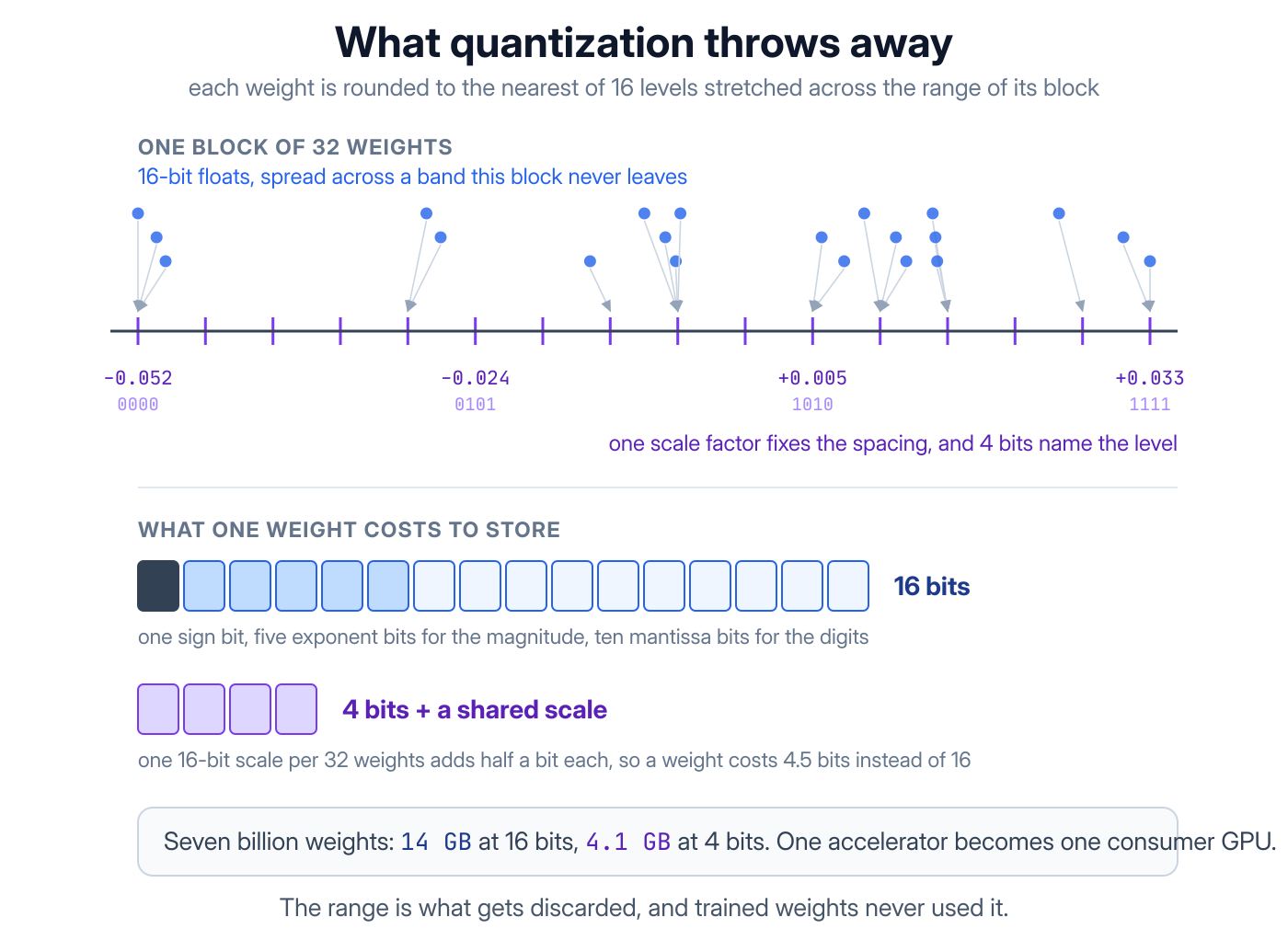
Here is why anyone bothers. Seven billion weights at two bytes each is 14 GB before you process a single token, and at four bits the same weights come to about 4 GB:
# Weights as released: two bytes per parameter
ls -lh model-f16.gguf       # 14G

llama-quantize model-f16.gguf model-q4.gguf Q4_K_M
ls -lh model-q4.gguf        # 4.1G
Q4_K_M keeps the layers that suffer most from rounding at higher precision and squeezes the rest, so it loses less quality than the name suggests. The size is what changes your options: 14 GB needs a data-centre card, while 4.1 GB fits on a gaming GPU or runs on a normal server's CPU.
Quality loss is small at 8 bits and depends on the job at 4 bits. Long chains of reasoning suffer first, and classification barely notices. The two tricks also stack, so the usual route is to distil down to the size you want and then quantize the student for the hardware you have.
Frequently Asked Questions
What is AI engineering?
AI engineering is building products on models somebody else trained. The work is search, prompt and context design, tool design, testing, cost control, latency and security, with the model treated as one more dependency that returns text.
It is closer to backend engineering than to machine learning, and the 20 concepts above are the vocabulary it runs on.
Which AI engineering concepts should I learn first?
Learn them in the order your first feature needs them:
- Tokens, context windows and retrieval, because they set the cost, the limit and the accuracy of anything you ship.
- Tool calling, MCP and agents, which is where an AI feature stops reading data and starts changing it.
- Attention, transformers and self-supervised learning, which explain why the first two behave the way they do.
- Distillation and quantization, once traffic rather than ability is the problem.
What is the difference between fine-tuning and RAG?
Fine-tuning changes how the model writes. RAG changes what it knows for one call.
Use fine-tuning for a format or a style that is hard to describe, or for a narrow job at volume where examples in the prompt cost too much. Use RAG for facts, because facts change, need quoting, and must stay inside the account that owns them.
What is the difference between distillation and quantization?
Distillation trains a new, smaller model to copy a bigger one, so you pay for training once and end up with a model shaped to your job. Quantization leaves the model alone and stores its existing weights at lower precision, so there is no training at all.
Production systems often use both: distil first, then quantize the result.
Do you need to train a model to work in AI engineering?
No. Most AI engineering work never touches a training loop, and a fine-tune is a managed job with a few hundred examples rather than research. What the work does need is everything around the model: data access, testing, cost, failure handling and security.
Wrapping Up
The list has a shape. Concepts 1 to 6 are the model, 7 to 13 are the text you put in front of it, and 14 to 20 are what that text costs to produce and to serve. Only the first group is machine learning, which is why most AI engineering is ordinary engineering.
Testing, guardrails and monitoring come next, and the AI interview questions collection covers all three. After that, build the search half of RAG end to end, because every feature above depends on it.